Ask Claude or Cursor about your AI visibility, from your own data
Surfacedd writes one entry into your assistant's config and keeps a backup. The server reads your local database and nothing else.
By the Surfacedd teamUpdated 4 min readMarkdown
On this page
Short answer
Open Settings › AI assistants in Surfacedd and press Connect next to Claude Desktop, Claude Code or Cursor. Surfacedd adds one surfacedd server to that client's config file and keeps a backup. Restart the client. Other stdio MCP clients can use the copy-ready mcpServers entry. The server is read-only and makes no network calls.
Surfacedd ships a small MCP server, surfacedd-mcp, next to the app. Assistants that speak the Model Context Protocol start it on demand and call its 25 read-only tools to answer questions such as "Which prompts did we lose on Perplexity this month?" from your stored answers.
What the server can and can't do
- It opens your Surfacedd database read-only for every call, so it works while the app is running a report.
- It never reads your API keys, never makes a network call and never spends money.
estimate_run_costreturns an estimate and cannot start a run. - Each result is compact JSON capped at 64 KB; lists stop at 200 rows and mark
truncated: truewhen cut. - It answers on a computer where Surfacedd is activated. It checks the signed licence token the app keeps on this computer, offline, with the same key the app uses. It keeps working if your licence turns read-only, lapses or is refunded, because reading your own data is always allowed. On a computer that was never activated, after Deactivate this computer, or with a data folder copied from another computer, each tool replies "Surfacedd isn't activated on this computer…" instead of data.
What the assistant then does with the results is up to that assistant and its provider: the text it sends to its own model leaves your computer under that provider's terms.
Install in one click
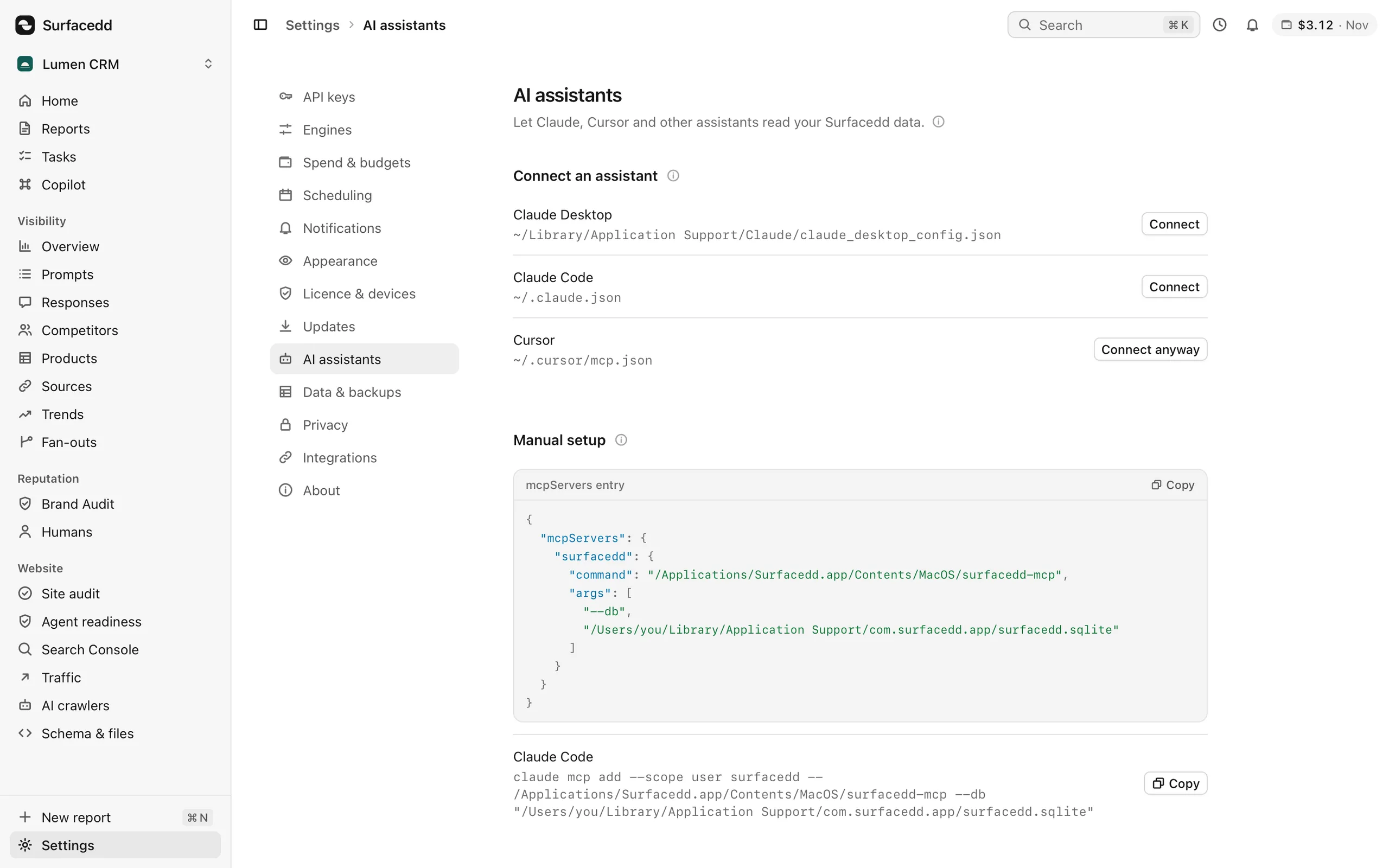
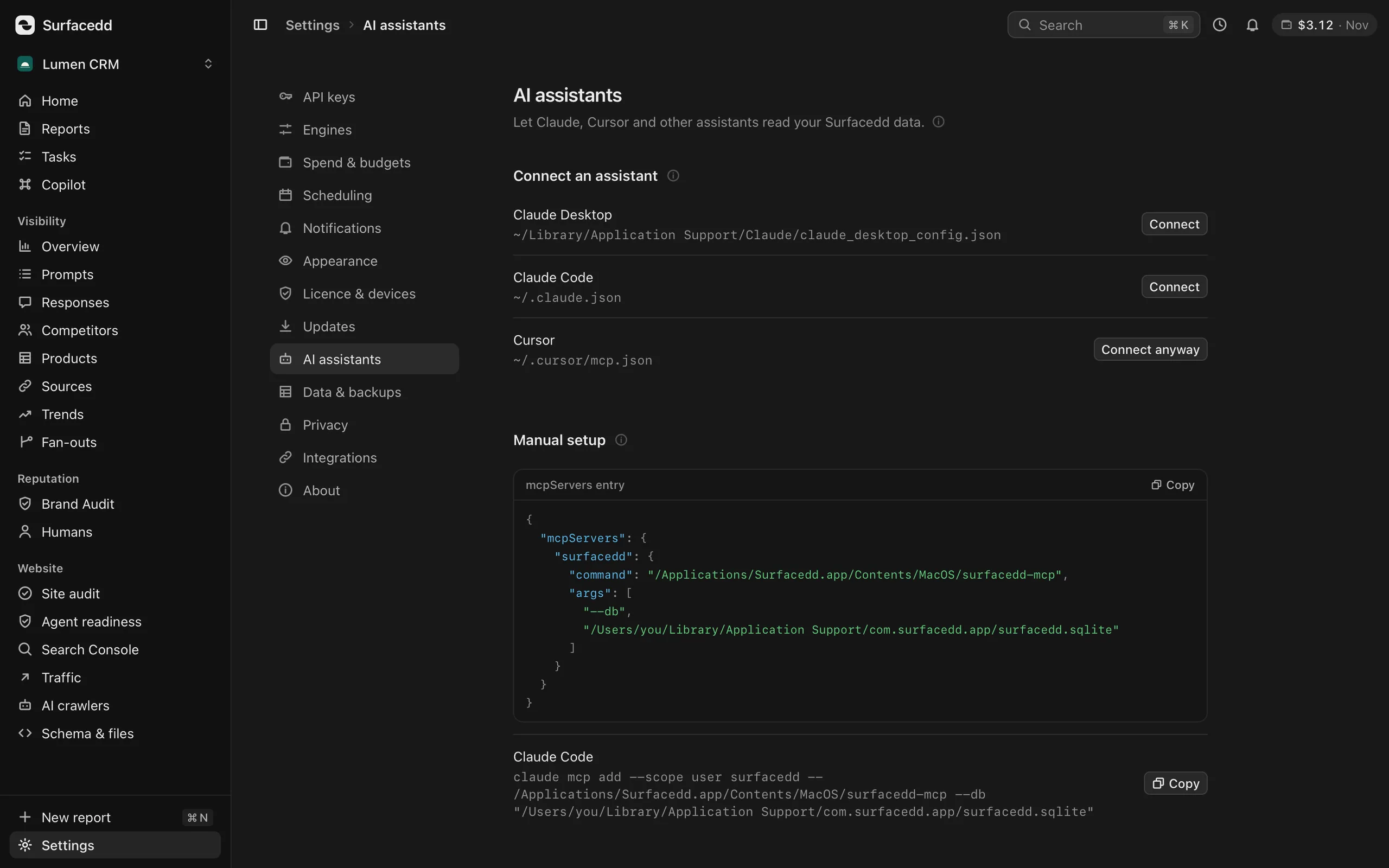
- Open Settings › AI assistants.
- Under Connect an assistant, find Claude Desktop, Claude Code or Cursor. Each row shows the exact config file path on this computer.
- Press Connect (or Connect anyway if the client isn't detected yet), read the confirmation, and confirm.
- Restart the assistant. Surfacedd's tools appear in its tool list.
Surfacedd adds one surfacedd entry under mcpServers, leaves every other server untouched, and saves the previous file next to it as <file>.surfacedd-backup. The row then shows Connected.
Config file paths per client
These are the files Surfacedd writes to. They come straight from the app's install code.
| Client | macOS | Windows |
|---|---|---|
| Claude Desktop | ~/Library/Application Support/Claude/claude_desktop_config.json | %APPDATA%\Claude\claude_desktop_config.json |
| Claude Code | ~/.claude.json | %USERPROFILE%\.claude.json |
| Cursor | ~/.cursor/mcp.json | %USERPROFILE%\.cursor\mcp.json |
Client walkthroughs with worked questions: Claude Desktop, Claude Code and Cursor.
Configure it manually
Manual setup in the same settings page shows a ready-to-paste entry for any MCP client that runs a local stdio server. The shape is:
{
  "mcpServers": {
    "surfacedd": {
      "command": "/Applications/Surfacedd.app/Contents/MacOS/surfacedd-mcp",
      "args": ["--db", "/Users/you/Library/Application Support/com.surfacedd.app/surfacedd.sqlite"]
    }
  }
}
Copy your own values from the app rather than this example: the command is the binary next to your installed app and --db points at your database. On the Microsoft Store build the command is simply surfacedd-mcp.exe, because the package puts it on your PATH.
For Claude Code there is also a one-line command to copy:
claude mcp add --scope user surfacedd -- <path to surfacedd-mcp> --db <path to surfacedd.sqlite>
Where the database is
If --db is missing, the server uses the SURFACEDD_DB environment variable, then the default app data folder: ~/Library/Application Support/com.surfacedd.app/surfacedd.sqlite on macOS, %APPDATA%\com.surfacedd.app\surfacedd.sqlite on Windows.
Check that it works
After restarting the assistant, ask a question it can only answer from your data, such as "Using Surfacedd, list my brands and their latest visibility." The assistant should call list_brands and answer with your brands. Then try something specific: "Which prompts did competitors win without us in the last 30 days?" calls competitor_share. If the assistant answers from general knowledge instead, the server isn't loaded: see the table below.
Remove or change the connection
To disconnect an assistant, delete the surfacedd entry from its config file, or restore the .surfacedd-backup copy Surfacedd saved next to it, then restart the assistant. If you move the app or your database, press Connect again: the entry is rewritten with the new paths.
Troubleshooting
| What you see | Cause | Fix |
|---|---|---|
| Tools reply "Surfacedd isn't activated on this computer" | No licence token on this computer (never activated, deactivated, or a copied data folder) | Activate in Settings › Licence & devices; the next question works without restarting the assistant |
| "The Surfacedd MCP server isn't next to the app in this build" | A development build without the sidecar | Install a release build from download |
| "… isn't valid JSON (…); fix or remove it, then try again" | The client's config file has a syntax error | Fix the file, or move it aside and connect again |
| "… isn't a JSON object" or "mcpServers isn't a JSON object" | The config file has an unexpected shape | Correct the top level to { "mcpServers": { … } } |
| Tools don't appear after connecting | The client was still running | Quit the assistant fully and reopen it |
| "surfacedd-mcp: database not found at …; open Surfacedd once, or pass --db" | The app has never run on this account, or --db is wrong | Open Surfacedd once, or fix the path |
| "surfacedd-mcp: no database path; pass --db …" | No --db, no SURFACEDD_DB, no home folder | Add --db with the full path |
| "range must be 7d, 30d, 90d, 365d or all" | The assistant passed an unsupported period | Ask for one of those ranges, or give explicit dates |
| Answers look out of date | The assistant read before your latest run finished | Ask again after the run; the server always reads the current file |
Every tool, its arguments and what it returns are listed in the MCP tool reference.
Related docs
- MCP server feature: what you can ask and why it stays local.
- Command-line tool:
surfacedd mcpruns the same server without paths, and scripts get the same data as JSON. - SEO MCP servers compared: how Surfacedd sits next to Google's and other vendors' servers.
- All integrations: MCP clients, Cloudflare logs, Google and the AI providers in one table.
Keep reading
- ProductAsk Claude or Cursor how your brand shows up in AIA local, read-only MCP server over your own Surfacedd data. Your assistant reads the answers, competitors, sources and tasks you've already collected, and it can't spend money or see your keys.Read
- DocsEvery Surfacedd MCP tool, with its arguments and what it returnsAll tools are read-only, return compact JSON of at most 64 KB, and read the database on your computer. None starts a run, spends money or reads your keys.Read
- IntegrationsAsk Claude Desktop how your brand shows up in AI answersSurfacedd adds one entry to Claude Desktop's config file. Claude can then read your stored AI answers, share of voice, sources and tasks, and it can't start runs or spend money.Read
- GuidesAsk Claude or Cursor about your search data: SEO MCP servers comparedSix MCP servers can put your analytics, rankings and AI-visibility data inside an assistant. They differ on where they run, whether they can change anything, how they sign in and what each question costs.Read
How we research, write and correct pages: read our editorial policy.