Write pages AI is more likely to cite, with your visibility data inside Cursor
Surfacedd adds a surfacedd server to Cursor's global MCP config. Cursor's agent can then read which prompts you lose, which pages AI cites instead, and what your crawler logs show, while you edit the page.
By the Surfacedd teamUpdated 6 min readMarkdown
On this page
Short answer
To use Surfacedd in Cursor, choose Connect next to Cursor in Surfacedd's Settings › AI assistants, or add the surfacedd entry to ~/.cursor/mcp.json yourself, then restart Cursor. Cursor's agent can then call read-only tools over your local AI-visibility data, such as lost prompts, cited pages and crawler errors.
Most fixes that raise your odds of being cited by AI answers end up as code or content in a repository: a clearer comparison page, a pricing table AI can quote, a robots.txt line, a schema block. Cursor is where many teams make those edits. Connecting Surfacedd's MCP server puts the evidence for each fix in the same window as the file you are changing.
Install Surfacedd in Cursor
One click. In Surfacedd, open Settings › AI assistants and choose Connect next to Cursor. Surfacedd writes a surfacedd entry into ~/.cursor/mcp.json, Cursor's global config, so the tools are available in every project. It backs up the existing file as mcp.json.surfacedd-backup and keeps your other servers. Restart Cursor afterwards.
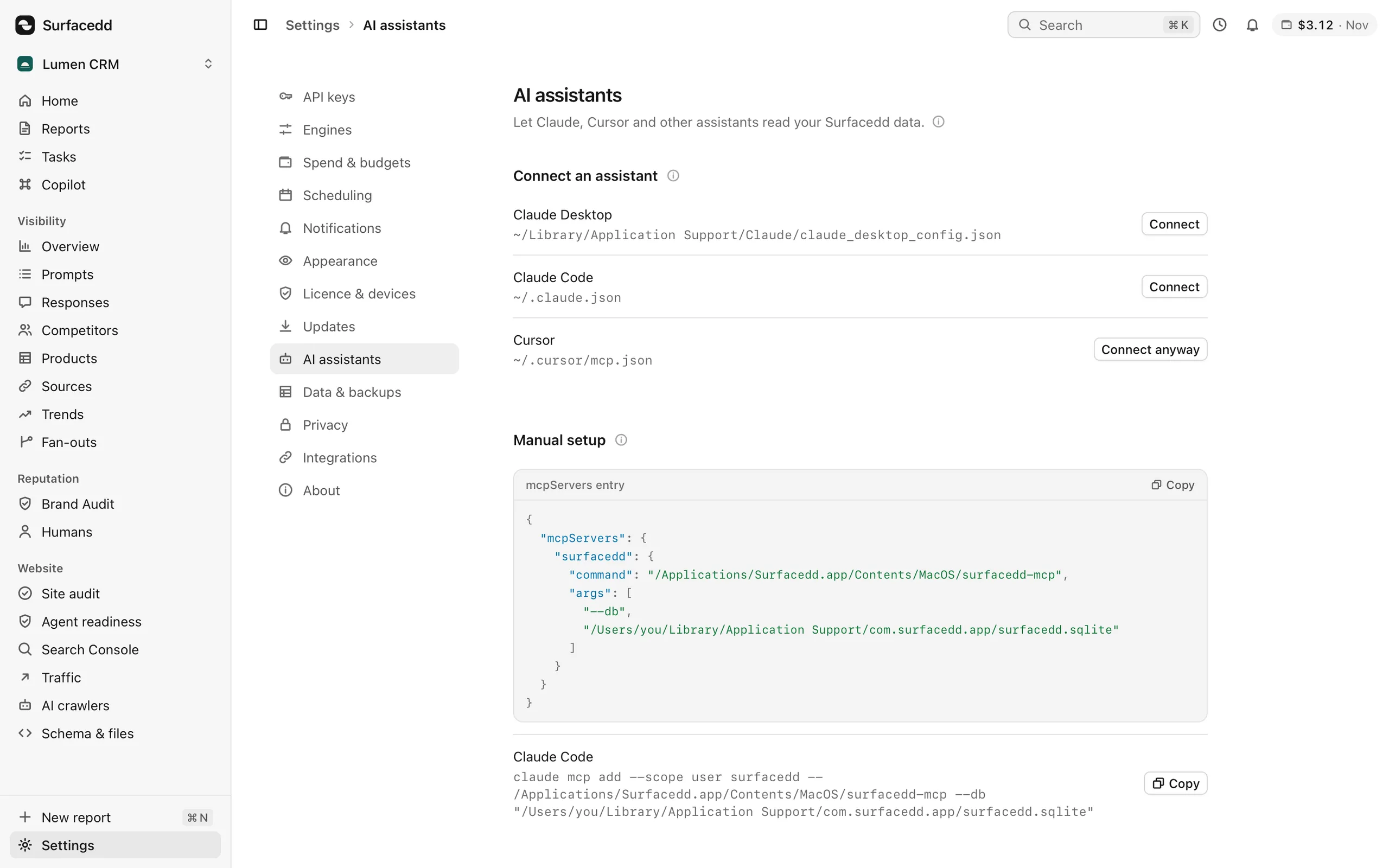
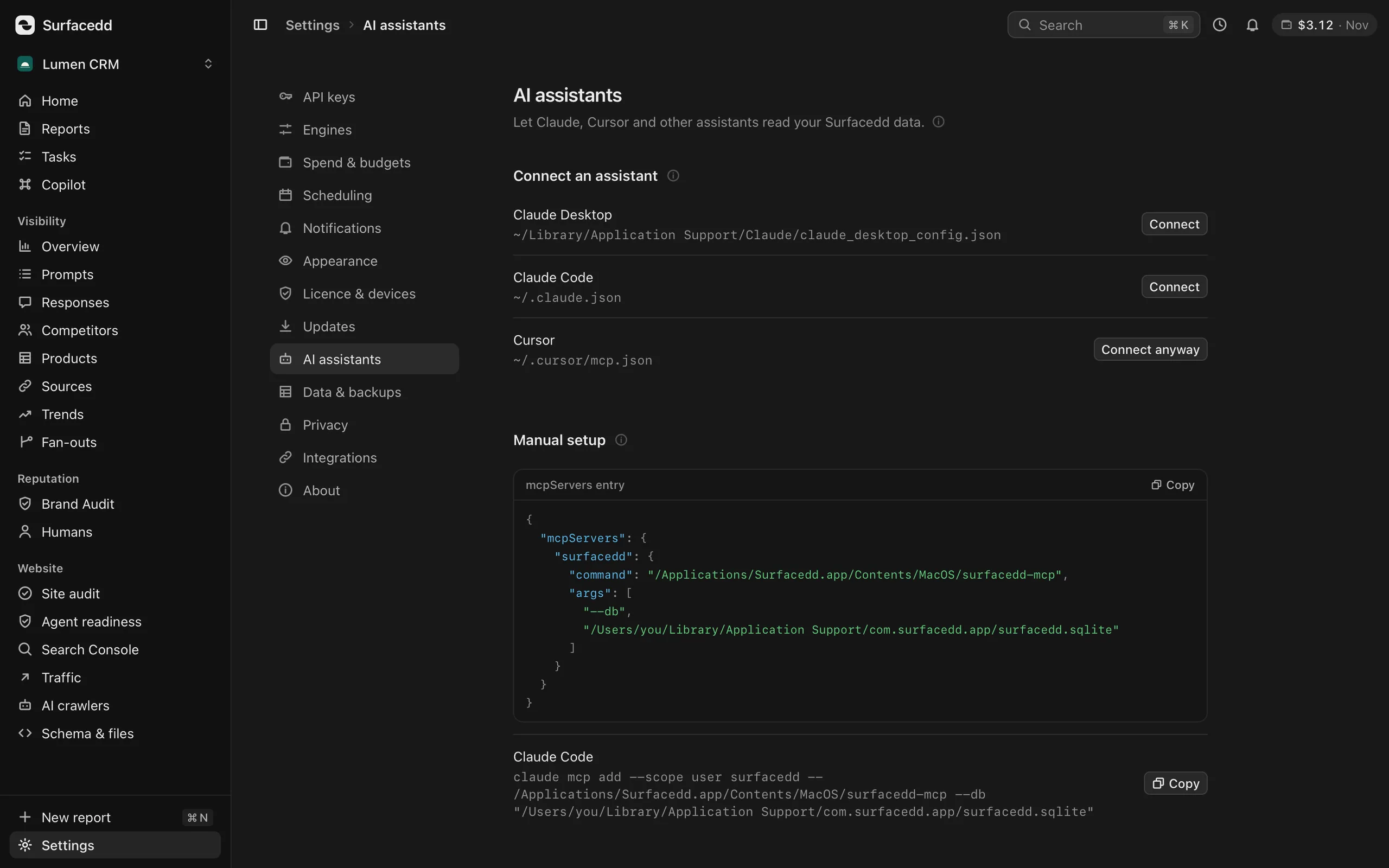
Manually, or for one project only. Cursor reads ~/.cursor/mcp.json for all projects and .cursor/mcp.json inside a project for that project only. Paste the entry from Surfacedd's Manual setup box into either file:
{
  "mcpServers": {
    "surfacedd": {
      "command": "/Applications/Surfacedd.app/Contents/MacOS/surfacedd-mcp",
      "args": ["--db", "/Users/you/Library/Application Support/com.surfacedd.app/surfacedd.sqlite"]
    }
  }
}
Use the global file if the repository is shared. A project file with your home-directory path in it will be committed for everyone and won't work on their machines.
On Windows, Surfacedd writes %USERPROFILE%\.cursor\mcp.json. On the Microsoft Store version, the command is surfacedd-mcp.exe with no path.
If you've installed the surfacedd command, a shorter entry works on any computer: "command": "surfacedd", "args": ["mcp"]. It starts the same server and finds your database itself. If Cursor can't find surfacedd, use the full path that surfacedd doctor prints.
What can Cursor's agent do with your visibility data?
Cursor's agent can call 25 read-only tools. For content and site work, five matter most:
competitor_share: the prompts a competitor wins in AI answers where you aren't named. These are your gaps.top_sources: the domains and pages that AI answers cite, with counts and trend. This shows which pages convinced the engine.get_answer: the full text of one stored answer, with the brands named and the URLs cited.fanouts: the search queries an engine ran while answering, which often reveal the wording a page should match.site_audit_issuesandcrawler_stats: what Surfacedd's site audit found, and which AI crawlers hit which pages with which status codes.
By default, Cursor asks you to approve each MCP tool call and shows its arguments. Nothing runs behind your back. The server is read-only in any case: it can't start a run, change data or spend money.
Worked examples: from lost prompt to content brief
The examples use Surfacedd's sample workspace: Lumen CRM, a fictional CRM, with fictional rivals Northwind CRM and Pipewell. The tool names are real; the results will be your own.
1. Brief a page from a lost prompt. With content/compare/northwind.md open, ask: "Using Surfacedd, find the prompts where Northwind CRM is named and Lumen CRM isn't. For the top three, get the ChatGPT and Perplexity answers and list the claims and cited URLs. Then draft an outline for this page that answers those questions with our own facts." The agent calls competitor_share, then get_answer for each prompt. The outline it writes is grounded in what the engines actually said. You still check every claim against your product.
2. Match the engine's search wording. Ask: "Which fan-out queries did the engines run for our 'CRM for agencies' prompts? Suggest H2s for agencies.md that match them." The agent calls fanouts. Engines search with their own phrasing, and a page that uses it is easier for them to find. Read more in the query fan-out guide.
3. Fix what crawlers can't read. Ask: "Which pages return 4xx or 5xx to OAI-SearchBot or PerplexityBot according to Surfacedd, and is any of them in our Next.js routes?" The agent calls crawler_stats and searches your repository for the paths. This needs logs imported into Surfacedd first; see AI crawler analytics.
4. Turn audit issues into a pull request. Ask: "List Surfacedd's site-audit issues for missing structured data or blocked AI crawlers and fix the ones in this repo." The agent calls site_audit_issues, then edits the files. You review the diff as usual.
5. Check before and after. After a change ships and a new run has finished in Surfacedd, ask: "Compare Lumen CRM's visibility on Perplexity between the last two runs." The agent calls visibility_summary. The 95% ranges show whether the difference is bigger than sampling noise.
Limits
- Read-only, local, no network. The server reads your local database and makes no network calls. Cursor sends the tool results to the model you've chosen in Cursor, under Cursor's and that provider's terms.
- No runs from the editor. New data comes from runs you start in Surfacedd, where the cost is shown first. The
estimate_run_costtool only estimates. - Results are capped at 64 KB and 200 rows per list. Ask for one engine or one brand at a time for detail.
- Install not live-tested on every Cursor release. The one-click install is built and unit-tested against the config format. If the server doesn't appear, paste the manual entry.
Troubleshooting
| Symptom | Likely cause | Fix |
|---|---|---|
| Server missing after Connect | Cursor still running with the old config | Restart Cursor, then check the server is switched on in Cursor's MCP settings |
| Server listed but marked as failed | Wrong path, or Surfacedd hasn't created its database yet | Open Surfacedd once; copy the entry again from Settings › AI assistants |
| "isn't valid JSON" when connecting | ~/.cursor/mcp.json has a syntax error | Fix the file (a trailing comma is the usual cause) and press Connect again |
| Calls fail with no message | Need the server's own error | Open Output (Cmd+Shift+U), choose MCP Logs; surfacedd-mcp writes its errors to stderr, which appears there |
| Works in one project, not another | Entry is in a project .cursor/mcp.json | Move it to ~/.cursor/mcp.json |
Sources
Fair questions
Where does Cursor keep MCP servers?
Cursor reads ~/.cursor/mcp.json in your home directory for servers available in every project, and .cursor/mcp.json inside a project for servers that apply to that codebase only. Surfacedd's one-click install writes to the global file, so a personal database path never lands in a shared repository.
Can Cursor's agent change my Surfacedd data?
No. The Surfacedd server opens the database read-only and marks every tool as read-only and non-destructive. Cursor also asks you to approve MCP tool calls by default. The agent can change files in your repository if you let it, but it can't edit, delete or create anything in Surfacedd.
Does this cost anything per question?
Not on the Surfacedd side. The MCP server makes no network calls and no paid API calls, so reading your data is free. You pay for Cursor and its model usage under your Cursor plan. Surfacedd itself is a one-time licence, and the runs that collect AI answers are billed by each provider to your own keys.
Can I use it with Cursor's background or cloud agents?
The Surfacedd server is a local program that reads a database file on your computer, so it works only where Cursor runs on that computer. An agent running on a remote machine can't reach the file. Use the local agent in the editor for Surfacedd questions.
Do I need Claude or GPT in Cursor for this to work?
No particular model is required. Any model that Cursor lets call MCP tools can use Surfacedd's tools. Models differ in how well they chain several calls, so if answers seem thin, ask more specifically, for example naming the tool: "use Surfacedd's competitor_share for Perplexity".
How do I remove it?
Delete the surfacedd entry from ~/.cursor/mcp.json, or restore mcp.json.surfacedd-backup, the copy Surfacedd saved before it changed the file. Then restart Cursor so it stops starting the server. Removing the entry doesn't touch your Surfacedd data, and you can reconnect at any time from Settings › AI assistants with one click.
How we research, write and correct pages: read our editorial policy.