See what AI recommends to buyers in each country and city
A market asks your prompts as someone in that place would. Engines differ in how much of the location they accept, and every answer records whether it was applied.
By the Surfacedd teamUpdated 4 min readMarkdown
On this page
Short answer
A Surfacedd market is a country, region or city with a language. Each report run asks its prompts once per market. Google AI Mode and AI Overviews take an exact location through DataForSEO; ChatGPT, Claude, Perplexity and Meta AI take the market as the user's location; Gemini and Grok have no location input, so their answers are labelled Not applied.
AI answers change with place: "best accountant near me" or even "best CRM" can name different brands in London and Austin. A market tells Surfacedd where to ask from, and in which language.
What a market is
A market is a country, a region or a city, plus a language. Pick one from the offline list of about 34,000 cities with 15,000 or more inhabitants, any country, or a region preset. The language defaults to the country's main language and can be changed. Cities carry coordinates and a time zone, which the engines that accept a precise location use.
Region presets add several countries at once:
| Preset | Countries |
|---|---|
| North America | US, CA |
| LATAM | MX, BR, AR, CO, CL, PE |
| Europe | GB, DE, FR, ES, IT, NL, SE, PL |
| DACH | DE, AT, CH |
| Nordics | SE, NO, DK, FI |
| Benelux | BE, NL, LU |
| Iberia | ES, PT |
| UK & Ireland | GB, IE |
| ANZ | AU, NZ |
| APAC | JP, KR, SG, IN, AU, ID |
Set up a market
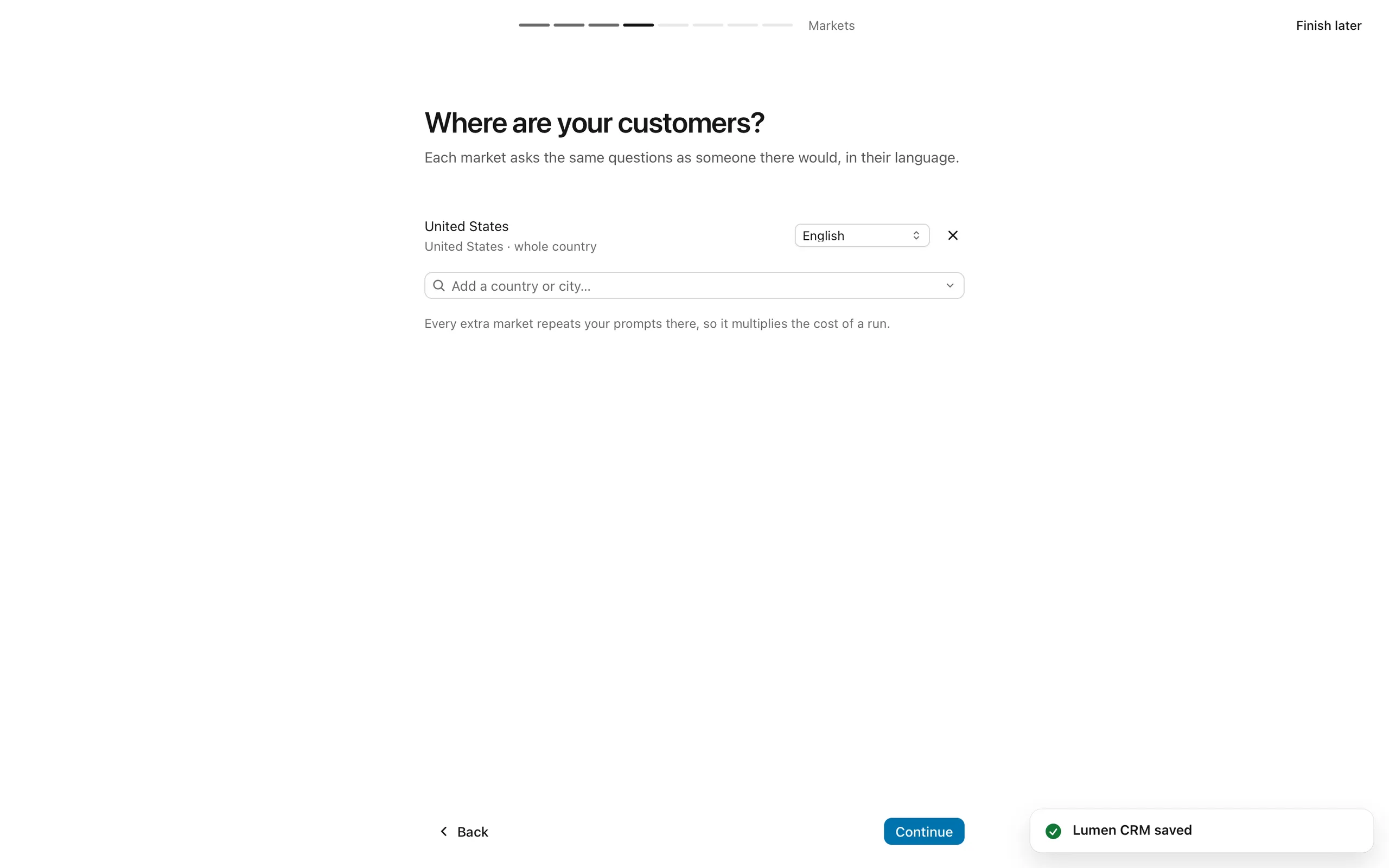
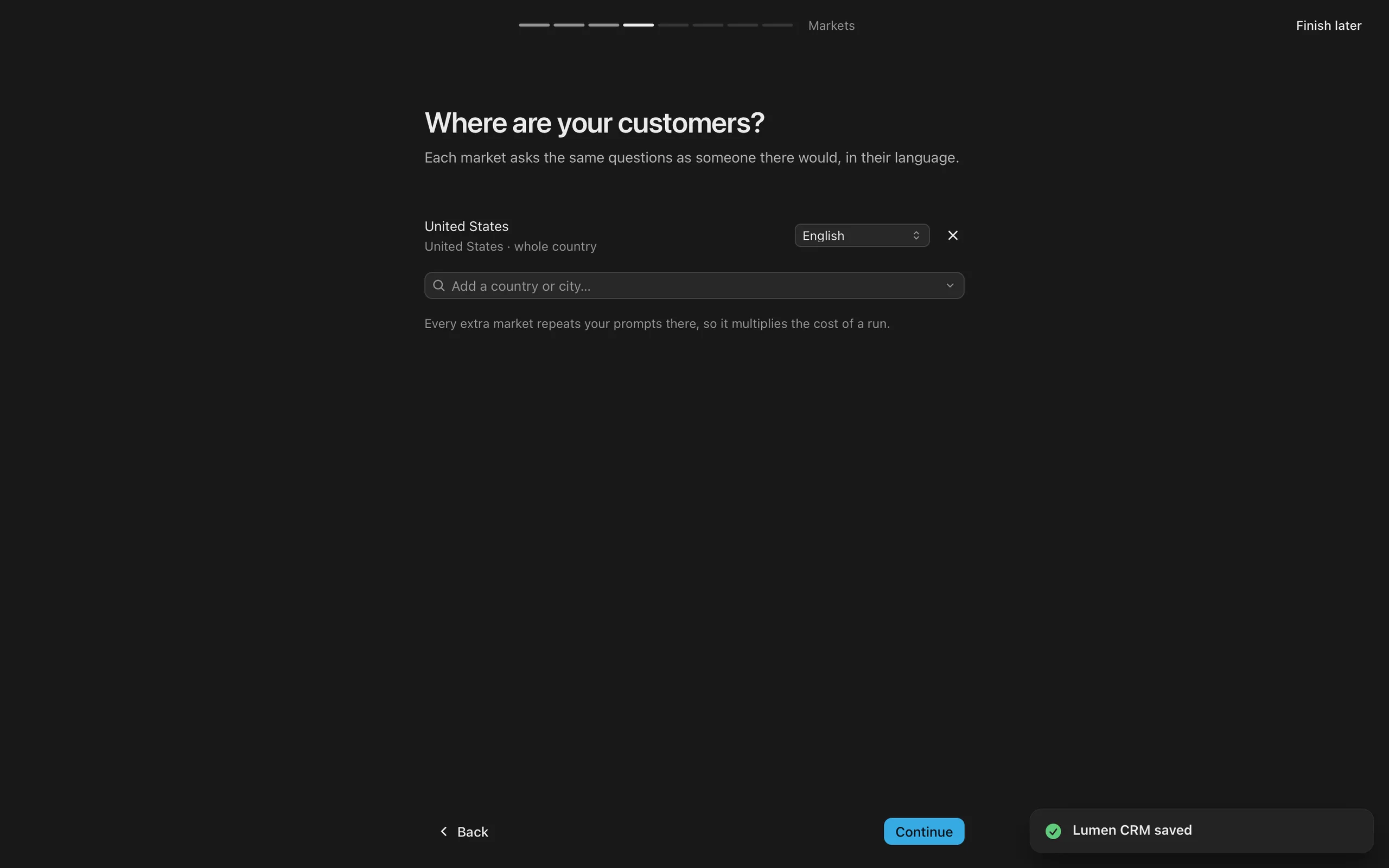
- In setup, the Where are your customers? step asks for a country or city. Later, add markets per report in the report wizard or the report's Settings tab.
- Check the language next to each market.
- Watch the cost: every extra market repeats your prompts there, so it multiplies the cost of a run. The estimate updates before you start.
How each engine applies the location
Engines accept location in different ways, so the same market can be exact on one engine and absent on another. The table below is generated from the engine facts the app uses.
| Engine | What Surfacedd asks | Search fee | Location | Fan-out searches | Est. per answer |
|---|---|---|---|---|---|
| ChatGPT | ChatGPT with web search | $10.00 per 1,000 calls | Approximate: country, region, city and time zone are passed as the user's location | Exposed | $0.0109 |
| Claude | Claude with web search | $10.00 per 1,000 calls | Approximate | Exposed | $0.0112 |
| Gemini | Gemini grounded with Google Search | $14.00 per 1,000 searches (5,000 free a month) | Not applied | Exposed | $0.0163 |
| Perplexity | Perplexity Sonar with web search | $2.50 per 1,000 calls | Country, region and city, or coordinates, as you set them per market | Exposed | $0.0051 |
| Grok | Grok with web search | $5.00 per 1,000 calls | Not applied | Saved when xAI's response includes the search queries | $0.0201 |
| Meta AI (Preview) | Meta AI (Muse) with web search | $2.50 per 1,000 searches | Approximate: country, region, city and time zone | Not exposed | $0.0129 |
| Google AI Mode | Google AI Mode results page | $0.0012 per results page (standard queue) | Exact: any location DataForSEO supports, down to coordinates | Not exposed | $0.0012 |
| AI Overviews | AI Overview on the Google results page | $0.0012 per results page (standard queue) | Exact: any location DataForSEO supports | Not exposed | $0.0012 |
Per-answer estimates use each engine's default model, typical token counts and one search, at list prices on 2026-11-23 (UTC), price table 2026-11-13.1. Reading each answer adds about $0.0015.
Three cases matter in practice:
- Exact. Google AI Mode and AI Overviews are captured through DataForSEO with the market's location, down to coordinates.
- Approximate. ChatGPT, Claude and Meta AI receive the market as the user's approximate location. Claude omits it for countries its tool doesn't support, and the answer is marked so. Perplexity takes the country, region, city or coordinates you set.
- Not applied. Gemini and Grok have no location input. Their answers are still collected, and the prompt's language still applies.
The "Not applied" label
Every stored answer records whether the location was actually applied. The answer drawer shows Location: Applied, or Not applied (engine has no location input). The PDF export's methodology appendix lists the same flag per engine and model, so a reader can see which numbers are truly local.
When you compare markets, filter to engines that apply location. Otherwise a difference between two cities may only reflect engines that ignored both.
Languages and translations
Each prompt can hold a translation per market. When a market has one, the run asks the translation; when it doesn't, it asks the prompt as written. If you fix a prompt's wording, machine translations are carried over and refreshed in the background, and a translation you edited by hand is never overwritten.
Using {location} in prompts
Write {location} (or {city}) in a prompt and each market fills in its display name: "best family lawyer in {location}" becomes "best family lawyer in Manchester" for a Manchester market. The text is frozen in the run's configuration, so changing a market's name later shows as a setup change on trend charts.
Troubleshooting
| What you see | Cause | What to do |
|---|---|---|
| "Not applied" on Gemini or Grok answers | The engine has no location input | Expected; compare markets on engines that apply location |
| "Not applied" on a Claude answer | The country isn't supported by Claude's search location | Expected for that country; the answer is still stored |
| A market doubled the estimate | Each market repeats every prompt | Track fewer prompts there, or fewer engines |
| A city can't be found | It has fewer than 15,000 inhabitants | Pick the nearest larger city or the region |
| The prompt was asked in the original language | No translation exists for that market | Add or edit the market's translation of the prompt |
| A trend marker after renaming a market | {location} text changed the prompt | Expected; the marker records the change |
Related docs
- Fan-outs: the searches engines ran, which also vary by place.
- First report: where the first market is set.
- How to rank in Google AI Mode: the engine with the most precise location.
Keep reading
- EnginesTrack your brand in every AI answer engine that mattersChatGPT, Claude, Gemini, Perplexity, Grok, Meta AI, Google AI Mode and AI Overviews each search the web differently. Here's how Surfacedd asks each one, what it can see and what one answer costs.Read
- DocsSee who AI recommends in your category, in one first reportGuided setup turns your website into a brand profile and nine buyer questions, asks the engines you have keys for, and shows the cost before it starts.Read
- DocsSee the searches AI ran before it answered, and cover themChatGPT, Claude, Gemini, Perplexity and Grok report the searches behind each answer. Surfacedd stores them, counts them across runs, and turns any of them into a tracked prompt in one click.Read
- GuidesHow to get recommended in Google AI ModeAI Mode answers from a fan of related searches, not from your target keyword alone. Pages that answer the sub-questions get cited; pages that only rank for the head term often don't.Read
How we research, write and correct pages: read our editorial policy.