Start generative engine optimization with the budget you have
You can start generative engine optimization for nothing and add paid tools only when a free check runs out. This guide sorts GEO tools by what they cost, from free checkers and open-source trackers to enterprise platforms, with every competitor fact taken from the vendor's own pages.
By the Surfacedd teamUpdated 10 min readMarkdown
On this page
Short answer
Generative engine optimization tools range from free to enterprise contracts. Free crawler, schema and llms.txt checkers plus open-source trackers cover the basics. Hosted trackers such as Otterly, Rankscale and Peec AI start from tens of dollars a month. Surfacedd is a one-time licence on your own API keys. Profound is enterprise-only.
Who wrote this, and how we checked
Surfacedd wrote this guide, and Surfacedd is one of the paid tools in it, along with several free tools we publish. Tools are listed alphabetically inside each budget band, with no scores or ranks, and with a "best for" line each. Every fact about another product comes from that product's own website or GitHub repository, read on 19 November 2026 and listed in the sources.
What a GEO tool has to do
Generative engine optimization (GEO) is the practice of getting generative AI answers, from ChatGPT, Gemini, Perplexity, Claude or Google's AI Mode and AI Overviews, to mention and cite you. A GEO toolkit has to cover three loops:
- Access. Can AI crawlers and user-triggered fetchers reach your pages, and is the content in the HTML they read?
- Measurement. Which of your buyers' questions name you, which name a competitor, and which pages did the engine cite?
- Change and re-check. After you fix a page or earn a mention, did the answers move, or was it noise?
The first loop is almost free. The second and third are where paid tools earn their money, because they repeat the same questions on a schedule and keep the history. Most people should spend their first week in the free band below.
Free: checks you can run today
These cost nothing per use. Each one answers a single question well.
Surfacedd's free tools (we make these; they run in your browser or on our server at no charge per use):
| Tool | What it checks or makes |
|---|---|
| AI crawler robots.txt checker | Which AI search, training and user-fetch crawlers your robots.txt allows |
| AI bot log analyzer | Which AI crawlers visit, from a server access log, entirely in your browser |
| llms.txt generator and validator | Writes an llms.txt in the llmstxt.org format, or checks one line by line |
| Organization and software schema generator | Organization and SoftwareApplication JSON-LD for your site |
| Person schema generator | ProfilePage and Person JSON-LD with sameAs links, for your own profile |
| GA4 AI traffic regex generator | The regex and channel rule that groups ChatGPT, Perplexity, Claude and other AI referrals in GA4 |
| AI visibility cost calculator | The monthly API cost of tracking your prompts on each engine |
All of them live on our free tools page. One honest note on llms.txt: it is informational. We know of no public evidence that it raises citations, and our own generator labels it that way, so treat it as a low-priority tidy-up rather than a GEO lever.
Free plans and accounts from other vendors (each is a limited version of a paid product):
- AthenaHQ Free gives $25 of credit (300 credits, one AI response each) on five engines, with unlimited users.
- LLMrefs offers a free account with no card.
- Rank Prompt Free includes 10 credits, which is one report on ChatGPT, Claude and Google AI Mode, with no card.
Several paid tools also offer trials: Otterly (no card), Peec AI, Scrunch (7 days) and Greta.sh (7 days, no payment details).
Manual checks that need no tool: ask ChatGPT, Perplexity and Gemini five of your buyers' real questions, note who gets named and which links appear, and repeat in a week. You will see straight away why repetition matters: some answers change with nothing else changed.
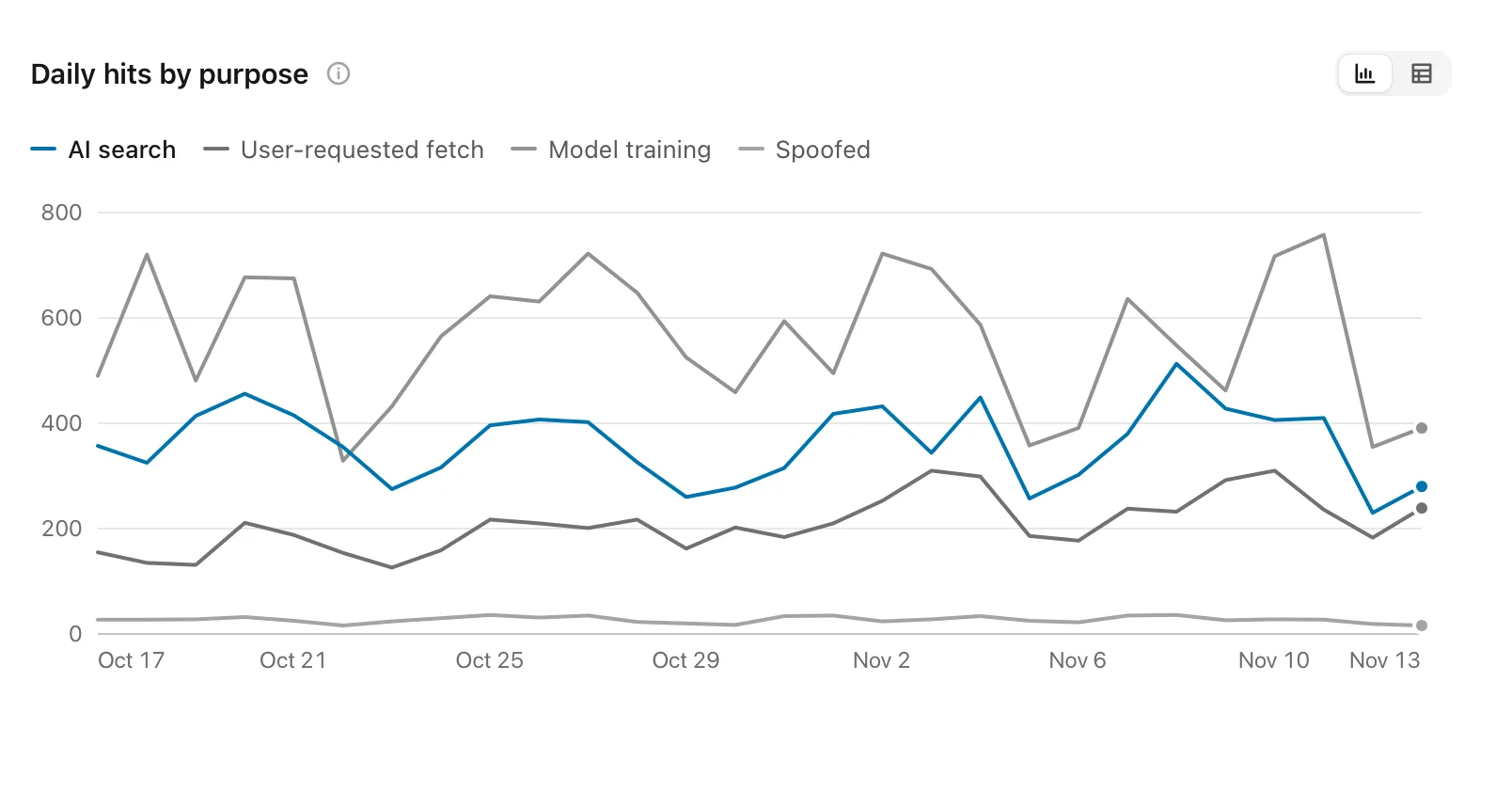
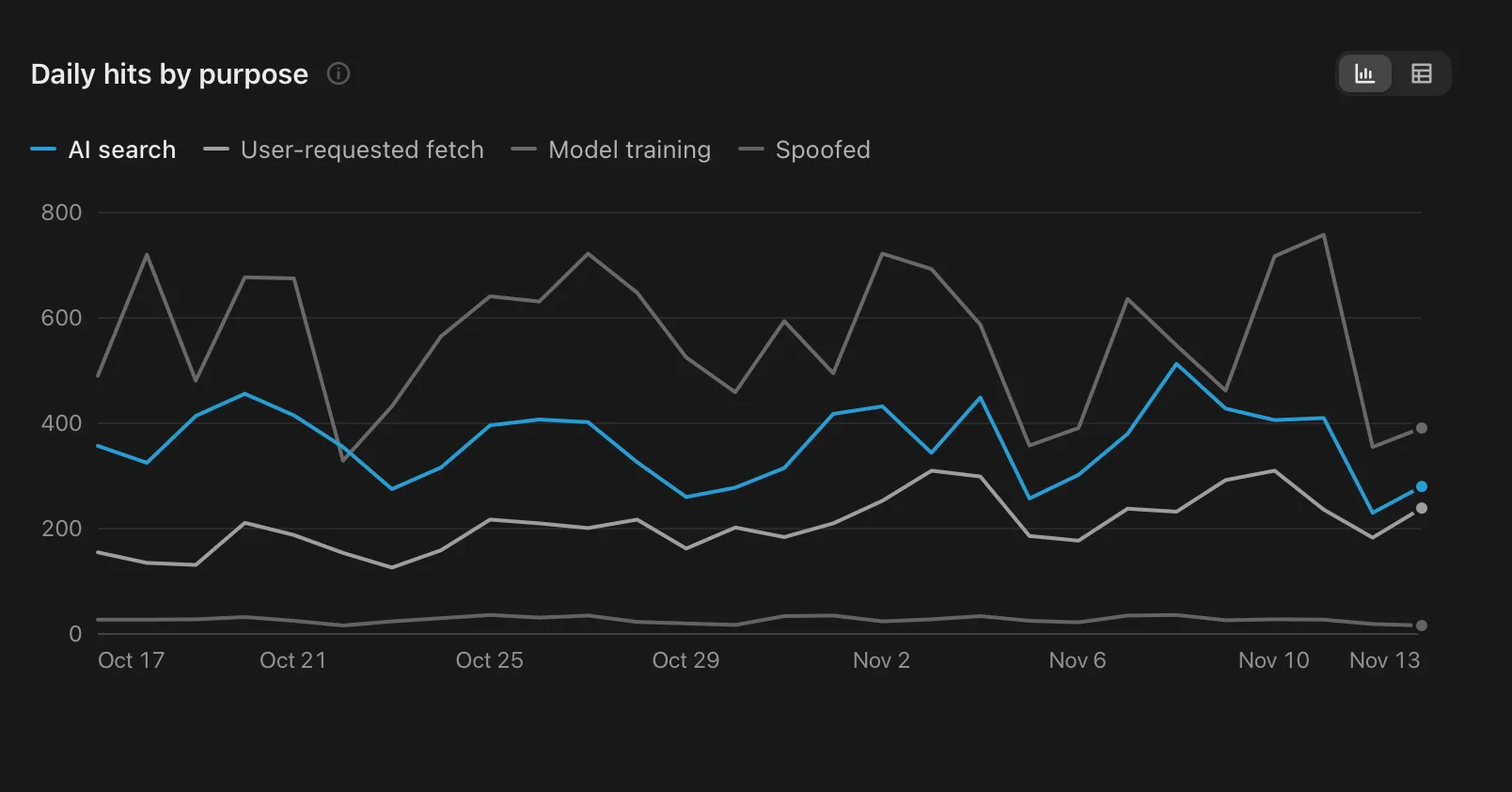
Free software you run yourself: open-source GEO trackers
Open-source trackers are free to use and change, and run on your own API keys or scraping accounts. In exchange you install, schedule, update and back them up yourself. Alphabetically:
- Elmo (MIT, TypeScript). Best for: teams with Docker experience who want a full self-hosted platform. Runs every prompt several times a day per engine, scrapes consumer apps through providers and uses APIs for others. Docker Compose with PostgreSQL; a hosted cloud is offered from $29 a month.
- GEO/AEO Tracker (MIT, TypeScript). Best for: a quick self-hosted dashboard on four engines. Collects ChatGPT, Perplexity, Gemini and Google AI Mode answers through Bright Data's scraper API; results stay in your browser by default.
- Hearsay (MIT, JavaScript). Best for: developers who want statistics and receipts. Reports rates with Wilson 95% intervals across several paraphrases; runs as a local dashboard or an agent skill in Claude Code or Codex.
- Limelit Open (Apache-2.0, Go). Best for: the simplest install. One binary and one SQLite file on macOS or Linux, with a built-in scheduler, dashboard and MCP server.
- OneGlanse (MIT, TypeScript). Best for: measuring the real consumer websites with your own logins. Runs prompts in ChatGPT, Perplexity, Gemini, Claude and AI Overview through a hardened browser.
Our review of open-source AI visibility trackers goes deeper on setup effort and what you maintain yourself.
Low-cost plans and one-time licences
The cheapest paid ways to track your own prompts, alphabetically:
- Ahrefs Brand Radar, custom prompts. Best for: Ahrefs users adding a few tracked prompts. From $50/mo for 2,500 checks (one prompt on one platform per check). Ahrefs Lite at $129/mo already includes 5 tracked prompts.
- Greta.sh AI Visibility Tracker. Best for: a Mac user who wants local data and a trial. $29 one time for the first 100 customers, then $79, plus your own API fees; five engines, no Google AI surfaces.
- LLMrefs. Best for: keyword-led SEO teams. $79/month for 500 prompts generated from your keywords on ten engines, refreshed weekly.
- Otterly.AI Lite. Best for: a handful of prompts tracked daily. €29/mo for 16 prompts on four engines.
- Peec AI Starter. Best for: daily consumer-interface data on 50 prompts. $95/mo with three models.
- Rank Prompt Starter. Best for: a solo user who also wants content generation. $49/mo billed monthly for 150 credits.
- Rankscale. Best for: many engines on a small budget. Essentials from $17/mo billed yearly; Pro $99/mo for up to 4,800 answers.
- Semrush AI Visibility Toolkit. Best for: Semrush users. $99/mo per domain for 25 daily prompts, no free trial.
- Surfacedd. Best for: people who want to pay once, keep data local and see each run's cost first. Launch price $29, $79 after 23:59 UTC on January 30, 2027.$79 once. Provider fees on your own keys come on top, about $3.75 a month for 25 prompts weekly on four engines. Covers eight surfaces, including Google AI Mode and AI Overviews, with 95% ranges.
At this level, the real choice is between a hosted tool with a fixed prompt allowance and a local tool where cost follows usage. If you run few prompts, both are cheap. If you want daily runs on many prompts, price both: on your own keys, 50 prompts daily on four engines comes to about $52.38 a month, which can exceed some hosted entry plans.
Mid-range: hosted platforms with more volume
- AthenaHQ Starter. Best for: teams that want content optimisation and publishing with tracking. $295/month for 3,600 responses on 11 models.
- Otterly.AI Standard and Premium. Best for: agencies with many brands and countries. €189/mo for 120 prompts, €489/mo for 403.
- Peec AI Pro and Advanced. Best for: marketing teams needing more prompts and countries. $245/mo for 150 prompts, $495/mo for 350 with Looker Studio.
- Rank Prompt Pro and Agency. Best for: teams and agencies wanting seats and client reporting. $89/mo and $149/mo billed monthly.
- Rankscale Pro+ and Growth. Best for: API access and agency features. $229/mo and $385/mo.
- Scrunch Core. Best for: brands that want page optimisation and agent traffic analysis. $250/mo for 15,000 responses on eight engines.
- Semrush One. Best for: teams wanting SEO and AI visibility in one subscription. From $199/mo billed monthly with 50 prompts.
Enterprise: custom contracts
- Ahrefs Brand Radar AI Visibility Index. Best for: market-wide benchmarking without setup. $199/mo for an index of 578 million+ prompts; Enterprise plans from 83 tracked prompts.
- Peec AI, Otterly.AI and Scrunch Enterprise. Custom pricing with SSO and, depending on the vendor, API access and more models.
- Profound. Best for: large brands with procurement and many stakeholders. Enterprise only, custom quote; self-serve plans were retired in September 2026. Captures answers from the consumer apps, adds prompt-volume data and AI crawler analytics, and runs content agents.
Signs you've outgrown free tools
Free checks answer "is something broken?". They don't answer "is it getting better?". These five signs mean it's time for a tracker:
- You're re-asking the same questions by hand every week and pasting answers into a spreadsheet. A tracker does this on a schedule and keeps every answer.
- You can't tell a real change from a lucky run. One manual check per question can't show noise. A tracker that repeats each prompt and shows a range, or at least counts samples, can.
- You need the sources, not just the names. Knowing a competitor was recommended is half the story; the pages the engine cited are where you can act. Trackers record the cited URLs for every answer.
- You track more than one market or language. Answers differ by country. Most trackers, Surfacedd included, let you set a location per market; Greta.sh, by its own description, measures from where you are.
- Someone else needs the numbers. A manager or client wants a monthly report. Hosted tools give them a login; local tools such as Surfacedd export CSV and PDF.
If none of these apply yet, stay in the free band a little longer. The answers you collect by hand will make your first paid setup better, because you'll know which questions matter.
How to build a GEO toolkit step by step
- Week 1, free. Run the robots.txt check and a log check. Fix any AI crawler you block by mistake. Ask five buyer questions by hand on three engines and write down who wins.
- Weeks 2 to 5, one tracker. Pick one tracker from the band that fits your budget, load 15 to 25 real buyer questions, and run them weekly. Don't switch tools in this period; each tool counts differently.
- Week 6, act on evidence. Take the three questions you lose most often. Look at which pages the engines cite instead, and decide whether to improve your own page, earn a mention on a cited page, or fix a wrong fact.
- Weeks 7 to 12, re-check. Keep the same prompts. Judge change over about four weekly runs, not one, and treat small moves inside the range as no change.
- Only then add tools for the job you're missing: content help, crawler analytics at scale, or SEO data.
The GEO strategy guide turns this into a 90-day plan with costs.
What Surfacedd doesn't do
Sources
- Ahrefs Brand Radar
- Ahrefs pricing
- AthenaHQ plans
- AI Visibility Tracker (Greta.sh) llms.txt
- LLMrefs home and pricing
- OtterlyAI pricing
- OtterlyAI llms.txt
- Peec AI pricing
- Profound pricing
- Profound AI instructions
- Rank Prompt pricing
- Rankscale pricing
- Scrunch pricing
- Semrush AI Visibility pricing
- Semrush SEO + AI Search pricing
- Elmo on GitHub
- GEO/AEO Tracker on GitHub
- Hearsay on GitHub
- Limelit Open on GitHub
- OneGlanse on GitHub
Fair questions
What are generative engine optimization tools?
They are tools that help you get mentioned and cited in AI-generated answers. Free tools check single things, such as whether your robots.txt allows AI crawlers or whether your structured data is valid. Paid and open-source trackers ask AI engines your buyers' questions on a schedule and record who gets named and which pages are cited, so you can see whether your changes moved the answers.
Can I do GEO for free?
You can do a useful first round for free: check crawler access, fix structured data, and ask your buyers' questions by hand. Open-source trackers such as Hearsay, Limelit Open and Elmo can automate tracking at no software cost, though you pay the AI providers and run the software yourself. Free plans from AthenaHQ, LLMrefs and Rank Prompt give a limited taste of hosted tracking.
What is the cheapest paid GEO tracker?
By headline price on 19 November 2026, the lowest entry points were Rankscale Essentials (billed yearly), Otterly Lite and the one-time licences of Greta.sh and Surfacedd. The cheapest for you depends on volume: how many prompts, on how many engines, how often. Plans that look cheap can include very few prompts, and pay-per-use costs grow with daily tracking.
Are open-source GEO tools good enough?
For developers, often yes. Several report sound statistics and keep raw answers you can audit. The cost is your time: installing, scheduling, updating when engines change their APIs or interfaces, and backing up the data. If nobody on your team wants that job, a hosted tool or a desktop app with updates included will cost less in practice.
Is GEO the same as AEO?
Mostly. Both describe getting AI answer engines to name and cite you; GEO comes from research on generative search, AEO from "answer engines". The same tools serve both. Our AEO tools guide sorts the same market by job (measure, audit, fix, write) instead of by budget.
Do I need llms.txt for GEO?
It's optional. llms.txt is a proposed file that lists your key pages for language models. We know of no public evidence that it raises citations, so treat it as optional. It's quick to create with a generator, so some sites add it as a tidy-up. Spend your time first on crawler access, server-rendered content and the pages AI engines cite.
How we research, write and correct pages: read our editorial policy.