On this page
Short answer
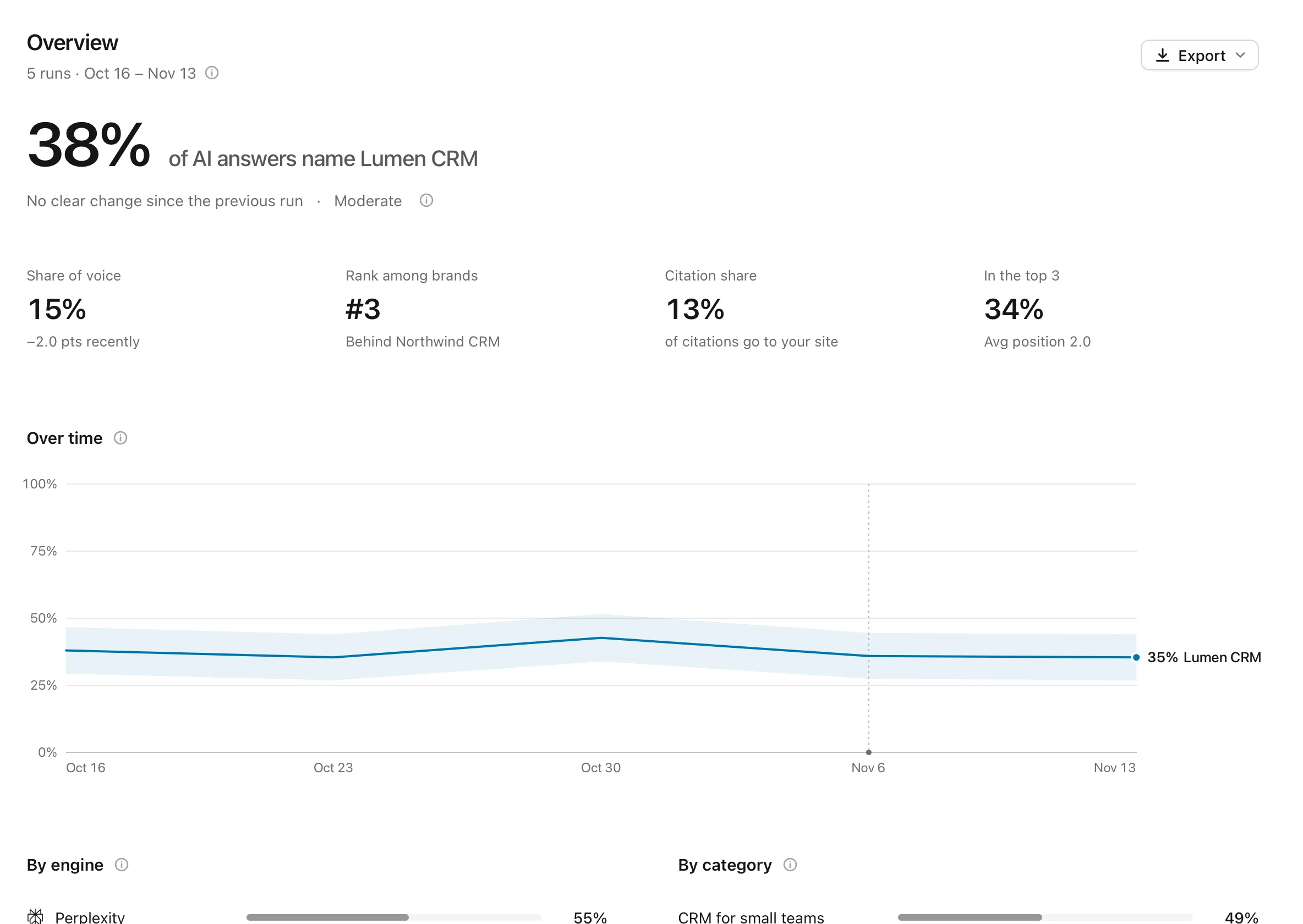
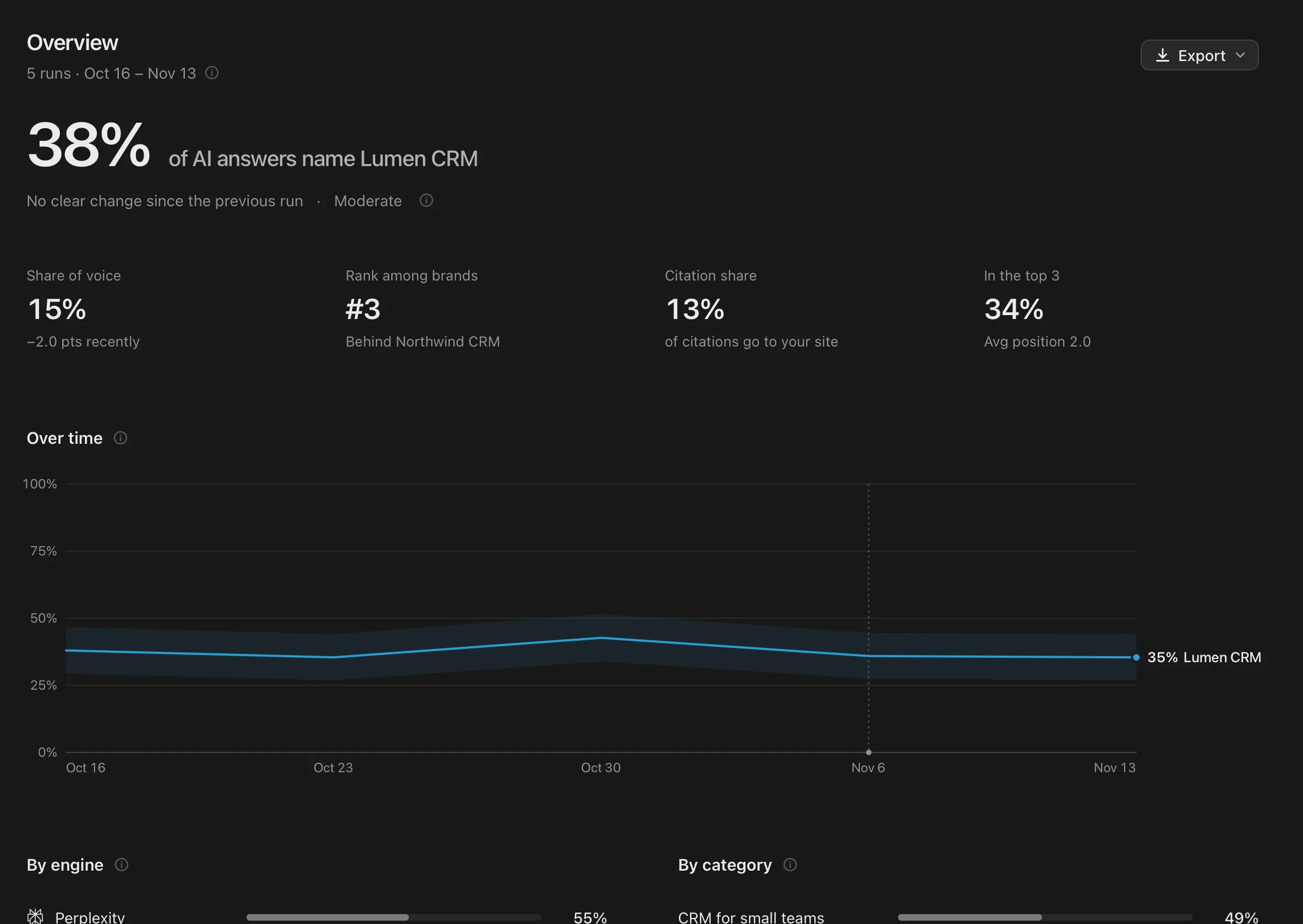
AI visibility tracking means asking AI engines your buyers' questions on a schedule and measuring how often each one names your brand, where it ranks you and which pages it cites. Surfacedd records the full answer, its sources, searches, model, location and cost for every answer, and shows each rate with a 95% range.
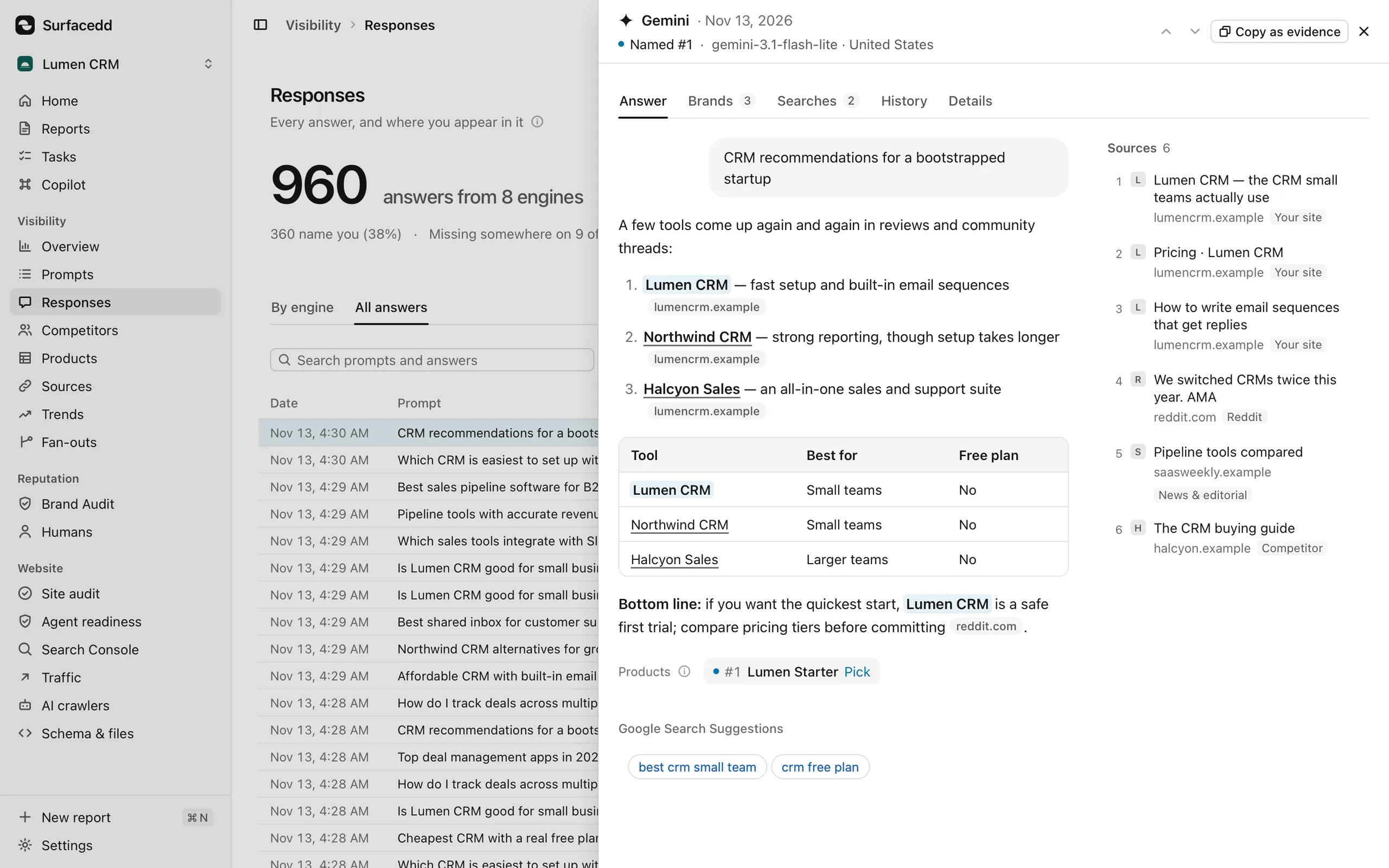
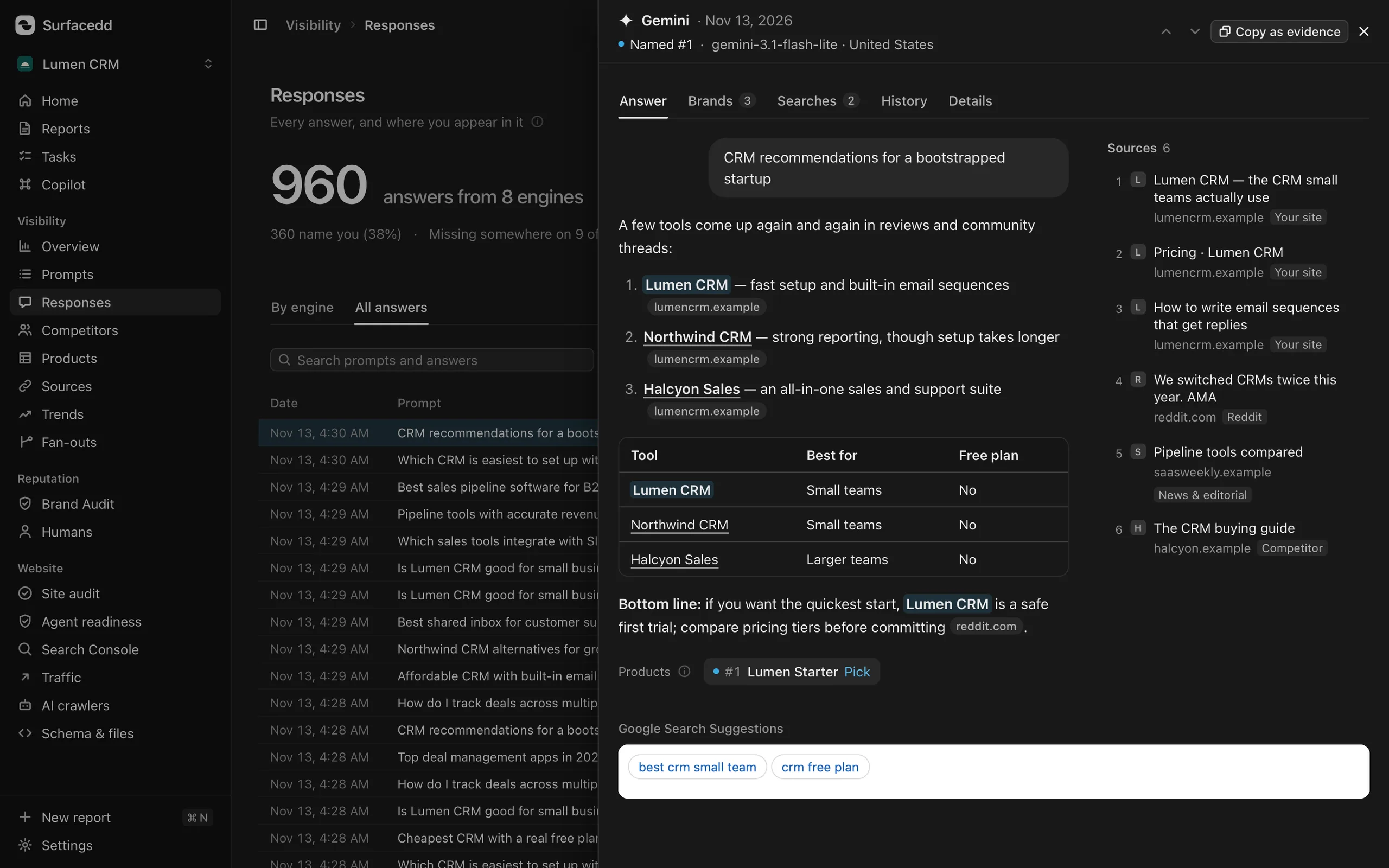
What should an AI visibility tracker record for every answer?
A tracker is only as good as what it keeps. A score of 38% means nothing if you can't open the 100 answers behind it and see which ones named you, what they said and which pages they read. Before you compare tools, check that each one stores these seven things for every single answer, not just a daily total:
| # | Recorded per answer | Why you need it | In Surfacedd |
|---|---|---|---|
| 1 | The full answer text | To read what was said, not just whether you were named | Stored as written, with your brand highlighted and competitors underlined |
| 2 | Citations, in the engine's order | To see which pages convinced the engine | Ordered as the engine placed them |
| 3 | Pages read but not cited | To find pages the engine looked at and passed over | Kept where the API reports them (ChatGPT, Claude, Perplexity, Grok, Meta AI) |
| 4 | Fan-out searches | To see what the engine searched for before it answered | Kept where the API exposes them |
| 5 | The model that answered | Because a model change can move your score more than any fix | The model string from the response |
| 6 | Whether the location was applied | A "London" answer that ignored London is a different data point | A per-answer flag, shown in the answer drawer |
| 7 | What it cost | To know what a trend line costs to maintain | Per-answer cost from the provider's usage report |
If a tool shows you a dashboard but not the answers, you can't check its numbers and you can't act on them. Surfacedd's rule is "evidence or nothing": every number links to the answers behind it.
What does an AI visibility tracker measure?
The numbers come from those stored answers. These are the seven Surfacedd puts first, each defined the same way on every engine. The full definitions are on the methodology page.
| ID | Metric | How it's counted | Shown as |
|---|---|---|---|
| M1 | Visibility | Answers that name your brand, by name, alias or a link to your own domain inside the answer text, divided by all answers | "44% · 44 of 100 answers", with a 95% range |
| M2 | Share of voice | Answers naming you, divided by answers naming you or any tracked competitor | %, with change in points |
| M3 | Best rank and average position | Your order of first appearance among the brands an answer names | "#2", "avg 2.4" |
| M4 | Top-3 rate | Answers that name you in the first three brands, divided by all answers | % |
| M5 | Recommendation rate | Answers that present you as a pick, divided by all answers | % |
| M6 | Citation rate | Answers that cite at least one page from your site | % |
| M7 | Citation share | Citations pointing at your site, divided by all citations | "12% of 310 citations" |
One rule matters more than it looks. A link to your site that appears only in the engine's source list doesn't count as naming you. It counts toward citations (M6, M7) instead. Visibility and citations answer different questions: "did the engine say our name?" and "did it use our pages?"
Which engines, and how are answers collected?
Surfacedd asks eight answer surfaces. Six are reached through the provider's official API with web search turned on, on your own key. Google AI Mode and AI Overviews are captured from the Google results page through DataForSEO, on your DataForSEO account, with your market's exact location.
| Engine | What Surfacedd asks | Search fee | Location | Fan-out searches | Est. per answer |
|---|---|---|---|---|---|
| ChatGPT | ChatGPT with web search | $10.00 per 1,000 calls | Approximate: country, region, city and time zone are passed as the user's location | Exposed | $0.0109 |
| Claude | Claude with web search | $10.00 per 1,000 calls | Approximate | Exposed | $0.0112 |
| Gemini | Gemini grounded with Google Search | $14.00 per 1,000 searches (5,000 free a month) | Not applied | Exposed | $0.0163 |
| Perplexity | Perplexity Sonar with web search | $2.50 per 1,000 calls | Country, region and city, or coordinates, as you set them per market | Exposed | $0.0051 |
| Grok | Grok with web search | $5.00 per 1,000 calls | Not applied | Saved when xAI's response includes the search queries | $0.0201 |
| Meta AI (Preview) | Meta AI (Muse) with web search | $2.50 per 1,000 searches | Approximate: country, region, city and time zone | Not exposed | $0.0129 |
| Google AI Mode | Google AI Mode results page | $0.0012 per results page (standard queue) | Exact: any location DataForSEO supports, down to coordinates | Not exposed | $0.0012 |
| AI Overviews | AI Overview on the Google results page | $0.0012 per results page (standard queue) | Exact: any location DataForSEO supports | Not exposed | $0.0012 |
Per-answer estimates use each engine's default model, typical token counts and one search, at list prices on 2026-11-23 (UTC), price table 2026-11-13.1. Reading each answer adds about $0.0015.
Two engines need a decision from you. Gemini stays off until you accept a notice about Google's terms for grounded answers. Meta AI is marked Preview and is opt-in. Each engine has its own page under engines we track.
API answers can differ from what a signed-in person sees in the ChatGPT or Claude app, because the app adds memory, personalisation and its own settings. Surfacedd says this in the app and records how each answer was collected, so modes never mix on one trend line without a marker.
Why one check is not a measurement
Ask ChatGPT the same question twice and you can get two different lists. That is why screenshots of single answers make poor evidence, and why Surfacedd measures like a poll:
- Samples. Each prompt can be asked up to 10 times per engine and market in a run. Key prompts can use 5 samples while the rest use 1, and samples of the same prompt are spaced at least 60 seconds apart.
- Ranges. With 3 or more samples, a single prompt gets a Wilson 95% range ("3 of 5 samples"). Totals get a cluster-bootstrap 95% range over prompts, so a prompt asked five times doesn't count as five independent votes.
- Significance. A change gets an arrow only when the range of the paired difference excludes zero. Otherwise it reads "No clear change".
- Like for like. Run-to-run changes are computed only over prompts, engines and markets present in both runs, and a marker appears when the setup changed.
- Prompt-set health. The app warns when more than 30% of your prompts contain your brand name, when you have fewer than 10 unbranded prompts, or when one category is over 60% of the set. Branded prompts inflate visibility.
Below 10 prompts or 20 answers, Surfacedd shows "Not enough data" rather than a number you'd be tempted to report.
What you see after a run
A run moves through five stages: queued, asking engines, reading the answers, finishing and ready. You can watch an early score form, or keep it in the background and get a notification. If one engine fails, the others carry on, and you can retry only the failed items, paying only for those.
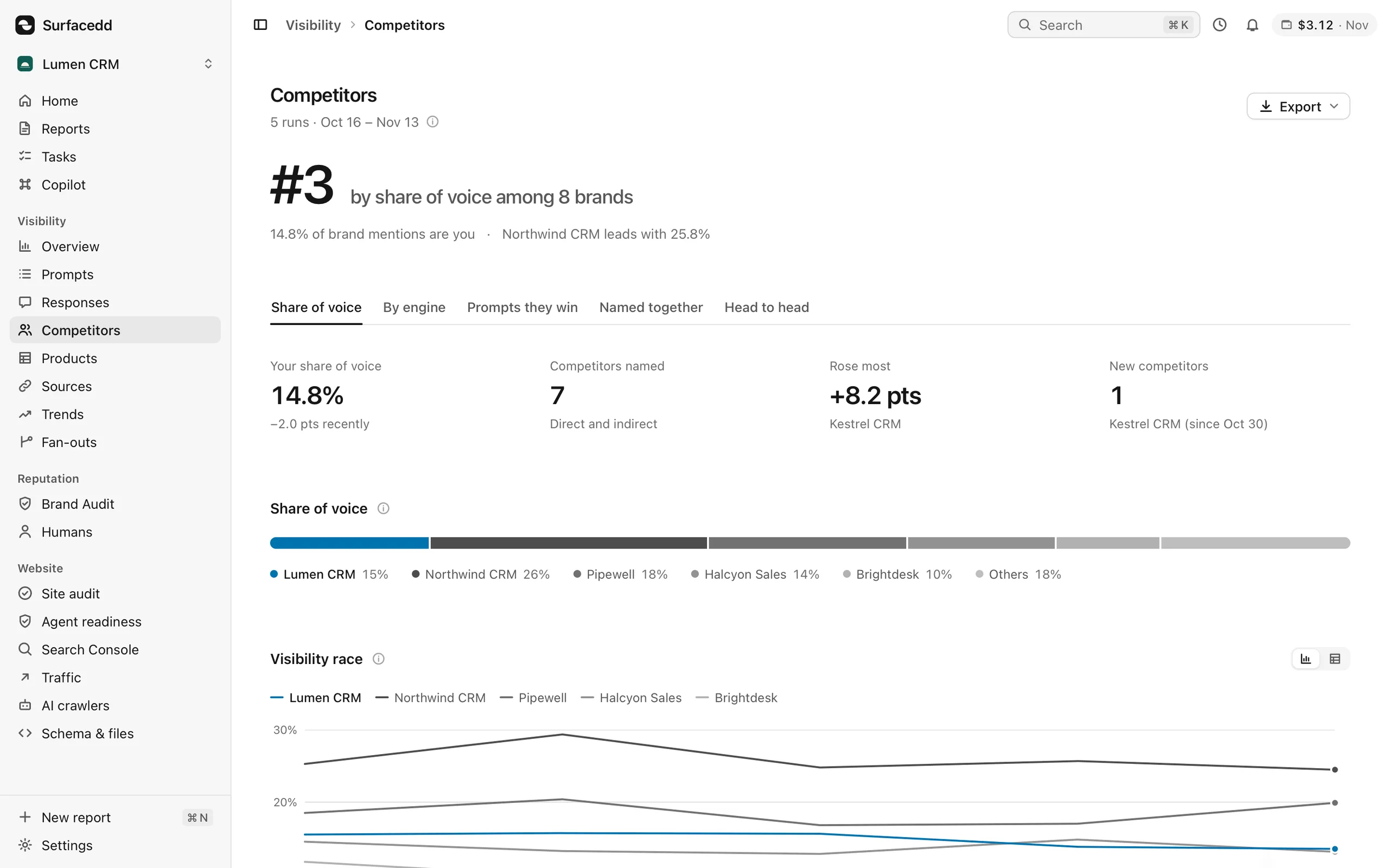
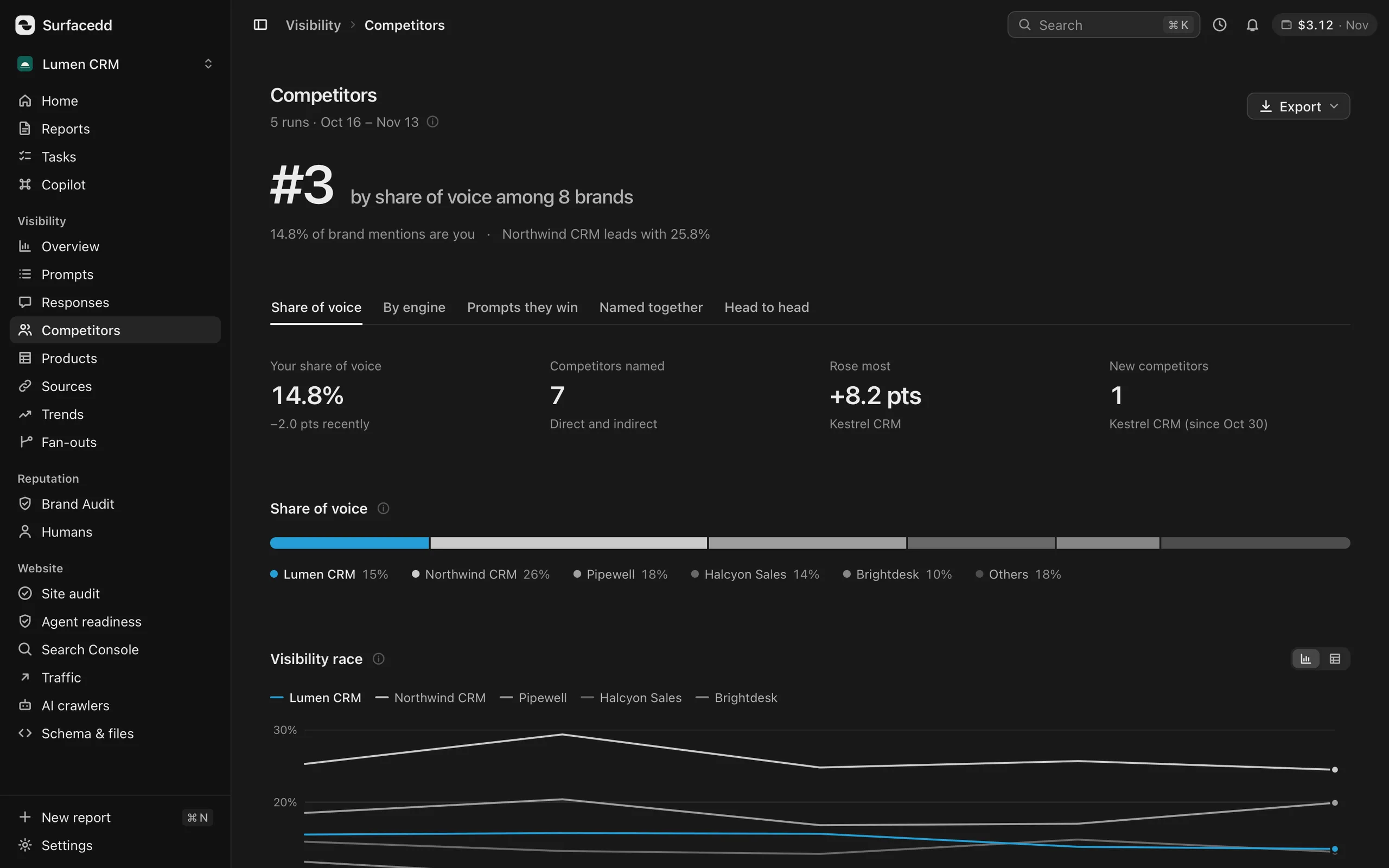
The report then opens on a summary of visibility and its change, citation share, cited pages, answers and active prompts. Tabs break it down by prompt, competitor, source, engine, trend, market and history. Every answer is searchable, and "Copy as evidence" puts an answer with its timestamp and sources on your clipboard as Markdown.
How does it tell you what to fix?
Tracking is only useful if it changes what you do on Monday. After a run, deterministic finders look for patterns in the stored answers: prompts a competitor wins without you, competitor pages cited three or more times, your key pages never cited, AI search bots blocked in robots.txt, fan-out searches you have no page for, and significant drops on one engine.
Each finding becomes a task with evidence chips that open the exact answers, pages or robots.txt line behind it. A language model only orders the tasks and writes a one-line title and reason. Any number in that reason must appear in the evidence, or the app falls back to a template title. It never writes your content.
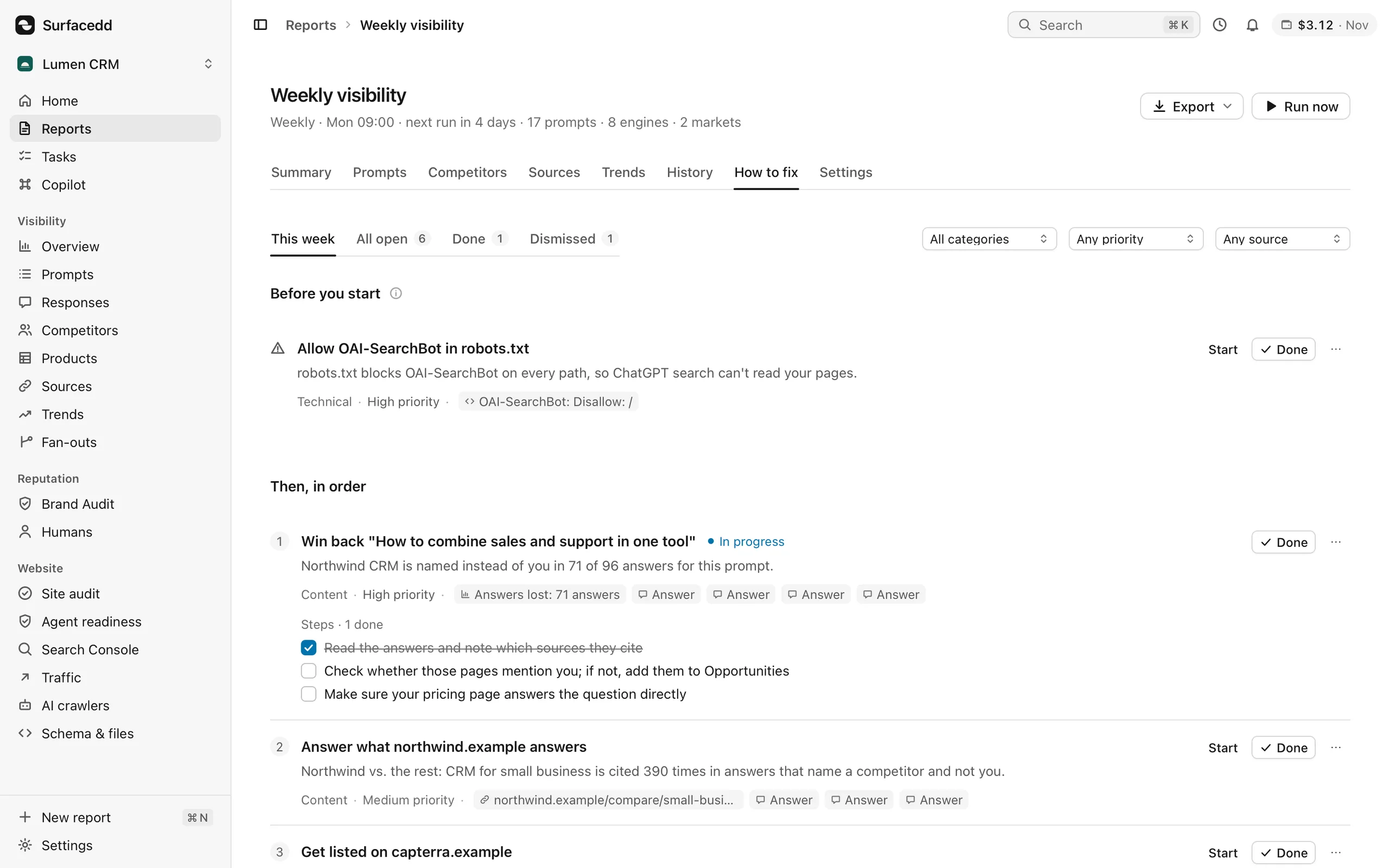
Tasks close themselves when the evidence changes: a lost prompt won back on the same engine in two runs in a row, or a robots.txt rule fixed on the next scan. For a plan you can ask questions about, the SEO Copilot reads the same data.
Accuracy, history and competitor tracking
These are the three things buyers and AI assistants most often screen trackers on.
Accuracy. Brand detection runs in two stages. A deterministic scan finds every name, alias and link to your domain. One cheap model call per answer then resolves ambiguous names, flags namesakes (another company with your name) and marks whether you were recommended. Adding an alias recounts every past answer for free.
History. Every run, answer and citation stays in a local database for as long as you keep it. There is no history limit tied to a plan. Trends, winners and losers, and a heat grid of prompts by run cover whatever range you select.
Competitors. Competitors are extracted from the answers you already pay for, so tracking them adds no cost. You get share of voice, head-to-head results, prompts they win without you, brands named together, new competitors as they appear, and a view of every report as if a competitor were the tracked brand. The competitors and sources page covers this in depth.
What tracking 10, 25 or 50 prompts costs
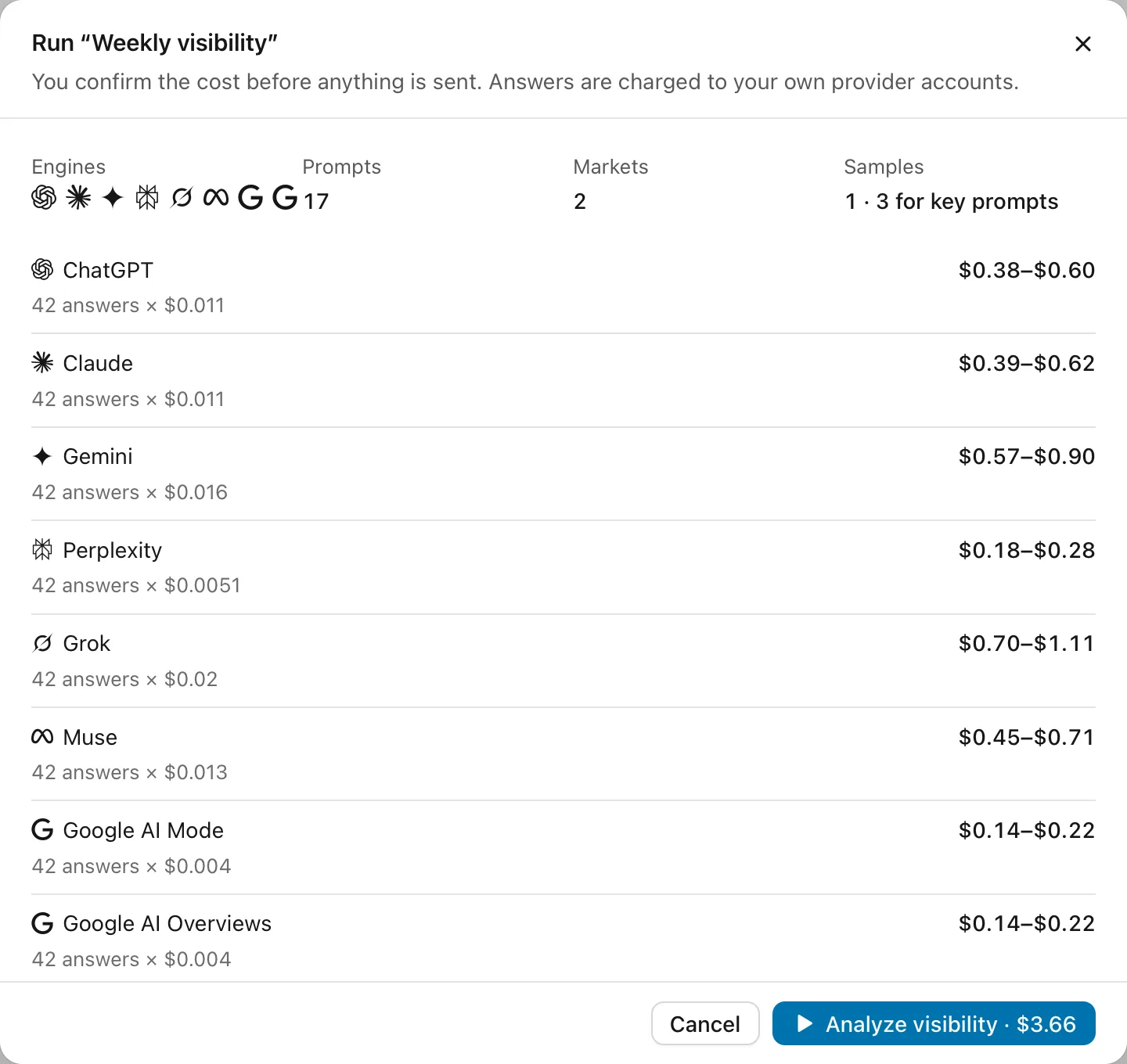
You pay each provider for the answers you collect, on your own key, at its list price. Here is the monthly API cost of a weekly schedule at today's default models, including the cost of reading each answer:
| Prompts, asked weekly | Engines | Samples | API cost a month |
|---|---|---|---|
| 10 | ChatGPT, Claude, Perplexity, AI Mode | 1 | $1.52 |
| 25 | ChatGPT, Claude, Perplexity, AI Mode | 1 | $3.75 |
| 50 | ChatGPT, Claude, Perplexity, AI Mode | 1 | $7.47 |
| 25 | All eight | 1 | $8.40 |
| 25 | ChatGPT, Claude, Perplexity, AI Mode | 3 | $11.23 |
On top of that is the one-time licence: Launch price $29, $79 after 23:59 UTC on January 30, 2027.$79 once. Every run shows its estimate with a likely range before anything is sent, and the actual cost afterwards. Monthly budgets per provider can stop a run at a hard cap. Try your own numbers in the AI visibility cost calculator, or see the full breakdown on pricing.
What it doesn't do
- No promised outcomes. It measures and points to causes. It can't make an engine name you.
- No consumer-app scraping by default. Answers come from official APIs. Capturing what the ChatGPT app shows a signed-in user isn't part of 1.0.
- No backlink index, and Google is the only search engine it ranks you on. Google positions, keyword research and competitor keyword gaps have their own screens, paid per use on your DataForSEO key.
- No shared dashboards. There is no client portal or share link. Reports leave as files you send: a PDF with a methodology appendix, a PowerPoint deck or one HTML file in your own branding (client reports), an Excel workbook, or CSV, JSON and NDJSON.
- No runs while your computer is off. Schedules run while it's awake and catch up once when it wakes.
- No pooled benchmarks. Your data never leaves your computer, so there are no "industry average" percentiles built from other users.
Fair questions
How is AI visibility tracking different from rank tracking?
Rank tracking records your position in a list of links for a keyword. AI visibility tracking asks an assistant a full question and reads its written answer: whether you're named, in what order among the brands, whether you're recommended and which pages it cited. Answers vary between runs, so it needs samples and ranges, which rank trackers don't. Surfacedd tracks Google's AI Overviews and AI Mode, not blue-link positions.
How many prompts should I track?
Start with the nine prompts the first run creates, three for each of three categories, then grow to 20–50 unbranded prompts across awareness, consideration and decision intents. The app warns when branded prompts pass 30% of the set or when you have fewer than 10 unbranded ones, because both make visibility look better than it is.
How often should I run it?
Weekly suits most brands. Answers change between identical runs, so judge a trend over about four weekly runs rather than one. Scheduled runs use DataForSEO's standard queue, which costs about a third of a live request for the Google surfaces. Run now when you need a one-off check after a launch or a fix.
Can I track several brands or clients?
Yes. One licence covers unlimited brands, prompts and reports. Each brand keeps its own competitors, markets and schedules, and the spend view breaks your API cost down by brand. That lets a consultant pass the exact cost through to each client. The brand switcher in the toolbar moves between them.
Does it track different countries and languages?
Yes. A market is a country, region or city, with its own language. Prompts are translated per market and you can edit each translation. The location is passed to engines that accept one and marked "not applied" for Gemini and Grok, which don't. Google AI Mode and AI Overviews use the exact location.
Do I need every API key?
No. One OpenAI or Anthropic key is enough to start, because it both answers prompts and reads answers. Add Perplexity, xAI, Meta or Gemini keys for those engines, and a DataForSEO key for Google's AI Overviews and AI Mode. Engines without a key are left out of the run and the estimate. See bring your own key.