Find what stops AI engines from reading your site, rule by rule
A crawl of up to 500 pages from your own computer, read the way AI crawlers read it: without JavaScript.
By the Surfacedd teamUpdated 4 min readMarkdown
On this page
Short answer
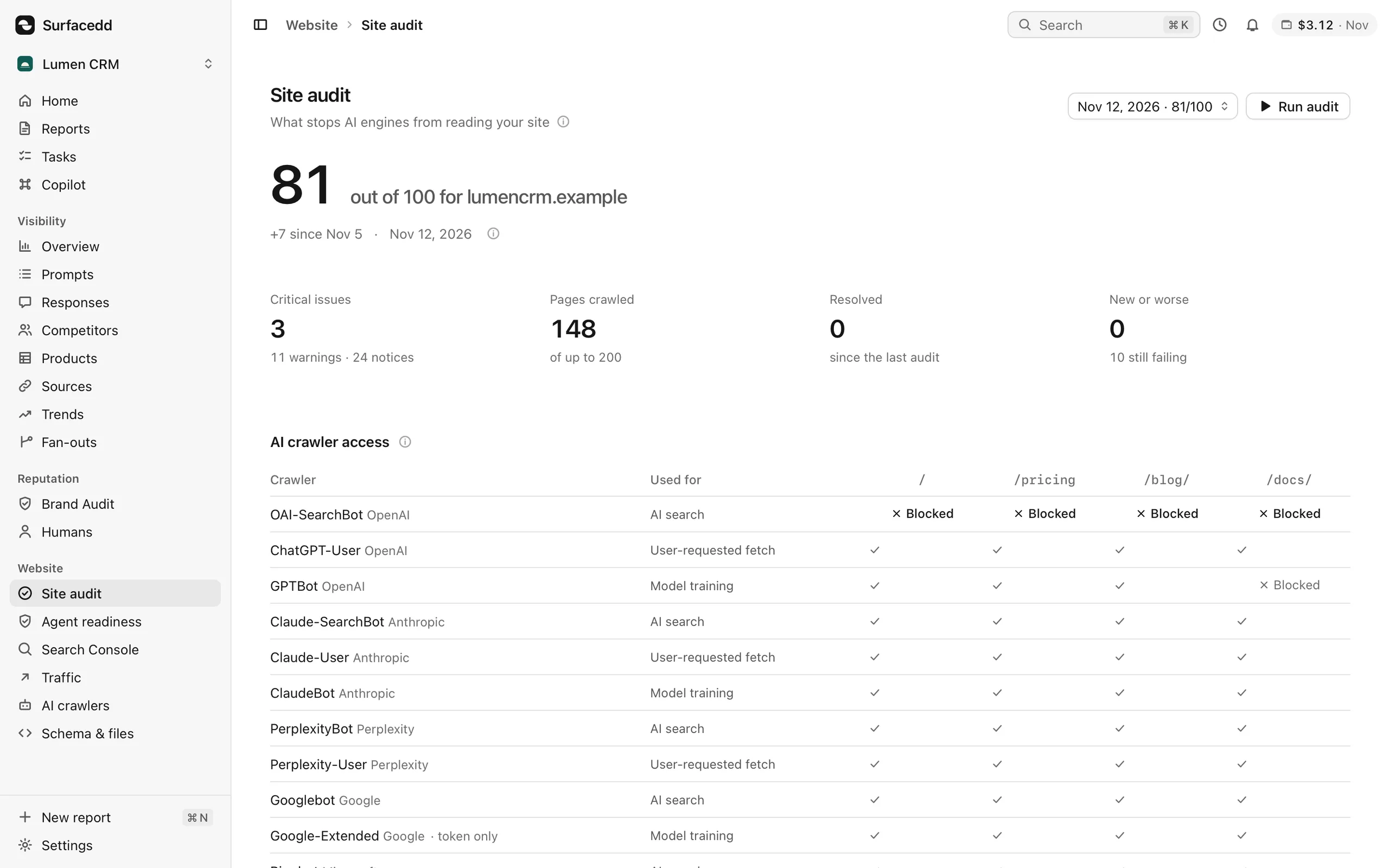
Surfacedd's site audit crawls up to 500 pages of your site from your computer, free, with JavaScript rendering off as most AI crawlers do. It checks 43 issue rules across AI readiness, indexing, content, links and crawling, scores the site from 0 to 100, and shows which AI crawlers your robots.txt lets into each key page.
The site audit lives under Website › Site audit. It finds the problems that keep AI engines and search crawlers from reading and citing your pages, and tells you how to fix each one. It runs on your computer and costs nothing.
Run an audit
- Press Run audit.
- Enter the Start URL (your website is filled in).
- Choose Pages to crawl: up to 50, 100, 200 or 500, breadth-first from the start URL and your sitemaps.
- Leave Respect robots.txt on to skip pages your robots.txt disallows for crawlers.
- Start. Progress shows "Crawling… n of up to N pages", and you get a notification when it finishes.
How the crawler behaves: it reads robots.txt, follows sitemaps (including sitemap indexes and gzip), probes /llms.txt, goes up to 6 links deep, makes at most 2 requests per second per host and backs off on 429 responses. It identifies itself as SurfaceddAudit. Addresses on private networks are blocked unless you allow them in Settings. JavaScript rendering is off, so you see the HTML that GPTBot, ClaudeBot or PerplexityBot see.
How the score works
The score starts at 100. Each issue type lowers it according to the share of crawled pages it affects: score = 100 × Π(1 − weight × share), with weights of 0.25 for critical issues, 0.08 for warnings and 0 for notices. Site-level issues count as affecting every page. One critical issue on every page takes the score to 75; a warning on half the pages costs about 4 points.
From the second audit on, the header shows the change since the last one, and every issue is marked New, Worse, Still failing or Resolved.
AI crawler access
The AI crawler access card is a matrix of AI crawlers against your key pages, each cell Allowed or Blocked with the robots.txt rule and line that decided it. Crawlers are grouped by what they are used for: AI search, user-requested fetch and model training. A missing robots.txt (404) allows everything; a robots.txt that errors is treated by major crawlers as "disallow everything".
Blocking a training crawler is a legitimate choice and is only a notice. Blocking an AI search crawler is critical, because pages it can't fetch can't be cited in that engine's answers. The robots.txt guide has a recommended setup.
Every rule
43 rules in five groups. Severity: C critical, W warning, I notice (no effect on the score).
AI readiness
| Rule | Sev. | Flags |
|---|---|---|
ai-search-bot-blocked | C | robots.txt blocks a crawler that feeds live AI answers |
javascript-rendering-suspected | W | an app shell with almost no text, links or headings without JavaScript |
snippet-restricted | W | nosnippet or max-snippet under 50 characters (Google applies it to AI Overviews and AI Mode) |
invalid-jsonld | W | JSON-LD that doesn't parse or lacks required properties |
ai-training-bot-blocked | I | a training crawler opted out (doesn't affect live answers) |
google-extended-blocked | I | Google-Extended disallowed: Gemini apps and Vertex AI only, not Search |
missing-structured-data | I | no JSON-LD or microdata on the home or a top-level page |
llms-txt-missing | I | no /llms.txt (informational: no evidence it raises citations) |
llms-txt-invalid | I | /llms.txt doesn't follow the llmstxt.org format |
Indexing
| Rule | Sev. | Flags |
|---|---|---|
server-error | C | 5xx response |
broken-page | W | 4xx response |
robots-unreachable | W | robots.txt failed with a server error or timeout |
canonical-conflict | W | HTML and HTTP header canonicals disagree |
hreflang-invalid | W | hreflang isn't a valid language(-region) code or x-default |
sitemap-missing | I | no sitemap in robots.txt or at /sitemap.xml |
slow-response | I | HTML took over 1.5 s to start arriving |
noindex-page | I | the page is noindex (often intentional) |
canonicalized-page | I | canonical points to another URL |
Content
| Rule | Sev. | Flags |
|---|---|---|
missing-title | C | no <title> |
duplicate-title, duplicate-meta-description | W | shared with other pages |
duplicate-content | W | identical visible text on several URLs |
missing-meta-description | W | no meta description |
missing-h1, multiple-h1 | W | zero or several H1s |
thin-content | W | under 150 words of visible text |
images-missing-alt | W | images without an alt attribute |
og-missing | I | og:title or og:image missing |
title-too-long, title-too-short | I | over 60 or under 10 characters |
meta-description-too-long, -too-short | I | over 160 or under 70 characters |
heading-order-skip | I | heading levels jump, e.g. H2 to H4 |
Links
| Rule | Sev. | Flags |
|---|---|---|
broken-internal-link | C | a link to a same-site URL that errors |
redirect-chain, redirect-loop | W | two or more hops, or a loop |
orphan-page | W | in the sitemap but not linked from any crawled page |
no-outgoing-links | W | the page links nowhere |
deep-page | I | five or more clicks from the start page |
Crawl
| Rule | Sev. | Flags |
|---|---|---|
blocked-page | C | a bot challenge or access denial instead of the page |
rate-limited-page | W | 429 twice for one page |
crawl-rate-limited | W | several 429s in a row stopped the crawl |
crawl-page-limit | I | the page limit was reached; orphan checks skipped |
Open any page in the Pages table to see every check on it, with the explanation and a "How to fix" line for each issue.
Troubleshooting
| What you see | Cause | What to do |
|---|---|---|
| "That address is on a private network. Allow it in Settings first." | The start URL resolves to a private or local address | Allow the host in Settings, or audit the public site |
Many blocked-page issues | A firewall or bot protection refuses the crawler | Allow the SurfaceddAudit user agent, then run again |
crawl-rate-limited and few pages | The server returned 429 repeatedly | Raise the crawler rate limit or run later |
javascript-rendering-suspected on every page | The site renders its content in the browser | Serve the main content in the initial HTML (server-side rendering or prerendering) |
crawl-page-limit | The site has more pages than the limit | Run again with up to 500 pages |
| Score unchanged after a fix | Only notices were fixed (weight 0) | Expected; notices don't affect the score |
Related docs
- AI visibility audit: what the audit is for, with examples.
- Crawler logs: whether AI crawlers actually visit, from your server logs.
- AI crawler checker: the free browser version of the robots.txt check.
Keep reading
- ProductMake sure AI can read the pages you want citedA free crawl from your own computer that checks every key page for what stops AI engines and search from reading and citing it.Read
- GuidesSet up robots.txt so AI can cite you, and train only if you agreeAI companies run separate crawlers for search, live fetches and training. Allow the first two to stay citable, decide on training separately, and check that your CDN agrees with the file.Read
- ToolsFree tools to check whether AI can read, understand and measure your siteEight small tools for the parts of AI search you can check yourself. No sign-up, no AI calls and no cost per use: most run entirely in your browser.Read
- DocsSee which AI crawlers really read your site, from your own logsImport an access log and Surfacedd counts AI crawler visits per bot, page and day, checks each against the operator's published IP ranges, and throws the IPs away.Read
How we research, write and correct pages: read our editorial policy.