Every Surfacedd MCP tool, with its arguments and what it returns
All tools are read-only, return compact JSON of at most 64 KB, and read the database on your computer. None starts a run, spends money or reads your keys.
By the Surfacedd teamUpdated 6 min readMarkdown
On this page
Short answer
The Surfacedd MCP server gives Claude, Cursor and other MCP clients read-only tools over your local data: visibility, prompts, answers, competitors, sources, fan-outs, runs, tasks, Humans, crawler logs, site audits, cost estimates and synced Search Console and GA4 data. Each call returns JSON capped at 64 KB, and lists stop at 200 rows.
This is the reference for the tools an assistant sees after you connect the Surfacedd MCP server. The assistant picks tools by itself; you ask in plain language. Use this page to know what can be answered and how to phrase a precise request. Scripts get the same results from the surfacedd command, which returns each tool's output in its JSON.
All tools at a glance
| Tool | Area | What it returns |
|---|---|---|
list_brands | AI visibility | Brands and people tracked in Surfacedd, with their latest run and visibility. |
visibility_summary | AI visibility | Visibility, share of voice, rank, top-3, recommendation and citation rates (with 95% ranges and counts), by engine and category. |
list_prompts | AI visibility | Tracked prompts with visibility, average position and intent. |
prompt_results | AI visibility | One prompt per engine and run: whether the brand was named, its rank, the brands named and the citation count. |
get_answer | AI visibility | One stored AI answer in full: text, mentions, citations, fan-out queries, model and cost. |
search_answers | AI visibility | Full-text search over stored answers; returns snippets with engine, date and prompt. |
competitor_share | AI visibility | Share of voice per competitor and the answers competitors win without the brand. |
top_sources | AI visibility | Domains or pages cited in answers, with citation counts and trend. |
fanouts | AI visibility | Search queries the engines ran while answering, by frequency. |
list_runs | AI visibility | Recent runs with status, answers collected and cost. |
list_tasks | AI visibility | Recommended tasks with the evidence behind each. |
humans_summary | AI visibility | How AI answers describe a person: recognition, accuracy and discovery. |
crawler_stats | AI visibility | AI crawler visits per bot and day from imported server logs. |
site_audit_issues | AI visibility | Issues found by the latest site audit. |
agent_readiness | AI visibility | Agent readiness of the brand's website from the latest check: Reach, Understand and Act scores 0–100, failing rules with evidence and copyable fixes, informational findings on emerging agent protocols, and what changed since the previous check. |
estimate_run_cost | AI visibility | What running a report would cost (estimate only; this tool never starts a run). |
gsc_summary | Search Console and GA4 | Google Search Console clicks, impressions, CTR and average position for the brand's linked property, with the comparison period, daily trend and device/country split. |
gsc_top | Search Console and GA4 | Top Search Console queries or pages (whole weeks) with clicks, impressions, CTR, position and the change against the comparison weeks. |
gsc_page_queries | Search Console and GA4 | The Search Console queries one page ranks for, with clicks, impressions, CTR and position. |
gsc_opportunities | Search Console and GA4 | Quick wins from Search Console: queries almost on page one (positions 8–20) or seen but rarely clicked (CTR under half of what the position usually gets), ranked by potential clicks. |
gsc_drop_diagnosis | Search Console and GA4 | Deterministic explanation of a click change between two whole-week windows: lost and new queries, impressions, position and CTR effects, unattributed (anonymized) clicks, lost pages, device and country split, data gaps and Google update annotations. The parts sum to the total change. |
ga4_traffic | Search Console and GA4 | Google Analytics 4 sessions, engaged sessions and key events by channel group, source or landing page, with the comparison period. |
ai_traffic | Search Console and GA4 | Visits from AI assistants (ChatGPT, Perplexity, Gemini, Copilot, Claude, …) in Google Analytics 4: GA4's AI Assistant channel when present, else referrer rules; by assistant and landing page. |
product_share | AI visibility | Which of the brand's products AI answers name and recommend, and whose products win instead: mention rate, category share of voice, average rank and recommended rate with 95% ranges, by engine, market and intent. |
product_results | AI visibility | One product's mention and recommended rates by engine, the answers naming it, the pages those answers cite and the rival products named alongside. |
25 tools, all read-only: none starts a run, spends money or reads your API keys.
Limits that apply to every tool
| Limit | Value |
|---|---|
| Access | Database opened read-only for each call; works while the app is writing |
| Result size | At most 64 KB of JSON |
| Rows | Lists capped at 200 rows; past 64 KB the largest arrays are halved and truncated: true is set |
| Network, keys, spending | None. estimate_run_cost only estimates |
| Licence | Needs Surfacedd activated on this computer (checked offline on every call). Reading works in every licence state after that, including read-only and refunded |
Periods
AI visibility tools take range: 7d, 30d, 90d (default), 365d or all, or explicit ISO dates in from and to, which override range. Google tools take range as 7d, 28d (default), 90d, 180d, 365d or 16m, ending at the latest synced day, or from and to, plus compare: previous (default), year (52 weeks earlier) or none.
AI visibility tools: arguments
| Tool | Required | Optional (default) |
|---|---|---|
list_brands | — | kind: brand or person |
visibility_summary | brand_id | period; engine; market_id; category_id |
list_prompts | brand_id | status: active, paused, archived |
prompt_results | prompt_id | period |
get_answer | answer_id (the answer's uid from other tools) | — |
search_answers | query (full-text) | brand_id; limit 1–100 (20) |
competitor_share | brand_id | period; types from direct, indirect, ai_platform, publisher, other (direct + indirect) |
top_sources | brand_id | period; kind: domain (default) or page |
fanouts | brand_id | period |
list_runs | — | brand_id; limit 1–100 (20) |
list_tasks | brand_id | status: todo, in_progress, done, dismissed |
humans_summary | person_id | — |
crawler_stats | brand_id | period |
site_audit_issues | brand_id | — |
estimate_run_cost | report_id | — |
engine takes one of chatgpt, claude, gemini, grok, perplexity, muse (Meta AI), google_ai_mode or google_ai_overview.
Search Console and GA4 tools: arguments
These read the Google data the app has already synced; connect Google under Settings › Integrations first.
| Tool | Required | Optional (default) |
|---|---|---|
gsc_summary | brand_id | period; compare |
gsc_top | brand_id; dim: query or page | period; compare; sort: clicks (default), impressions, change; limit 1–200 (50); search |
gsc_page_queries | brand_id; page (the full URL as Search Console reports it) | period |
gsc_opportunities | brand_id; kind: almost_page_one (positions 8–20) or low_ctr (seen but rarely clicked) | period; limit 1–200 (25) |
gsc_drop_diagnosis | brand_id | period; compare |
ga4_traffic | brand_id | period; compare; by: channel (default), source, landing_page |
ai_traffic | brand_id | period; compare |
gsc_drop_diagnosis splits a click change between two whole-week windows into parts that add up to the total: lost and new queries, impression, position and CTR effects, anonymized clicks, lost pages, device and country, data gaps and Google update annotations. ai_traffic uses GA4's AI Assistant channel when the property has it, and referrer rules otherwise.
The report resource
Besides tools, the server offers one resource template: surfacedd://brand/{id}/report/latest, the latest report for a brand as a Markdown summary. Clients that support resources can attach it to a conversation directly.
Questions and the tools they use
| Ask | Tools the assistant typically calls |
|---|---|
| "How visible are we on Perplexity this month, and is it changing?" | list_brands, visibility_summary with engine: perplexity, range: 30d |
| "Which prompts do competitors win without us?" | competitor_share, then list_prompts or prompt_results |
| "Show me the answer where Claude recommended Northwind" | search_answers, then get_answer |
| "Which pages get cited most in our category?" | top_sources with kind: page |
| "What did the engines search for while answering?" | fanouts |
| "Is GPTBot really visiting, or being blocked?" | crawler_stats, site_audit_issues |
| "What would next week's run cost?" | estimate_run_cost |
| "Why did organic clicks drop last week?" | gsc_drop_diagnosis with range: 7d |
| "How much traffic did ChatGPT send us?" | ai_traffic |
Errors
| Error | Cause | Fix |
|---|---|---|
| "range must be 7d, 30d, 90d, 365d or all (got …)" | Unsupported period on an AI visibility tool | Use one of those values or from/to |
| "range must be 7d, 28d, 90d, 180d, 365d or 16m (got …)" | Unsupported period on a Google tool | Use one of those values |
| "compare must be previous, year or none (got …)" | Unsupported comparison | Use one of those values |
truncated: true in a result | The result hit the 200-row or 64 KB cap | Narrow the period, engine or brand |
| Empty Google results | Google isn't connected, or the first sync hasn't finished | Connect in Settings › Integrations and wait for the sync |
Related docs
- MCP server: what it's for and why it stays local.
- SEO MCP servers compared: Surfacedd next to Google's and other vendors' servers.
- Model Context Protocol: the standard behind it.
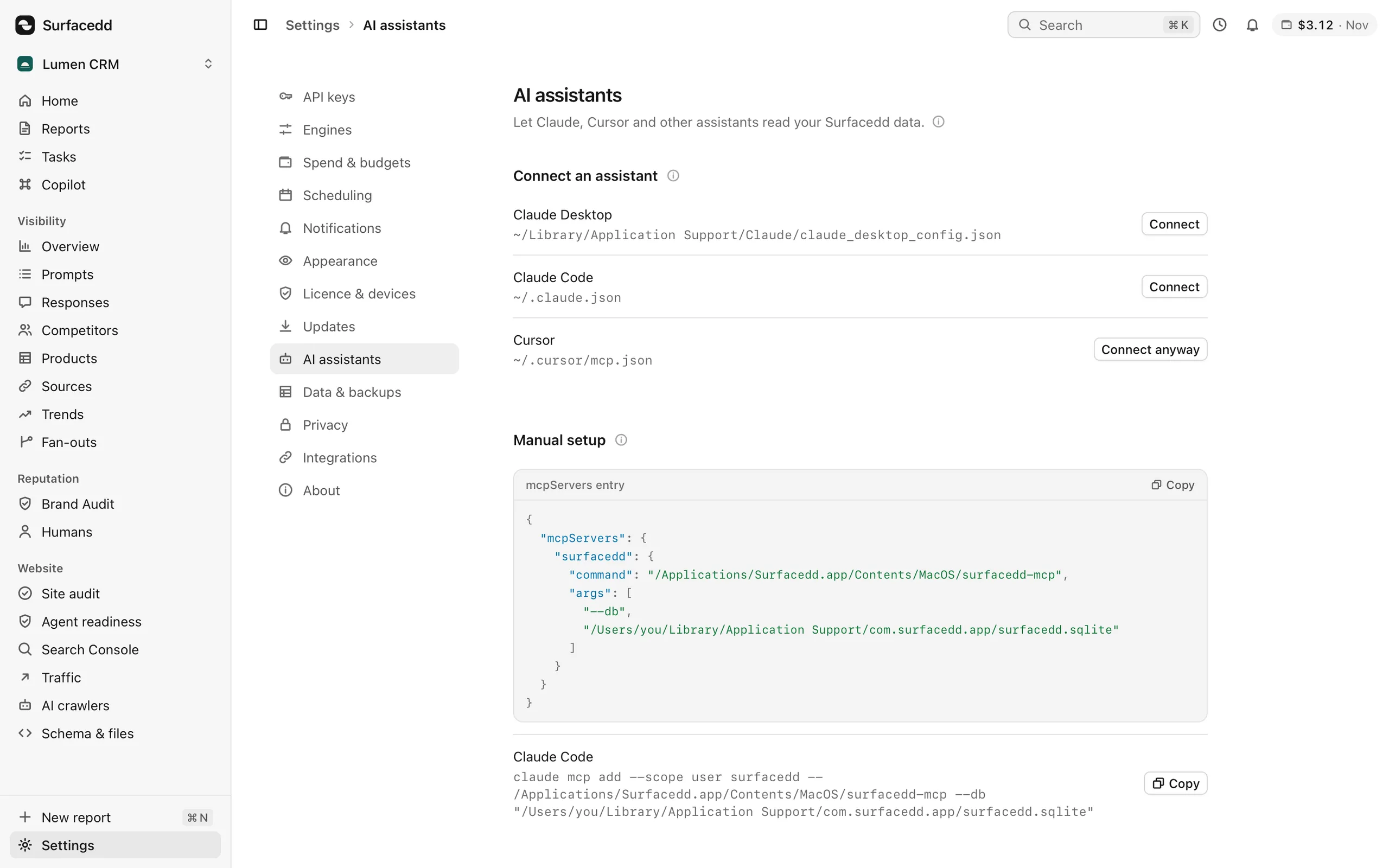
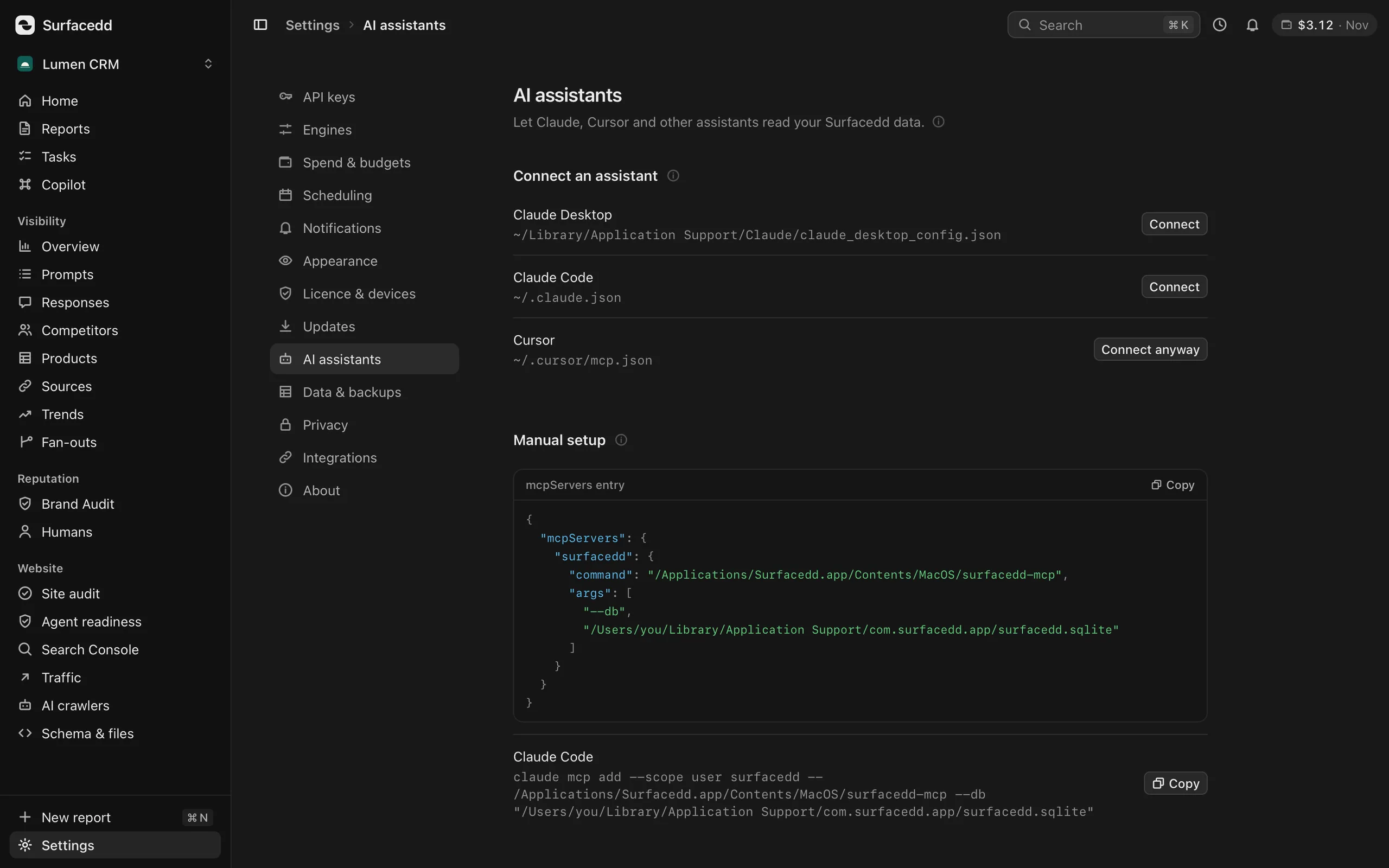
- Integrations: connecting Claude Desktop, Claude Code and Cursor, with worked questions for Cursor.
Keep reading
- ProductAsk Claude or Cursor how your brand shows up in AIA local, read-only MCP server over your own Surfacedd data. Your assistant reads the answers, competitors, sources and tasks you've already collected, and it can't spend money or see your keys.Read
- DocsAsk Claude or Cursor about your AI visibility, from your own dataSurfacedd writes one entry into your assistant's config and keeps a backup. The server reads your local database and nothing else.Read
- GuidesAsk Claude or Cursor about your search data: SEO MCP servers comparedSix MCP servers can put your analytics, rankings and AI-visibility data inside an assistant. They differ on where they run, whether they can change anything, how they sign in and what each question costs.Read
- GlossaryModel Context Protocol: how AI assistants plug into your tools and dataWhat MCP is in one paragraph, the difference between a local server your assistant starts and a remote one it connects to, and a real config file you can read line by line.Read
How we research, write and correct pages: read our editorial policy.