Private and local
Track AI visibility without handing your strategy to another server
Your prompts, answers, competitors and Google data stay in a database on your own computer. This page lists every request the app makes, where it goes and what it carries.
Short answer
Surfacedd is a private AI visibility tool: prompts, answers, reports, Humans profiles and Google data are stored in a local SQLite database, and API keys stay in your operating system's keychain. Requests go straight from your computer to the providers you choose. Surfacedd's servers receive only licence checks, update checks and configuration downloads.
- Answers, prompts, reports
- ~/Library/Application Support/com.surfacedd.app
- API keys
- macOS Keychain · shown as ••••3f9a
- Sent to each AI provider
- Your prompt, on your key
- Sent to Surfacedd
- Licence check only
- Product analytics
- None
- OpenAIConnected••••3f9a
- AnthropicConnected••••a01c
- PerplexityConnected••••77e2
- DataForSEOConnected••••c8d0
- GeminiOff until you accept Google's terms
The prompts you track are a map of your strategy: the categories you want to win, the competitors you watch, the people whose reputation you care about. Hosted AI visibility tools keep that map, and every answer collected for it, on their servers. Surfacedd keeps it on your computer. This page shows what that means in practice, request by request, so you or your security team can check it rather than take our word for it.
What stays on your computer
Everything you create or import lives in one SQLite database in the app's data folder on your Mac or PC: brands, competitors, prompts, every answer with its citations and search queries, metrics, tasks, Brand Audits, Humans profiles, site audits, crawler statistics, SEO Copilot chats and the data imported from Search Console and Google Analytics.
API keys and the Google sign-in token are not in that database. They sit in your operating system's credential store, the Keychain on macOS or Credential Manager on Windows, and only the app's Rust core reads them, to make the request they are for. They never enter the interface layer, logs or exports.
We have no copy of any of it, and no way to reach it. There is no Surfacedd account to sign in to and no cloud sync.
Every request the app makes
Local does not mean offline: tracking AI answers means asking AI providers. What matters is where each request goes and what it carries. This is the complete list, checked against the app's source code:
| Destination | When | What is sent | Started by |
|---|---|---|---|
| AI engine providers: OpenAI, Anthropic, Perplexity, Google Gemini, xAI, Meta | Each answer in a run, Ask now, Brand Audit, Humans runs, key tests | The prompt text, the market's approximate location where the engine accepts one, the model name and your API key | You or your schedule |
| DataForSEO | Google AI Mode and AI Overviews answers; paid Copilot lookups you approve | The prompt or keyword, the market's location and language code, your DataForSEO login | You or your schedule |
| Your analysis model (the first available of OpenAI, Anthropic, Meta, Gemini, Perplexity, xAI) | After each answer; during brand setup, prompt suggestions and translations | The answer text with your brand name, aliases, website, category, a description of up to 600 characters and competitor names; for setup, text fetched from your website | The run |
| SEO Copilot provider: Anthropic, OpenAI or OpenRouter | Each Copilot message | Your question, a short brand description and the results of the tools it used; Search Console and GA4 figures only after you allow it | You |
| Websites you add or audit | Brand setup (home page and up to 8 linked pages), site audits (up to 500 pages), the brand's favicon | Ordinary page requests from the SurfaceddAudit/1.0 user agent. Agent readiness checks also request a few pages with AI agents' and a browser's user-agent strings, to spot bot walls | You or the weekly re-scan |
| Pages that AI answers cite | After a run, once per page, refreshed after 30 days | An ordinary page request from the Surfacedd/ user agent; robots.txt is honoured | The run |
| Crawler operators' published IP range files, and your DNS resolver | When you import a server log or refresh IP ranges | A request for each operator's public range file; reverse-DNS lookups for up to 2,000 bot IP addresses per import. Your log file is never uploaded | You |
| Google (accounts, Search Console, Analytics APIs) | When you connect Google, then a sync shortly after launch and each property at most once every 20 hours | Sign-in in your browser, then read-only report requests with your access token | You |
| Polar (licence-key API) | Activation and deactivation | Your licence key and a device name made of the computer's name and operating system, such as "studio · macOS 27" | You |
| surfacedd.com licence check | At activation, then only when the licence token is more than seven days old (at most once a day until a check succeeds) | Licence key, activation ID, licence key ID, a one-way hash of a device identifier, app version and platform | The app |
| surfacedd.com updates | Every 6 hours on the Mac and direct Windows builds (the Microsoft Store build updates through the Store) | App version, platform, architecture and the device hash, for staged roll-outs | The app |
| surfacedd.com configuration | Once a day while the app runs (first about 2 minutes after launch) for the signed price table and AI crawler list; shortly after each launch and then daily for the signed Google-update annotations; Google sign-in settings when you connect Google; the price table again when you click Check for updates | A plain request with nothing about you in it; the signed files are verified before use | The app, or you |
Two things follow from the table. Your prompts and answers do reach the AI providers you choose, because that is how an answer is collected, and each provider handles them under your own agreement with it. And websites the app fetches see an ordinary request from your IP address, as they would from your browser. Nothing in the table sends your prompts, answers, brands or Google data to Surfacedd.
Licence checks: the exact payload
Activation sends your licence key and a device name to Polar, our merchant of record, which issues an activation ID. After that, the app asks surfacedd.com for a signed entitlement with six fields: the licence key, the activation ID, the licence key ID, a one-way hash of a machine identifier, the app version and the platform. The reply says whether the licence is valid and until when updates are included.
The app re-checks only when its token is more than seven days old, not on every action or launch, and keeps working for 30 days if it can't reach us. If a check fails for good, the app turns read-only instead of closing: viewing, searching and exporting still work.
Google data stays local too
Connecting Search Console or Google Analytics signs you in through Google in your own browser and stores the refresh token in your keychain. The app then requests read-only reports straight from Google's APIs and keeps them in the local database: up to 16 months of Search Console and 14 months of GA4 history, updated daily. Surfacedd's servers never receive the data or the token.
The only path from that data to another company is one you start. The SEO Copilot asks before it first sends Search Console or GA4 figures to the AI provider you chose, and remembers your answer, which you can change in Settings › Integrations.
MCP: local and read-only
The local MCP server lets Claude Desktop, Claude Code or Cursor answer questions from your Surfacedd data. It is a separate program that opens the database read-only, never reads your API keys and makes no network calls of its own. It checks offline that Surfacedd is activated on this computer, and then reads in every licence state, read-only included. What an assistant reads through it goes to that assistant's provider, so connect only assistants you trust with the data. The MCP server page lists every tool.
Telemetry: none
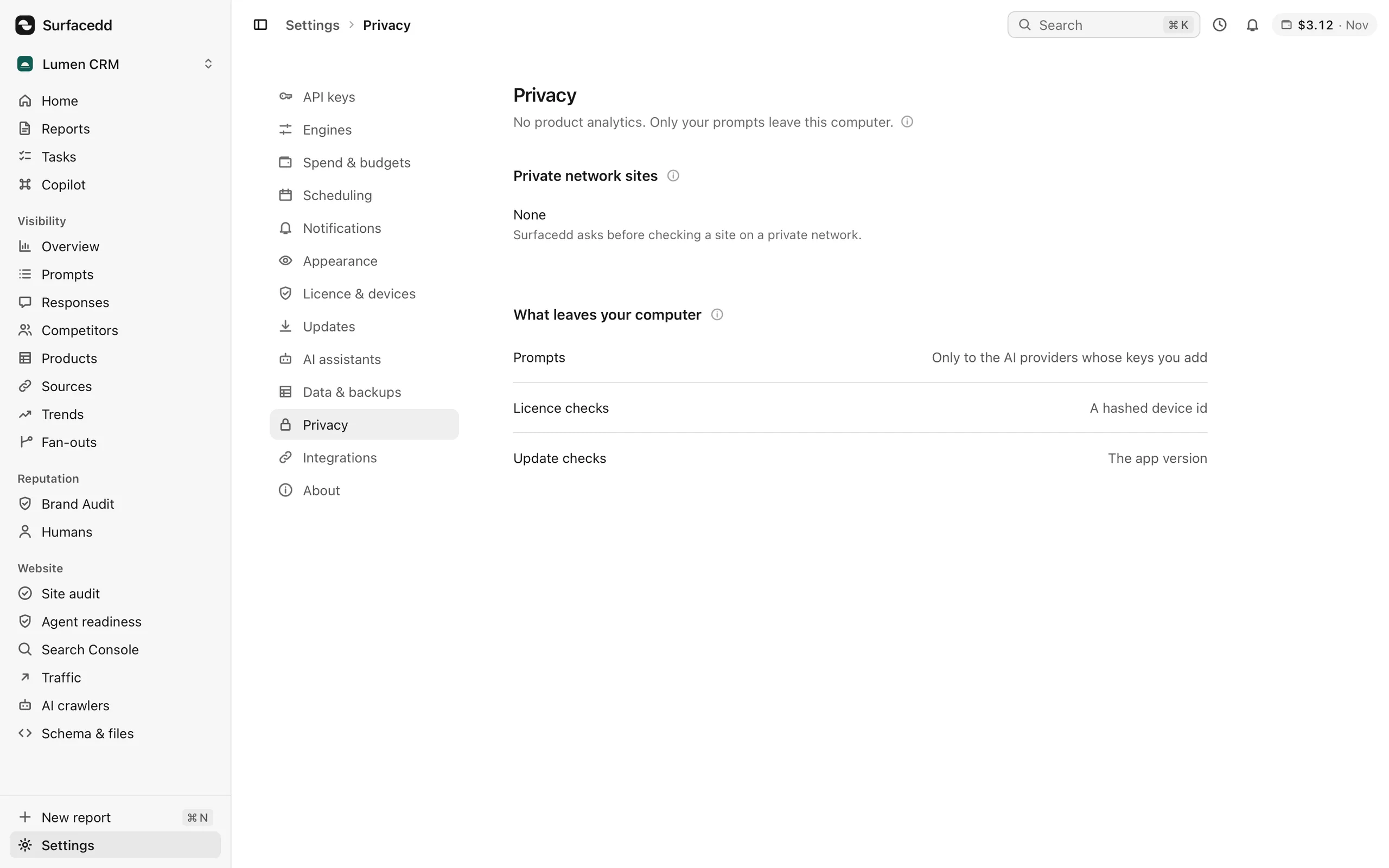
The app contains no product analytics. It doesn't report which screens you open, what you track or what you ask the Copilot. Version 1.0 also has no crash reporter, so no error report is ever sent. Settings › Privacy lists exactly what does leave your computer.
Backups and encrypted workspace exports
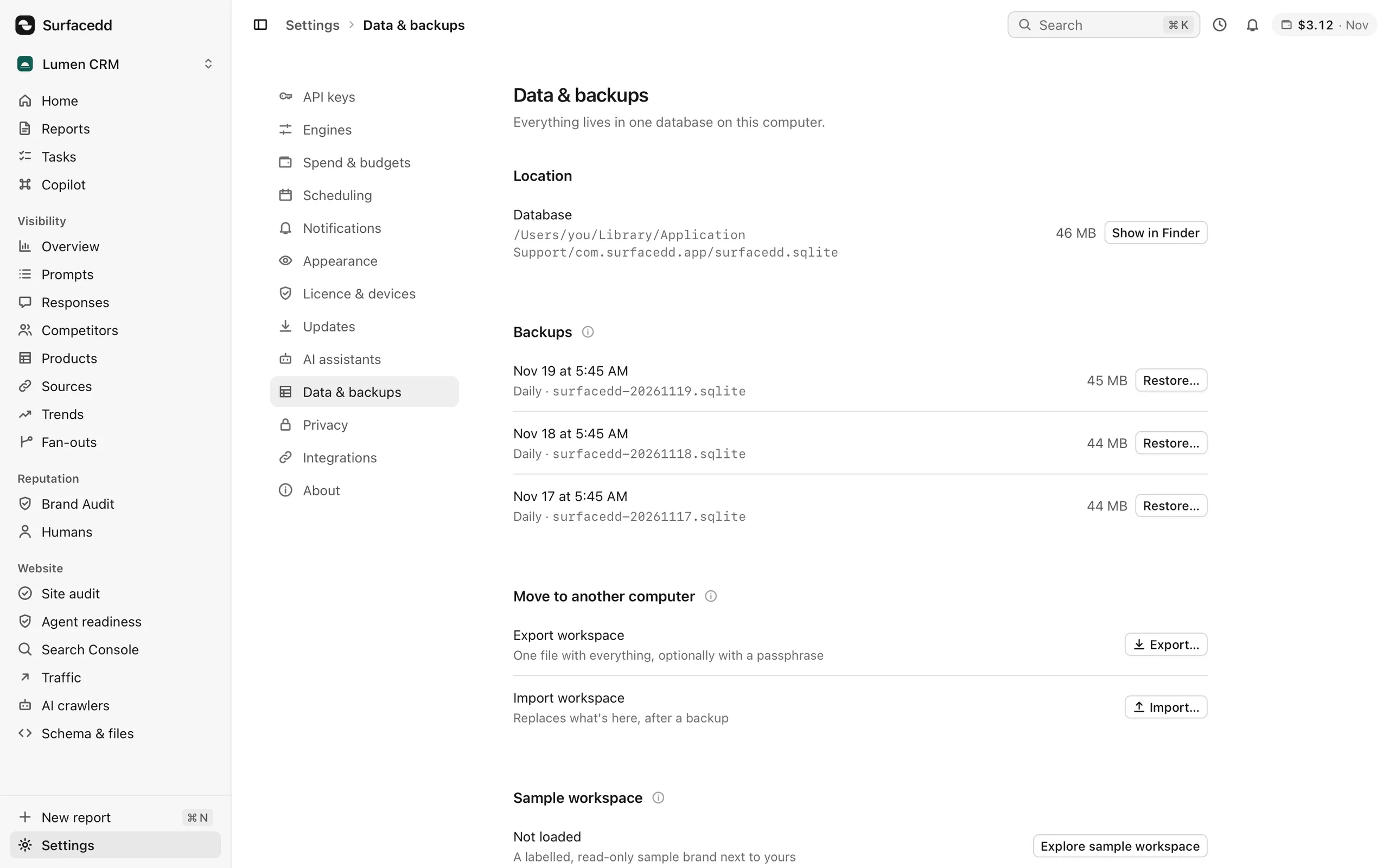
The app keeps seven rolling nightly backups of the database in its data folder. To move to a new computer, or hand a workspace to a colleague, export a .surfacedd file: a copy of the database with a manifest, which you can protect with a passphrase. API keys are never included, so the recipient adds their own. Import and export covers each format.
The database itself isn't encrypted by the app. Use FileVault on macOS or BitLocker on Windows to encrypt the disk it sits on.
Who this matters to
- Legal, health and finance teams whose tracked prompts reveal clients, matters or products that aren't public yet.
- EU organisations that would rather not add another SaaS vendor storing prompt and answer data. The AI providers you use still process prompts under your agreements with them.
- Agencies that don't want a client list sitting on a third party's servers.
- Anyone tracking people. Humans profiles hold personal data about you or a client, and keeping it on your own device is the safest place for it.
What local doesn't protect
Being local doesn't hide your prompts from the AI providers you query, or your IP address from the sites the app fetches. And the database is only as safe as the computer it is on, so keep your disk encrypted and your backups somewhere you control. For the threat model in detail, see security, and for the legal terms, the privacy policy.
Fair questions
Does Surfacedd see my prompts or AI answers?
No. Prompts go from your computer to the AI providers you enabled, on your own API keys, and the answers come straight back to your local database. Surfacedd's servers receive only licence checks, update checks and configuration downloads, none of which contain prompts, answers, brands or Google data.
Can the app work offline?
Partly. Everything you have already collected stays available offline: browsing, filtering, exports, tasks and the MCP server all work without a connection. New runs need the internet, because they ask AI providers, and they resume when you're back online. The licence keeps working for 30 days without reaching our server.
Where exactly is the database?
In the app's data folder in your user account: the standard application-support location on macOS and the app data folder on Windows (inside the package folder for the Microsoft Store build). Settings › Data shows the exact path, and you can back it up, move it or delete it like any other file.
Do AI providers train on my prompts?
That depends on each provider's terms for your API account, not on Surfacedd. Several providers say API data isn't used for training by default, and some free tiers allow it. Check the terms for each key you add. Surfacedd never offers Meta's contributor models, which Meta trains on, unless you opt in.
How do I delete everything?
Delete a brand or person profile in the app, which removes its prompts, answers and raw responses, with a 48-hour undo for brands. Or reset the app in Settings › Data. Because nothing is stored on our servers, there is nothing for us to delete on our side. Delete everything has the steps.
Is there a cloud sync or team sharing?
No. There is no Surfacedd cloud to sync through. To share a workspace, export an encrypted .surfacedd file with a passphrase and send it yourself; to move to a new computer, import the same file there. API keys are never included in an export.
Keep your data where it belongs.
On your own computer, under your own keys.
Launch price $29, $79 after 23:59 UTC on January 30, 2027.$79 once. One-time licence. No subscription.