Let Claude Code, Cursor and your scripts work with your AI visibility data
One command, installed from Surfacedd's settings, reads the same numbers as the app and its MCP tools. Agents and scripts get JSON, CI gets exit codes, and paid runs always wait for your confirmation.
By the Surfacedd teamUpdated 7 min readMarkdown
On this page
Short answer
The surfacedd command-line tool lets Claude Code, Cursor, scripts and CI read your Surfacedd data: visibility with 95% ranges, competitors, cited sources, products, Search Console, GA4 and agent readiness. It runs on your computer, prints JSON for programs, serves the MCP server with surfacedd mcp, and spends money only on a confirmed run.
Your AI visibility data is most useful where the work happens. That might be the repository where an agent fixes the page AI answers skip, the script that writes the weekly numbers into a report, or the CI job that stops a release from blocking AI crawlers. The surfacedd command brings the data in your Surfacedd workspace to all three. It reads the workspace on your computer, so nothing is uploaded and there is no account or API to sign up for.
What it lets you do
| You want to | How |
|---|---|
| Ask Claude Code which prompts you lose, then fix the page | The Claude Code plugin, which runs surfacedd mcp. Read-only MCP tools plus six skills, inside the session that edits your code |
| Give Cursor or another MCP client the same tools | {"command": "surfacedd", "args": ["mcp"]}. The read-only MCP server, started by the client |
| Put weekly numbers in a file, sheet or dashboard | surfacedd visibility --range 7d > visibility.json. One versioned JSON document per command |
| Stop a release that locks AI agents out | surfacedd agent-readiness check <url> --fail-under 70. Exit code 5 under the threshold; see agent readiness in CI |
| Refresh the data on a schedule | surfacedd report run "Weekly visibility" --max-usd 5 --yes. A paid run on your own keys that never starts a call that could take it past your cap |
Every read command gives exactly the same answer as the matching MCP tool, because both call the same code. A number in a script, in an assistant's reply and in the app agree.
Install it from Settings
In Surfacedd, open Settings › AI assistants & CLI and click Install command-line tool, then confirm. On a Mac this adds /usr/local/bin/surfacedd, or ~/.local/bin/surfacedd with a PATH tip when that folder isn't writable. On Windows the direct download adds a launcher to your user PATH, and the Microsoft Store app already includes it. Remove undoes it.
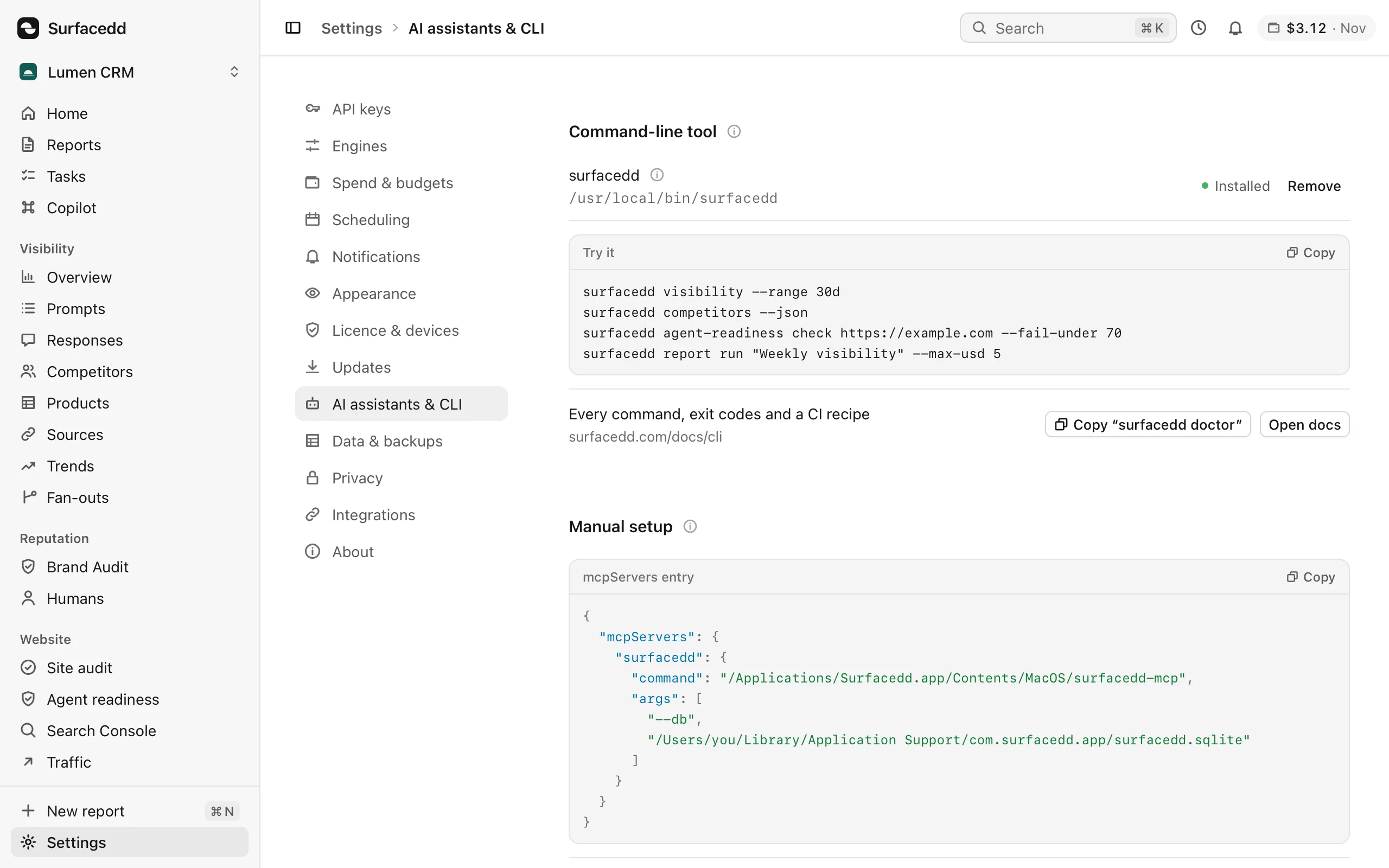
Then check it in a new terminal with surfacedd doctor. It reports the licence, the database, the names of saved provider keys, whether the app is running and whether surfacedd is on your PATH. The getting started guide has the details.
For AI agents: Claude Code, Cursor and anything with a shell
Agents can reach Surfacedd in two ways, and the plugin sets up both.
Through MCP. surfacedd mcp runs the read-only MCP server, the same server and tools as the surfacedd-mcp program inside the app. Any MCP client can start it with this entry, for example in Cursor's ~/.cursor/mcp.json:
{
  "mcpServers": {
    "surfacedd": {
      "command": "surfacedd",
      "args": ["mcp"]
    }
  }
}
Apps opened from the Dock don't always see your shell's PATH. If the client can't start surfacedd, use the full path that surfacedd doctor prints, or the copy-ready entry in Settings. See Cursor for that client's details.
Through the shell. When an agent runs surfacedd itself, stdout isn't a terminal, so it gets JSON without asking. Errors come back as JSON too, with a code and the exit code, so the agent can tell "not found" from "needs a licence".
In Claude Code, the Surfacedd plugin installs from a marketplace in two commands. It adds the MCP server and six skills: a weekly briefing, agent readiness fixes, a traffic-drop diagnosis, a competitor gap, product visibility, and a CI step. We loaded it in Claude Code 2.1.328 against Surfacedd's sample workspace: the server connected, all 25 tools and six skills loaded, and the numbers matched the app's.
Use with Code Mode (experimental)
Claude Code has an experimental Code Mode, in which Claude writes JavaScript that runs several tool calls at once, including shell commands. Because surfacedd is an ordinary shell command that prints JSON, it can be called from there like any other. Code Mode is off by default and may change or be removed in any release, so nothing here depends on it. The Claude Code page shows an example.
For scripts and dashboards
Pipe the JSON wherever you keep numbers. Read commands are free and never change anything:
# Weekly visibility, as a number, into your own report
surfacedd visibility --range 7d | jq '.data.visibility.rate.pct'

# Who AI names instead of you, as a spreadsheet
surfacedd export competitors --format csv --range 30d --out competitors.csv

# Search Console queries almost on page one
surfacedd gsc opportunities --kind almost_page_one --limit 20
Exports use the app's export kinds (responses, prompts, competitors, sources, fan-outs, products and more) as JSON, CSV or NDJSON. The CLI's CSV uses field names as headers and no BOM, which suits scripts better than the app's Excel-friendly CSV. Output formats are in JSON output.
Paid runs wait for a yes
Reading costs nothing. Only report run spends money, on your own provider keys, and it is guarded at every step. It always shows the estimate. It refuses when the estimate is over --max-usd or a hard budget cap. In a terminal it asks; in a script or an agent's shell it needs --yes, and without it the command stops with exit code 4 and spends nothing:
$ surfacedd report run "Weekly visibility" --max-usd 5
Run “Weekly visibility” for Tallyfox: about $4.18 (likely $3.46 to $4.50), at most $5.00.
surfacedd: This command spends money. Pass --yes to confirm (needed when not run in a terminal). Nothing was spent.
--max-usd is also a hard limit while the run works: it never starts a call that could take it past your limit. If it reaches the limit, it keeps the answers it has, ends partial and exits 4. Set it at or above the high estimate the command prints so a normal run finishes.
That example is from Surfacedd's sample workspace, a fictional brand. The plugin's skills follow the same rule: they show you the estimate and run only after you confirm in the conversation. If Surfacedd is open, the command hands the run to the app and follows its progress, so two copies never run the same job.
Privacy, keys and licence
- Local. The command reads the workspace file on your computer. Read commands and
surfacedd mcpmake no network calls. - Keys. Provider keys come from your system keychain, as in the app. They are never printed or logged, and the command refuses them as flags.
- Licence. Reading and exports work in every licence state once the computer is activated, because the data is yours. Runs and audits need an active licence. The URL form of the agent readiness check needs no licence at all, which is what makes it usable in CI.
The command is part of the same Launch price $29, $79 after 23:59 UTC on January 30, 2027.$79 once. licence as the app. See pricing.
What it doesn't do
- No cloud API. There's no hosted endpoint to call. The command works on the computer that has Surfacedd and its workspace.
- The full command ships inside the Mac and Windows app. For CI on hosted runners, use the free standalone agent-readiness checker (
surfacedd-check, Mac, Windows and Linux, plus a GitHub Action). It runs only the agent-readiness check; everything else needs the app. - No content writing. It reads data and runs checks. It doesn't generate articles or publish anything, and neither do the plugin's skills.
- No AI visibility promises. It shows where you're missing and why. It can't make an engine mention you.
Sources
Fair questions
Is the surfacedd command a separate purchase?
No. It ships inside the Surfacedd app and is covered by the same one-time licence. Install it from Settings › AI assistants & CLI. Reading your data and exporting it is free in every licence state once your computer is activated. Only runs spend money, and they're billed by each AI provider to your own key.
Does it send my data anywhere?
Read commands and the MCP server read the workspace on your computer and make no network calls. A paid run calls the AI providers you've added keys for, exactly as a run started in the app does. When an agent such as Claude Code reads the output, that text becomes part of its conversation with its own model provider.
Can Claude Code start a paid run on its own?
Not without you. report run needs --yes outside a terminal, and the plugin's skills show the estimate and ask you first. --max-usd is a hard limit on what the run spends, and your monthly hard budget caps apply too. A run whose estimate is over either is refused before anything is spent.
What's the difference between the CLI and the MCP server?
They share the read code, so the answers are identical. The MCP server suits assistants that pick tools themselves. The command suits scripts, CI, shell-based agents and people at a terminal. It also has actions the read-only server doesn't: exports, site audits, the agent readiness check and confirmed runs. surfacedd mcp starts the server from the same program.
Does it work on Linux?
The full surfacedd command doesn't: it ships inside the Mac and Windows app. The agent-readiness check does. The free standalone checker, surfacedd-check, is built for Linux x64 and arm64 as well as Mac and Windows, needs no licence or app, and gives the same scores. It ships with the first release.
Is the JSON format stable?
Yes, within a version. Every document says "schema": "surfacedd.cli/v1", and within v1 fields are only added, never renamed or removed. A JSON Schema for the envelope is published, and the command's tests keep a shape snapshot of every read command.
How we research, write and correct pages: read our editorial policy.