Ask Claude or Cursor how your brand shows up in AI
A local, read-only MCP server over your own Surfacedd data. Your assistant reads the answers, competitors, sources and tasks you've already collected, and it can't spend money or see your keys.
By the Surfacedd teamUpdated 12 min readMarkdown
On this page
Short answer
Surfacedd ships a local MCP server, surfacedd-mcp, that lets Claude Desktop, Claude Code, Cursor and other MCP clients read your own AI-visibility data. It opens the database read-only, makes no network calls, never reads API keys and can't start a paid run. It still answers when your licence is inactive.
Surfacedd collects AI answers about your brand and keeps them on your computer. The MCP server gives your AI assistant read access to that data, so you can ask "which prompts did we lose to Northwind this month, and which pages did ChatGPT cite instead?" in Claude or Cursor and get an answer built from stored evidence, not from the assistant's memory.
What is the Surfacedd MCP server?
It is a small program, surfacedd-mcp, that ships inside the Surfacedd app and speaks the Model Context Protocol. MCP is an open protocol that lets an AI application call tools and read resources from a server over JSON-RPC (MCP specification). Your assistant (the MCP client) starts the server as a local process and talks to it over standard input and output. Nothing listens on a network port.
The server opens the same SQLite database the app writes to, in read-only mode, for every call. Because the database runs in WAL mode, the assistant can read while the app is collecting answers.
It exposes 25 tools and one resource. The resource, surfacedd://brand/{id}/report/latest, is a Markdown summary of a brand's latest visibility by engine, with share of voice, which some clients let you attach to a conversation as context.
Which assistants can it install into?
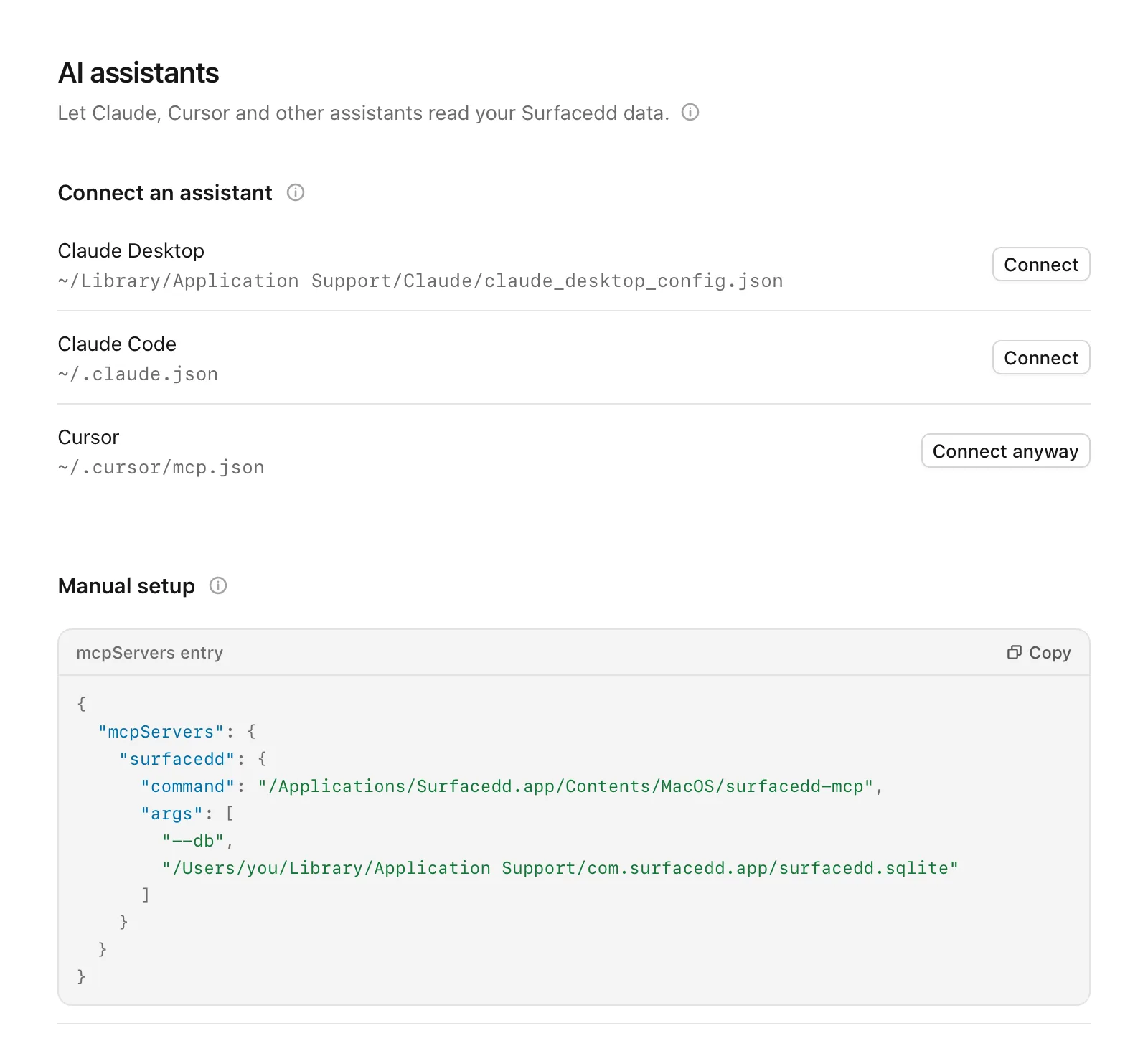
Settings › AI assistants offers one-click install for three clients. After you confirm, the app writes a surfacedd entry into that client's MCP config file, keeping your other servers:
| Client | Config file the app edits | Notes |
|---|---|---|
| Claude Desktop | ~/Library/Application Support/Claude/claude_desktop_config.json (Mac), %APPDATA%\Claude\claude_desktop_config.json (Windows) | Quit and reopen Claude Desktop to load it |
| Claude Code | ~/.claude.json (user scope, every project) | Or run the one-line claude mcp add --scope user surfacedd -- … command the app shows |
| Cursor | ~/.cursor/mcp.json (global) | Available in every workspace |
Before writing, the app copies the existing file to <file>.surfacedd-backup, then replaces it atomically, so a broken edit can't leave you with half a config. If the server binary isn't next to the app (for example in a development build), the install refuses and says why.
Any other MCP client that can run a local stdio server works too: copy the mcpServers entry the app shows (the absolute path to surfacedd-mcp plus --db and your database path) into its config. Claude Code's own docs describe the same claude mcp add … -- <command> pattern for stdio servers (Claude Code MCP docs), and Cursor reads global servers from ~/.cursor/mcp.json (Cursor MCP docs).
If you've installed the surfacedd command, surfacedd mcp starts the same server, so a client can use {"command": "surfacedd", "args": ["mcp"]} with no paths. The Claude Code plugin is set up that way and adds six skills.
The one-click installers are implemented and unit-tested against sample config files. We are still confirming them against the latest releases of each client, so if a client doesn't show the tools after a restart, paste the entry by hand; the MCP setup guide covers each client. We don't claim support for clients we haven't tested, such as the ChatGPT desktop app.
On the Microsoft Store build, Windows packages the server with an app execution alias, so the config runs surfacedd-mcp.exe by name instead of an absolute path.
The tools your assistant gets
Every tool returns compact JSON, capped at 64 KB and 200 rows, so a single call can't flood the assistant's context.
| Tool | Area | What it returns |
|---|---|---|
list_brands | AI visibility | Brands and people tracked in Surfacedd, with their latest run and visibility. |
visibility_summary | AI visibility | Visibility, share of voice, rank, top-3, recommendation and citation rates (with 95% ranges and counts), by engine and category. |
list_prompts | AI visibility | Tracked prompts with visibility, average position and intent. |
prompt_results | AI visibility | One prompt per engine and run: whether the brand was named, its rank, the brands named and the citation count. |
get_answer | AI visibility | One stored AI answer in full: text, mentions, citations, fan-out queries, model and cost. |
search_answers | AI visibility | Full-text search over stored answers; returns snippets with engine, date and prompt. |
competitor_share | AI visibility | Share of voice per competitor and the answers competitors win without the brand. |
top_sources | AI visibility | Domains or pages cited in answers, with citation counts and trend. |
fanouts | AI visibility | Search queries the engines ran while answering, by frequency. |
list_runs | AI visibility | Recent runs with status, answers collected and cost. |
list_tasks | AI visibility | Recommended tasks with the evidence behind each. |
humans_summary | AI visibility | How AI answers describe a person: recognition, accuracy and discovery. |
crawler_stats | AI visibility | AI crawler visits per bot and day from imported server logs. |
site_audit_issues | AI visibility | Issues found by the latest site audit. |
agent_readiness | AI visibility | Agent readiness of the brand's website from the latest check: Reach, Understand and Act scores 0–100, failing rules with evidence and copyable fixes, informational findings on emerging agent protocols, and what changed since the previous check. |
estimate_run_cost | AI visibility | What running a report would cost (estimate only; this tool never starts a run). |
gsc_summary | Search Console and GA4 | Google Search Console clicks, impressions, CTR and average position for the brand's linked property, with the comparison period, daily trend and device/country split. |
gsc_top | Search Console and GA4 | Top Search Console queries or pages (whole weeks) with clicks, impressions, CTR, position and the change against the comparison weeks. |
gsc_page_queries | Search Console and GA4 | The Search Console queries one page ranks for, with clicks, impressions, CTR and position. |
gsc_opportunities | Search Console and GA4 | Quick wins from Search Console: queries almost on page one (positions 8–20) or seen but rarely clicked (CTR under half of what the position usually gets), ranked by potential clicks. |
gsc_drop_diagnosis | Search Console and GA4 | Deterministic explanation of a click change between two whole-week windows: lost and new queries, impressions, position and CTR effects, unattributed (anonymized) clicks, lost pages, device and country split, data gaps and Google update annotations. The parts sum to the total change. |
ga4_traffic | Search Console and GA4 | Google Analytics 4 sessions, engaged sessions and key events by channel group, source or landing page, with the comparison period. |
ai_traffic | Search Console and GA4 | Visits from AI assistants (ChatGPT, Perplexity, Gemini, Copilot, Claude, …) in Google Analytics 4: GA4's AI Assistant channel when present, else referrer rules; by assistant and landing page. |
product_share | AI visibility | Which of the brand's products AI answers name and recommend, and whose products win instead: mention rate, category share of voice, average rank and recommended rate with 95% ranges, by engine, market and intent. |
product_results | AI visibility | One product's mention and recommended rates by engine, the answers naming it, the pages those answers cite and the rival products named alongside. |
25 tools, all read-only: none starts a run, spends money or reads your API keys.
The tools fall into five groups:
- AI visibility: brands, prompts, per-prompt results, full answers, full-text search over answers, visibility summary with 95% ranges, competitor share and the prompts competitors win without you, cited sources, fan-out queries, runs and tasks with their evidence.
- Products:
product_shareandproduct_resultsreport which of your products AI names and recommends, and whose products win instead, when you track a catalogue with product tracking. - Website: latest site-audit issues, AI-crawler visits from imported logs, and
agent_readiness, which returns the Reach, Understand and Act scores with failing rules, evidence and copyable fixes from your last agent readiness check. - Google data: seven Search Console and GA4 tools, including a deterministic click-drop diagnosis and AI-assistant traffic, once you connect Google in the app.
- People:
humans_summaryfor a Humans profile: recognition, accuracy and discovery.
Why it can't spend money or leak your keys
The server is built so that the worst a confused assistant can do is read your own data:
| Risk | How it's prevented |
|---|---|
| Starting a paid run | No tool runs anything. estimate_run_cost returns an estimate only; the planned request_run tool is not offered. |
| Reading API keys | Keys live in the OS keychain, which the server never opens. The database holds no keys. |
| Sending data somewhere | The server makes no network calls at all. Your assistant still sends tool results to its own AI provider, as with any MCP server. |
| Changing your data | The database is opened read-only for every call. |
| Large responses | Results capped at 64 KB and 200 rows. |
That last row of the first table matters: the server keeps Surfacedd's data on your machine, but once your assistant reads a result, that text goes to whichever AI provider runs the assistant. The MCP specification asks hosts to get your consent before invoking tools; Claude Desktop, for example, asks before each tool call (MCP: connect to local servers).
Eight questions to ask your assistant
These are worked examples against the app's sample workspace, a fictional CRM brand called Lumen CRM with competitors such as Northwind CRM and Pipewell. Each question names the tool the assistant would typically call.
- "How visible is Lumen CRM in AI answers this month, by engine?" →
visibility_summary. Returns visibility, share of voice, average rank, top-3 and citation rates, each with a 95% range and the answer counts behind it. - "Which prompts does Northwind win without us?" →
competitor_share, thenprompt_resultsfor the prompts it lists. - "Show me the ChatGPT answer where we dropped out of the top three." →
search_answers, thenget_answerfor the full text, citations, fan-outs, model and cost. - "Which pages do AI engines cite most for our category, and is any of them ours?" →
top_sources. - "What searches did the engines run while answering?" →
fanouts. Useful for spotting topics you don't have a page for. - "What should we fix first, and what's the evidence?" →
list_tasks. Each task carries the answer IDs, page URLs or metric changes that justify it. - "Is GPTBot or ClaudeBot hitting errors on our site?" →
crawler_statsfrom your imported logs, withsite_audit_issuesalongside. - "Why did organic clicks drop last week, and did AI traffic change?" →
gsc_drop_diagnosisandai_traffic, after you connect Search Console and GA4.
Search Console and GA4 through MCP
When you connect Google in the app, Surfacedd syncs Search Console and GA4 data to your computer, and seven MCP tools read it: gsc_summary, gsc_top, gsc_page_queries, gsc_opportunities, gsc_drop_diagnosis, ga4_traffic and ai_traffic. The read queries live in the shared core library, so the MCP binary stays network-free even for Google data: it reads what the app already synced and never calls Google itself.
The drop diagnosis is deterministic: it splits a click change into lost and new queries, impressions, position and CTR effects, lost pages, device and country, and the parts sum to the total. Your assistant explains a computed answer instead of guessing one. More on the data side is on the Search Console and GA4 feature page.
Licence states
The MCP server answers only on a computer where Surfacedd is activated. It checks the licence offline, on every request: it verifies the signature on the licence file the app already stores and that it belongs to this computer, and makes no network call to do it. Once a computer has been activated, reading your own data is allowed in every licence state, including read-only after a refund, a revoked licence, or when the licence server can't be reached, because the data is yours. Listing the tools always works, so your assistant can tell you to activate first. Runs, schedules and paid calls stop in the app when a licence is read-only; the MCP server never did those things anyway.
What it costs
The MCP server is free to use: it's part of the licence (Launch price $29, $79 after 23:59 UTC on January 30, 2027.$79 once.) and every tool call is a local database read. The only costs involved are your assistant's own model usage, billed by its provider, and the AI answers you collect in Surfacedd beforehand. For example, 25 prompts asked weekly on the default engines costs about $3.75 a month in provider fees; the pricing page shows the full breakdown.
What it doesn't do
Sources
Fair questions
Does the MCP server send my data to Surfacedd?
No. The server makes no network calls at all, and Surfacedd has no server that receives your answers or reports. It reads the local database and returns results to the assistant that started it. Bear in mind that your assistant then sends those results to its own AI provider, such as Anthropic for Claude, as part of the conversation, exactly as with any other MCP server.
Can my assistant run a report and spend my API credit?
No. None of the tools start a run or call a paid API. The closest is estimate_run_cost, which returns what a report would cost and stops there. A tool that queues a run under a spending cap you set is planned for a later version and will be off by default, so nothing changes unless you turn it on.
Which AI assistants work with it?
Any MCP client that can launch a local stdio server. The app installs itself into Claude Desktop, Claude Code and Cursor with one click, and shows a ready-to-paste config entry for other clients. We're still confirming the one-click installers against the latest client releases, so pasting the entry by hand is the fallback if the tools don't appear after a restart.
Do I need to keep the Surfacedd app open?
No. The assistant starts surfacedd-mcp itself and the server reads the database file directly. The app only needs to be open to collect new answers, run scheduled reports or sync Google data. If the app is collecting answers while you ask questions, the server still reads safely, because the database allows reads during writes.
What happens if my licence expires or I get a refund?
Your assistant can still read everything. The MCP server checks only that this computer was activated, offline, and then allows reads in every licence state, read-only and revoked included. In read-only mode the app stops new runs, schedules and paid calls, but viewing, exporting and MCP reads keep working, because the data on your computer belongs to you.
Is this the same as the SEO Copilot?
They share the same read tools. The Copilot is a chat inside Surfacedd that uses your own model key, can also call paid keyword and SERP research tools after asking you, and turns answers into an action plan you can add to Tasks. The MCP server gives an outside assistant the free, read-only tools only, so you can work in the assistant you already use.
Can a teammate query my data over MCP?
Not directly. The server runs as a local process on your computer and has no network listener. To share data, export the brand's answers as JSON, NDJSON or CSV, or send a full encrypted workspace export that a colleague imports into their own copy of Surfacedd; their assistant can then read their copy.
How we research, write and correct pages: read our editorial policy.