Agent readiness: make sure AI agents can read your site and act on it
AI assistants now fetch pages, compare offers and fill in forms for people. This guide shows how to check that they aren't walled out, confused by your markup or stopped by a CAPTCHA, using each vendor's own documentation.
By the Surfacedd teamUpdated 15 min readMarkdown
On this page
Short answer
Agent readiness is how well AI agents can use your website for a person: reach the pages (robots.txt, bot walls, server-rendered content), understand them (structured data, price in the HTML, landmarks) and act on them (labelled forms, named buttons, no login wall or CAPTCHA). It removes blockers; no vendor says it raises recommendations.
What is agent readiness?
Agent readiness is a measure of whether an AI agent, working for a person, can get to your pages, make sense of what they offer and complete the action the person asked for. It is the difference between an assistant saying "I couldn't access that site" and an assistant that reads your pricing, finds the right plan and opens your contact form with the fields filled in.
It answers three questions, in order, because each depends on the one before:
| Question | Name | What fails in practice |
|---|---|---|
| Can the agent get to the page at all? | Reach | A robots.txt rule, a firewall challenge, a 403, or a page whose text only appears after JavaScript runs |
| Can it tell what the page is and what it offers? | Understand | No structured data, a price that exists only in a script, no <main> element, links that all say "read more" |
| Can it do something for the person? | Act | Form fields without labels, icon buttons without names, a login wall in front of "add to cart", a CAPTCHA on the contact form |
Agent readiness overlaps with technical SEO and with accessibility, and that is no accident. Browser agents read the same signals screen readers do. Google's guide to AI features says browser agents may analyse screenshots, inspect the DOM and interpret the accessibility tree (Google Search Central). A button a screen reader can't name is a button an agent has to guess at.
What agent readiness is not: a ranking factor or a recommendation lever. No AI vendor has said that agent-friendly markup makes its assistant recommend you more often. The point is narrower and more certain. If an agent is blocked or confused, it can't use your site, whatever it thinks of you. That is also the line we hold in this guide: every check below removes an obstacle that a vendor or a standard documents, and none promises an outcome.
Who are the agents visiting your site?
Three kinds of automated visitor come from AI companies, and they behave differently enough that one robots.txt rule rarely fits all three.
| Kind | Examples | When it visits | robots.txt, per the operator |
|---|---|---|---|
| Crawler (training or search index) | GPTBot, OAI-SearchBot, ClaudeBot, PerplexityBot | On its own schedule | Followed |
| User-triggered fetcher | ChatGPT-User, Claude-User, Perplexity-User, Google's user-triggered fetchers | When a person asks the assistant about your page | Mixed: OpenAI says robots.txt rules "may not apply" to ChatGPT-User; Perplexity says Perplexity-User generally ignores them; Anthropic says its bots honour them |
| Browser agent | ChatGPT agent's cloud browser, Claude-Agent, Google-Agent | When a person asks the assistant to do a task on your site | Mostly not stated. These are real browsers, identified by a token, a signature or an IP list |
The browser agents are the newest and the least documented. OpenAI says signed requests from ChatGPT's cloud browser carry a Signature-Agent: "https://chatgpt.com" header with HTTP Message Signatures (RFC 9421), and publishes the public keys at chatgpt.com/.well-known/http-message-signatures-directory (OpenAI agent access). Anthropic says Claude-Agent adds compatible; Claude-Agent/1.0 to an ordinary browser user agent, comes from IPs listed at claude.com/.well-known/sail, and that allowing or blocking it decides whether your users can use Claude to complete tasks on your site (Anthropic).
Two practical consequences follow. A robots.txt Disallow is not a dependable way to keep agents out, because several operators say their user-triggered fetchers may not follow it. And an Allow is not a dependable way to let them in, because your firewall decides independently of robots.txt. You have to check both.
Training opt-outs are a separate decision. Blocking GPTBot or using the Google-Extended token keeps future content out of model training. It doesn't stop an agent fetching a page for a user, and it shouldn't, if you want assistants to be able to help your customers.
Reach: can agents get to your pages?
Reach fails more often than the other two categories, and it fails silently: your analytics show nothing, because the agent never got a page to run your tag on.
Robots.txt rules for search crawlers and user fetchers
Read your robots.txt group by group for the tokens that matter: the AI search crawlers (OAI-SearchBot, Claude-SearchBot, PerplexityBot, Googlebot, Bingbot) and the user-triggered fetchers (ChatGPT-User, Claude-User, Perplexity-User). Robots.txt uses the longest matching rule, per RFC 9309, so a narrow Disallow: /pricing beats a broad Allow: /. The robots.txt guide for AI crawlers covers the syntax; for agent readiness, the question is simply whether a fetcher acting for a person is told to stay away from pages the person would want it to read.
Bot walls
A bot wall is a firewall or bot-management rule that serves agents a challenge or an error while browsers get the page. It is the most common reason an assistant reports that it "couldn't access" a site that loads fine for you. The documented markers are specific:
- Cloudflare: every challenge page response carries the header
cf-mitigated: challenge, andchallengeis the only valid value (Cloudflare docs). Blocks and rate limits return 403 and 429. - AWS WAF: CAPTCHA and challenge actions carry the header
x-amzn-waf-action(AWS docs). - Anything else: a 401, 402, 403 or 429 for an agent user agent when a browser user agent gets a 200.
Google's advice for its own agent is unusually concrete. It asks site owners to make the allow rule run before broad cloud or data-centre ASN blocks, to skip interactive CAPTCHAs and JavaScript challenges as well as HTTP blocks, to cover whole journeys (on-site search, detail pages, add-to-cart, booking and the XHR, GraphQL or api.* calls behind them) and to exempt verified agent IP ranges from per-IP rate limits, because many users share the same egress pool (Google: allow Google-Agent).
Worked example: test your own bot wall in two commands
Fetch the same page as a browser and as an agent, and compare the status line and the headers. Replace the URL with one of your key pages:
URL=https://example.com/pricing
curl -s -o /dev/null -D - -A "Mozilla/5.0 (Macintosh; Intel Mac OS X 10_15_7) AppleWebKit/537.36 (KHTML, like Gecko) Chrome/142.0.0.0 Safari/537.36" "$URL" | grep -iE "^HTTP|cf-mitigated|x-amzn-waf-action"
curl -s -o /dev/null -D - -A "Mozilla/5.0 AppleWebKit/537.36 (KHTML, like Gecko); compatible; ChatGPT-User/1.0; +https://openai.com/bot" "$URL" | grep -iE "^HTTP|cf-mitigated|x-amzn-waf-action"
Reading the result:
| Browser | Agent | What it means | What to do |
|---|---|---|---|
HTTP/2 200 | HTTP/2 200 | No wall for unverified clients presenting as this agent | Nothing |
HTTP/2 200 | HTTP/2 403 and cf-mitigated: challenge | Cloudflare is challenging the agent | Allow verified bots and signed agents ahead of your challenge rules |
HTTP/2 200 | HTTP/2 429 | Rate limit hit by the agent token or its IP | Exempt verified agent ranges from per-IP limits |
HTTP/2 403 | HTTP/2 403 | Your test machine is blocked too | Inconclusive; run it from another network |
One caveat matters. Your curl sends the agent's token but isn't the real agent, which is verified by IP range or signature. A pass means unverified clients presenting as that agent get through; a firewall that verifies signatures may treat the real agent better than your test. A fail is still worth fixing, because many rules match on the token alone.
Content that only appears with JavaScript
Many fetchers read the HTML response and never run your scripts. Google's own JavaScript SEO page says not all bots can run JavaScript (Google). The quick test is the same curl: fetch the page and search the output for your headline and your price. If they aren't there, a non-rendering agent sees an empty shell. Server-render or pre-render the main text, headings and links.
Sitemaps and canonicals
Agents that look for "the pricing page" or "the returns policy" start from links and sitemaps. Keep a sitemap that lists canonical URLs with believable lastmod dates, make each page's rel="canonical" point to itself or its true original, and keep key pages within a few clicks of the home page. No primary source names a click depth; treat "three clicks" as a habit, not a rule.
Understand: can agents tell what each page offers?
Once an agent has the HTML, it has to work out what the page is: a product, an article, a contact page. This is where markup does its work.
Structured data is useful, but don't oversell it. Google says structured data isn't required for generative AI search and there's no special schema.org markup you need to add, while recommending it for rich-result eligibility (Google). For agent readiness the useful types are Organization on the home page, Product with an Offer (price, currency, availability, and a GTIN or SKU where you have one) on product pages, and Article and BreadcrumbList where they apply. The structured data guide shows a complete @graph.
Put the price and stock in the HTML. A price that is injected by a script after load, or that differs from the price in your JSON-LD, is the most common confusion on shop pages. Mastercard's agentic commerce guide asks merchants for price, availability and checkout fields in the initial HTML (Mastercard). If you sell products and want them named in answers, the guide to getting products recommended by AI covers the catalogue side.
Mark the main content. One <main> element, header, nav and footer landmarks (WAI-ARIA 1.2), a single H1 and no skipped heading levels let an agent find the part of the page that matters.
Say where links go. "Read more" and "click here" give an agent nothing to choose between. "Compare plans" and "Returns policy" do. This is WCAG 2.2 success criterion 2.4.4, link purpose (W3C).
llms.txt is optional. It is a proposal from 2024 (llmstxt.org). Google's mythbusting section says you don't need machine-readable AI text files to appear in Google Search. Publish one if you like; our llms.txt guide explains the format, and we don't count it as a readiness win.
Act: can an agent use your forms and buttons?
This is the part only agents need, and the part most sites have never tested. Agents find controls by their accessible name. Anthropic's browser tool reads the accessibility tree first, as role plus name, before falling back to text and screenshots (Anthropic docs), and web.dev's guidance for agent-friendly sites lists the same handful of habits: native <button> and <a> elements, <label for> on inputs, no transparent overlays over clickable elements, and a layout that doesn't shift under a screenshot (web.dev).
Worked example: one contact form, before and after
Before: the form looks fine to a person, but to an agent it is two unnamed text boxes and an icon.
<form action="/contact" method="post">
  <input type="email" placeholder="Your email">
  <textarea placeholder="How can we help?"></textarea>
  <div class="send" onclick="submitForm()"><svg>…</svg></div>
  <div class="g-recaptcha" data-sitekey="…"></div>
</form>
Four problems, each one documented:
| Problem | Why an agent struggles | Standard |
|---|---|---|
| Placeholders instead of labels | A placeholder is not an accessible name, so the field is unnamed | WHATWG HTML label, WCAG 3.3.2 |
div with an onclick | Not exposed as a button in the accessibility tree; no name | WCAG 4.1.2 |
| Icon with no text | Even as a <button> it would have no name | WCAG 4.1.2 |
| CAPTCHA on the primary action | Google asks sites to skip interactive CAPTCHAs for its agent, because agents are not meant to solve them | Google allow-google-agent |
After: the same form, readable by people, screen readers and agents.
<form action="/contact" method="post">
  <label for="email">Email</label>
  <input id="email" name="email" type="email" autocomplete="email">
  <label for="message">How can we help?</label>
  <textarea id="message" name="message"></textarea>
  <button type="submit" aria-label="Send message"><svg aria-hidden="true">…</svg></button>
</form>
If spam is the reason for the CAPTCHA, move the defence off the primary action: rate limits that exempt verified agents, a honeypot field hidden from people and assistive technology, or server-side scoring. Keep "add to cart", "book" and "contact" reachable without signing in; a login is fine at checkout, where the person can step in.
Which agent protocols are worth adopting now?
Most of the new agent standards are months old. Some are worth a look if they fit your business; none is something you are behind on today.
The rule of thumb: fix Reach, Understand and Act first, because every agent benefits from them. Adopt a protocol when a platform you already use supports it, or when a partner asks for it. Agentic commerce explains where the shopping protocols fit together.
Does agent readiness help you get recommended?
Not directly, and nobody can show that it does. The vendors document what blocks or confuses their agents; none of them says that an agent-ready site gets recommended more often. Google is explicit that structured data and AI text files are not needed for its AI features. The only primary-source claim of a visibility benefit we found is a Bing Webmaster blog post saying structured content such as FAQs and tables increases the chances of being cited in multi-source answers (Bing, 2025-11-20), and that is one engine's statement, not a measurement.
So treat agent readiness the way you treat site speed or uptime: a condition, not a campaign. Whether AI recommends you depends on what it reads about you elsewhere, which is the subject of our GEO guide. Agent readiness makes sure that when an assistant does send a person your way, or does try to act for them, your site doesn't stop it at the door.
A 30-minute agent readiness check
Run these on your home page and one key page (pricing, a product, or contact). The AI agent readiness checklist expands each line into a full audit.
| # | Check | How to test it | Pass when |
|---|---|---|---|
| 1 | AI search crawlers allowed | Read robots.txt groups for OAI-SearchBot, Claude-SearchBot, PerplexityBot | No Disallow covers the page |
| 2 | User fetchers not disallowed | Same, for ChatGPT-User, Claude-User, Perplexity-User | No Disallow covers the page |
| 3 | No bot wall | The two curl commands above | Agent gets the same status as the browser |
| 4 | Main text in the HTML | curl -s URL | grep -i "your headline" | Headline and price appear |
| 5 | Sitemap and canonical | Open /sitemap.xml; view source for rel="canonical" | Page listed; canonical points to itself |
| 6 | Organization and Product markup | Paste the URL into Google's Rich Results Test | Parses; Offer has price, currency, availability |
| 7 | Landmarks and headings | Browser dev tools, accessibility pane | One <main>, one H1, no skipped levels |
| 8 | Labelled fields and named buttons | Accessibility pane on your main form | Every field and button has a name |
| 9 | No login wall or CAPTCHA on the main action | Open the page in a private window | Contact, booking or add-to-cart works signed out, without a challenge |
How Surfacedd checks agent readiness
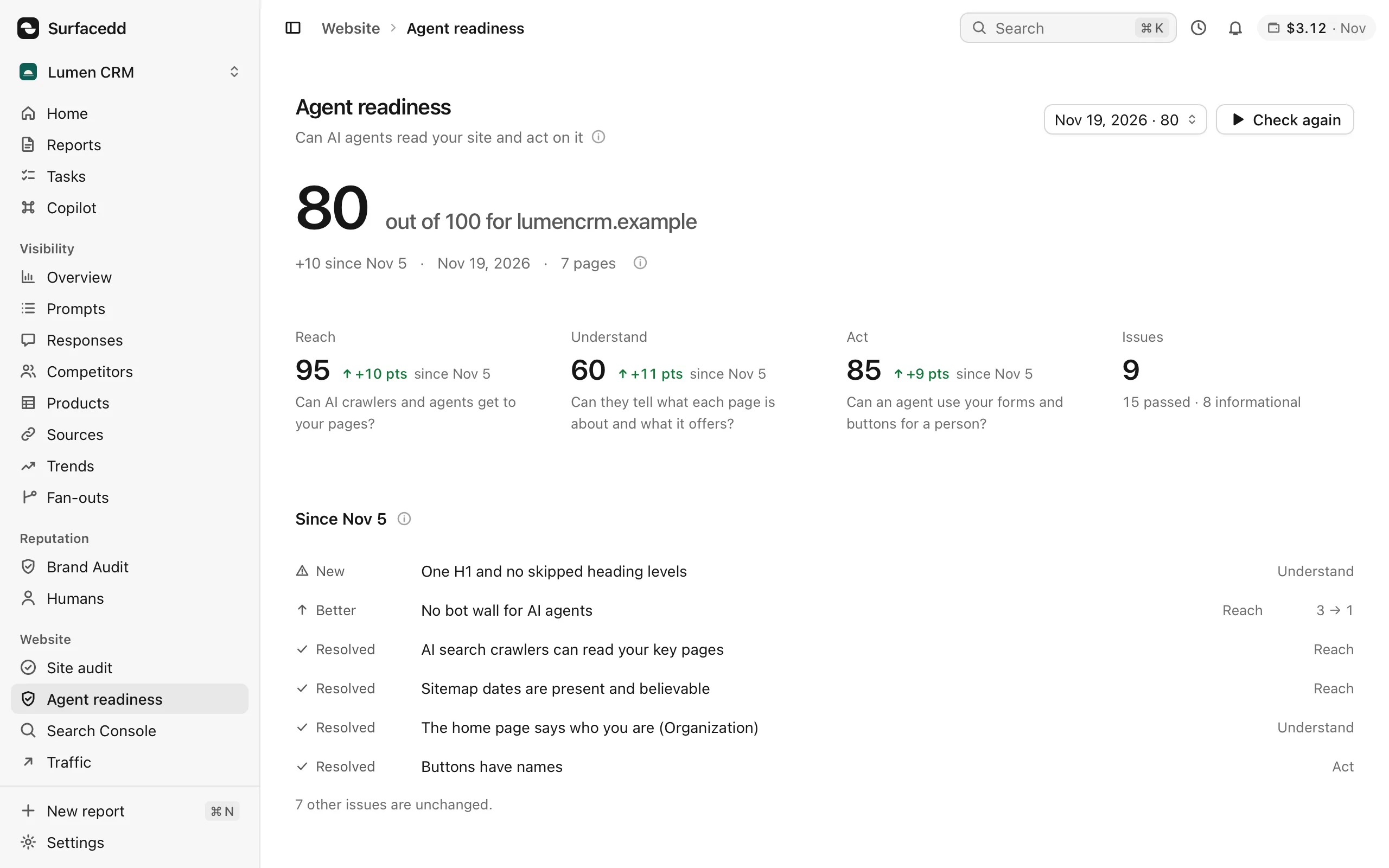
Surfacedd runs an agent readiness check as the last phase of every site audit, on your computer, with no AI calls and no charge per check. The same site gives the same report, and because it runs with the audit, your weekly audit schedule re-checks it and shows what changed since the last run.
The check scores Reach, Understand and Act from 0 to 100 each, from a versioned table of weighted rules. Every rule cites the vendor page or standard it comes from, and every issue shows its evidence (the URL, the fetched snippet, the response header or the robots.txt line) with a fix you can copy: a robots.txt group, an HTML snippet or a firewall rule. Emerging protocols such as UCP, MCP discovery, WebMCP and A2A agent cards are reported as information and never scored. The bot-wall test fetches your home page and a key page with a browser user agent and with seven agent user agents, and it says plainly that a pass covers unverified clients presenting as each agent. Content that needs JavaScript is detected with a raw-HTML heuristic, labelled as such, because Surfacedd doesn't render pages.
The check runs at the end of every site audit, so weekly re-scans re-check automatically, and each re-check lists what changed since the last one: new, worse, better or resolved. Results appear on their own Website › Agent readiness screen and as a card on Site audit, and AI assistants connected over MCP can read them through the agent_readiness tool, which the SEO Copilot also uses. The free agent readiness checker runs a lite version of the same rules on your home page and one key page, and the agent readiness feature page lists every rule.
Surfacedd is a desktop app with a one-time licence; see pricing for what's included.
Sources
- Google Search Central: AI features and your website (optimizing for generative AI)
- Google: allow Google-Agent
- Google: JavaScript SEO basics
- OpenAI: agent access for ChatGPT's cloud browser
- OpenAI: overview of OpenAI crawlers
- OpenAI: product feed specification
- Anthropic: Claude-Agent
- Anthropic: browser use tool
- Perplexity: Perplexity crawlers
- Cloudflare: detect a Challenge Page response
- AWS WAF: CAPTCHA and Challenge action behaviour
- web.dev: build agent-friendly websites
- Mastercard: agentic commerce guide
- Universal Commerce Protocol specification overview
- Agentic Commerce Protocol repository
- MCP SEP-2127: server cards
- Chrome: WebMCP
- A2A protocol specification
- IETF: Web Bot Auth HTTP message signatures draft
- RFC 9309: Robots Exclusion Protocol
- W3C WAI-ARIA 1.2
- W3C WCAG 2.2
- WHATWG HTML: the label element
- llmstxt.org
- Bing Webmaster blog: how AI search is changing the way conversions are measured
Fair questions
Is agent readiness the same as accessibility?
They overlap heavily but aren't identical. The Act checks (labelled fields, named buttons, landmarks) are accessibility checks, because browser agents read the same accessibility tree screen readers use. Agent readiness adds things accessibility audits ignore: robots.txt rules for AI fetchers, firewall challenges served to agent user agents, server-rendered prices and structured data. A site that passes WCAG 2.2 has usually done half the work.
Should I block AI agents instead?
That is a legitimate choice, and it is separate from training opt-outs. Blocking user-triggered fetchers and browser agents means people can't ask an assistant to read or act on your pages. If you do block them, do it at the firewall with verified IP lists or signatures, because several operators say their user fetchers may not follow robots.txt. Blocking GPTBot or Google-Extended only affects training.
Does an agent-ready site get recommended more often by ChatGPT?
No vendor says so and we know of no measurement showing it. Agent readiness makes sure assistants aren't blocked or confused when they try to use your site. Whether they recommend you depends on what they read about you across the web, which is a separate piece of work covered in our GEO and brand mentions guides.
Do I need llms.txt or a /.well-known agent file?
Not today. Google says you don't need AI text files to appear in its AI features, and the agent files (UCP profiles, MCP catalogues, A2A agent cards) matter only if a platform you use supports them or a partner asks for one. Fix Reach, Understand and Act first.
How can I tell whether an agent was blocked on my site?
Look for responses your firewall served to agent user agents: Cloudflare challenge responses carry cf-mitigated: challenge, and blocks show as 403 or 429. Your server logs, or Cloudflare's security events, show the user agent for each request. Our guide to log file analysis for AI crawlers shows how to filter them, and the two-command curl test reproduces most walls.
Will fixing these things cost much?
Usually not. Most fixes are configuration or markup: a firewall rule placed before your bot rules, a robots.txt group, labels on form fields, a <button> instead of a div, the price rendered in the HTML. The larger jobs are server-rendering a JavaScript-only site and replacing a CAPTCHA with quieter spam defences.
How we research, write and correct pages: read our editorial policy.