The AI agent readiness checklist: make sure agents aren't blocked or confused
Work through three questions in order: can AI crawlers and agents reach your pages, can they understand what each page offers, and can they use your forms for a person? Every check has a quick test, a copyable fix and the primary source behind it.
By the Surfacedd teamUpdated 15 min readMarkdown
On this page
Short answer
An AI agent readiness checklist tests whether AI crawlers and agents can reach your pages, understand them and act on them. Reach covers robots.txt, bot walls, server-rendered content and sitemaps. Understand covers structured data, prices in HTML, landmarks and headings. Act covers labelled forms, named buttons, login walls and CAPTCHAs. Emerging protocols are optional.
How to use this checklist
AI systems reach a website in three ways. Crawlers such as OAI-SearchBot and PerplexityBot index pages so AI search can cite them. User-triggered fetchers such as ChatGPT-User and Claude-User open a page when someone asks an assistant about it. Agents such as Google-Agent and Claude-Agent browse, fill in forms and click for a person. Each can be stopped by a different thing, from a robots.txt line to an unlabeled button.
The checklist follows the same three questions the agent readiness checker and the Surfacedd app score:
- Reach: can crawlers and agents get to your pages?
- Understand: can they tell what each page is about and what it offers?
- Act: can an agent use your forms and buttons for a person?
Work through them in that order. A page an agent can't reach can't be understood, and a page it doesn't understand won't be acted on. Each check below has a weight from 1 to 4, the weight it carries in our score, so you know what to fix first. Checks marked informational cover protocols with early adoption: worth knowing about, never scored.
One thing to keep straight before you start: none of these checks is known to make AI assistants recommend you more. No primary source says so. They make sure agents aren't blocked or confused, which removes reasons to be left out. What assistants say about you is a separate question, covered in what is agent readiness.
Reach: can crawlers and agents get to your pages?
1. AI search crawlers may read your key pages (weight 3)
Test: for each AI search crawler, find the robots.txt group that names it, or User-agent: *, and check whether the longest matching rule allows your home, product, pricing and contact pages. Search crawlers include OAI-SearchBot, Claude-SearchBot, PerplexityBot, Googlebot, Bingbot, Applebot and Meta-WebIndexer. The AI crawler checker does this for every crawler in one go.
Fix: give the crawlers you want to cite you their own group:
User-agent: OAI-SearchBot
User-agent: Claude-SearchBot
User-agent: PerplexityBot
Allow: /
Blocking a search crawler keeps your pages out of that engine's live results. Blocking a training crawler such as GPTBot is a separate choice that doesn't affect search; the robots.txt guide covers both. (RFC 9309; OpenAI crawlers)
2. Agents fetching a page for a person aren't disallowed (weight 2)
Test: check the robots.txt rules for ChatGPT-User, Claude-User, Perplexity-User, MistralAI-User, DuckAssistBot, Meta-ExternalFetcher and Amzn-User on the same pages.
Fix: remove the Disallow or narrow it to private paths. These fetchers open a page only when someone asks about it. Note that several operators say their user fetchers may not follow robots.txt at all: OpenAI says robots.txt rules "may not apply" to ChatGPT-User, Perplexity says Perplexity-User "generally ignores" them, and Google says the same of its user-triggered fetchers. So a Disallow is neither a reliable block nor harmless. (Google user-triggered fetchers; Perplexity crawlers)
3. robots.txt can be read (weight 2)
Test: curl -sI https://yoursite.com/robots.txt. A 200, or a 404 if you have no rules, is fine.
Fix: never let it time out or return a 5xx or 429. RFC 9309 says crawlers must then treat the whole site as disallowed, which takes you out of every AI engine at once. (RFC 9309 §2.3.1)
4. No bot wall for AI agents (weight 4, the heaviest)
Test: request a page as a browser and as an agent, and compare:
curl -s -o /dev/null -w "%{http_code}\n" -A "Mozilla/5.0 (Macintosh) Chrome/142.0.0.0 Safari/537.36" https://yoursite.com/
curl -s -D - -o /dev/null -A "Mozilla/5.0 AppleWebKit/537.36 (KHTML, like Gecko); compatible; ChatGPT-User/1.0; +https://openai.com/bot" https://yoursite.com/ | grep -iE "^HTTP|cf-mitigated|x-amzn-waf-action"
A wall is a 401, 402, 403 or 429 for the agent while the browser gets the page, or a challenge: Cloudflare marks every challenge page with the header cf-mitigated: challenge, and AWS WAF sends x-amzn-waf-action: captcha or challenge. (Cloudflare; AWS WAF)
Fix: let verified agents through your firewall or bot manager: skip JavaScript challenges and CAPTCHAs for them and exempt them from rate limits. Google asks site owners to place the allow rule for verified Google-Agent before any ASN, managed-bot or AI-category blocks, and to allow full journeys such as search, add to cart and booking. (Google: allow Google-Agent) On Cloudflare, a custom rule that skips your bot rules for verified bots looks like this:
When incoming requests match: (cf.client.bot)
Then: Skip (remaining custom rules, Super Bot Fight Mode, rate limiting)
Keep in mind a test with a User-Agent string can't prove how the real agent is treated: real agents are verified by IP range or signature. A pass means unverified clients presenting as that agent get through.
5. Main content is in the HTML (weight 3)
Test: look at what a fetcher that doesn't run JavaScript sees:
curl -s -A "ChatGPT-User" https://yoursite.com/pricing | grep -i "your headline"
If your headline, prices and links aren't in the output, the page is built in the browser. Google itself says not all bots can run JavaScript. (Google: JavaScript SEO basics)
Fix: server-render or pre-render the main text, headings and links. Most frameworks have a static or server rendering mode; turn it on for marketing, product and pricing pages first.
6. A sitemap lists your pages, with believable dates (weights 1 + 1)
Test: robots.txt has a Sitemap: line, or /sitemap.xml exists and lists your pages. Most entries have a <lastmod>, none is in the future, and they aren't all the same timestamp.
Fix: set <lastmod> to the date the page's main content last changed, not the time the sitemap was generated. Google uses lastmod only when it's consistently accurate. (Google: build a sitemap)
Sitemap: https://yoursite.com/sitemap.xml
7. Indexable pages are in the sitemap (weight 1)
Test: compare the pages your crawler finds with the sitemap. A page reachable only by links is easier to miss.
Fix: list every indexable page by its canonical URL. This one needs a crawl of the whole site, so the free checker skips it and the app runs it.
8. Canonical URLs are consistent (weight 2)
Test: each page's rel=canonical points at a URL that answers 200 without redirecting; the HTML and any Link header agree; sitemap URLs aren't canonicalized elsewhere.
Fix: point each canonical at the final URL and list only canonical URLs in the sitemap. (Google: consolidate duplicate URLs)
9. Key pages are a few clicks from home (weight 1)
Test: count the links from your home page to product, pricing, contact, booking and cart pages. We flag more than 3, but that's a rule of thumb: no primary source sets a click limit.
Fix: link key pages from the home page or main navigation with plain <a href> links, which Google documents as the crawlable kind. (Google: crawlable links)
10. AI usage preferences (informational)
Two newer ways to state a training preference in robots.txt: an IETF AIPREF group, User-agent: __usage_ai-training, and Cloudflare's Content-Signal: lines. Anthropic honours the AIPREF token; Google and Bing have announced support from 2027. Optional, and separate from search access. (AIPREF draft; Cloudflare Content Signals)
Understand: can they tell what each page offers?
11. The home page says who you are (weight 2)
Test: view the source of your home page and search for application/ld+json with "@type": "Organization" (or a subtype such as LocalBusiness or OnlineStore) carrying name, url and logo.
Fix: add Organization JSON-LD; our schema markup generator writes it with a stable @id. Google says structured data is not required for its AI features and that there's no special markup for them. It does state who you are without guesswork. (Google: Organization; Google: generative AI features)
12. Product pages describe the product and its offer (weight 3)
Test: Product markup has name, image and offers; the Offer has a price above 0, priceCurrency and availability.
Fix: use an Offer that matches the visible price and stock. Google's merchant listings require an Offer; an AggregateOffer is accepted only for product snippets. (Google: merchant listings)
13. Products carry an identifier (weight 1)
Test: each Product has a gtin (or gtin8/12/13/14), sku or mpn.
Fix: add the GTIN where the product has one, otherwise your SKU or the manufacturer part number:
"sku": "TR2-BLK-42",
"gtin13": "0123456789012"
14. Price and stock are in the server HTML (weight 3)
Test: the curl from check 5 on a product page shows the price with its currency and stock wording, and the number equals the markup's price.
Fix: render price and availability in the HTML response and keep them equal to the structured data. Mastercard's agentic-commerce guidance asks for price, availability and checkout fields in the initial HTML. (Mastercard agentic commerce guide)
15. Article, breadcrumb and FAQ markup is complete where you have it (weight 1 each)
Test: Article or BlogPosting has headline, datePublished and author; each BreadcrumbList item has position and name, and all but the last have an item URL; each FAQPage question has a name and an answer text.
Fix: complete or remove incomplete markup. FAQ markup is checked for syntax only: Google has shown no FAQ rich results for any site since 2026-05-07, so it's not a visibility gain. (Google Search documentation updates)
16. Structured data parses (weight 2)
Test: paste each application/ld+json block into a JSON validator. One stray comma and the whole block is ignored.
Fix: correct the syntax; generate JSON-LD from data rather than hand-editing it.
17. Pages mark their main content (weight 2)
Test: each page has exactly one <main> (or role="main"), and the home page has a <nav>.
Fix: wrap the primary content in <main> and menus in <nav>. Browser agents read the accessibility tree, where landmarks say what each region is. (WAI-ARIA 1.2 landmarks; web.dev: agent-friendly websites)
18. One H1, no skipped heading levels (weight 1)
Test: one non-empty <h1> per page; headings go down one level at a time (no h2 straight to h4).
Fix: use the H1 for the page's subject and nest the rest in order. (WCAG 2.2)
19. Links say where they go (weight 1)
Test: look for links named "click here", "read more", "here" or "learn more", and icon links with no name.
Fix: name the destination in the link text, or add aria-label to icon links: <a href="/cart" aria-label="Cart">. (WCAG 2.2: link purpose)
20. llms.txt (informational)
Optional. If you publish one, start it with an H1 and list your key pages; the free llms.txt generator and validator writes and checks the format. Google says Search doesn't use it, and there's no evidence it raises citations; Chrome's experimental Lighthouse agentic category does check for it. Our llms.txt guide reviews the evidence. (llmstxt.org)
Act: can an agent use your forms and buttons?
21. Form fields have labels (weight 3)
Test: every visible input, select and textarea has an accessible name: aria-labelledby, aria-label, a <label for> or a wrapping <label>. A placeholder alone doesn't count.
Fix:
<label for="email">Email</label>
<input id="email" name="email" type="email" autocomplete="email">
Agents find fields by their accessible name. (HTML label element; AccName 1.2)
22. Buttons have names (weight 3)
Test: every <button>, role="button" element and input button has text, an aria-label or an image alt. Icon-only buttons are the usual offenders.
Fix: <button type="submit" aria-label="Add to cart"><svg aria-hidden="true">…</svg></button>, and prefer native <button> elements over clickable <div>s. Anthropic's browser tool, for one, reads each element's role and name from the accessibility tree. (Anthropic browser use tool)
23. Cart, contact and booking work without signing in (weight 3)
Test: open your cart, contact and booking links in a private window. A redirect to a sign-in page, a 401, or a page whose only form asks for a password is a login wall.
Fix: let people, and agents acting for them, add to cart, contact you and book before asking them to sign in; offer guest checkout.
24. No CAPTCHA on primary actions (weight 2)
Test: look for interactive reCAPTCHA, hCaptcha, Turnstile, Friendly Captcha or AWS WAF CAPTCHA widgets on cart, contact, booking or search forms.
Fix: use invisible or risk-based checks, and skip interactive CAPTCHAs for verified agents. Google's guidance for Google-Agent names in-page CAPTCHAs on search and form submits specifically.
25 to 30. Emerging agent protocols (informational)
Adoption is early for all of these. Check them if they fit your business; skip them if not.
| Check | What to look for | Who it's for | Status |
|---|---|---|---|
| Agentic-commerce feed fields | Product markup has title, description, URL, brand, image, price with currency and availability, so a feed can be built from the same data | Online stores. OpenAI's product feed is a file you upload, not read from your pages | Informational |
| Universal Commerce Protocol | /.well-known/ucp answers JSON with a ucp object | Stores that want agent checkout through UCP. Shopify says its stores are UCP-enabled by default | Provisional IANA registration, 2026-10-26 |
| MCP server discovery | /.well-known/ai-catalog.json lists your MCP server card | Sites that run a public MCP server. /.well-known/mcp isn't in the spec | Pre-release extension |
| WebMCP | <form toolname="…"> or modelContext.registerTool() on the page | Sites that want in-page tools for browser agents | Chrome origin trial |
| A2A agent card | /.well-known/agent-card.json with its required fields | Sites that run an A2A agent | Early adoption |
| API catalog | /.well-known/api-catalog (RFC 9727) | Sites with public APIs | Few publish one |
The checklist on one page
| # | Check | Category | Weight | Quick test |
|---|---|---|---|---|
| 1 | AI search crawlers allowed | Reach | 3 | AI crawler checker |
| 2 | User fetchers not disallowed | Reach | 2 | AI crawler checker |
| 3 | robots.txt answers 200 or 404 | Reach | 2 | curl -sI /robots.txt |
| 4 | No bot wall | Reach | 4 | curl as browser vs agent |
| 5 | Content in server HTML | Reach | 3 | curl … | grep headline |
| 6 | Sitemap with real dates | Reach | 1 + 1 | open /sitemap.xml |
| 7 | Pages in the sitemap | Reach | 1 | crawl vs sitemap |
| 8 | Canonicals consistent | Reach | 2 | canonical answers 200 |
| 9 | Key pages ≤3 clicks | Reach | 1 | count links from home |
| 11 | Organization markup | Understand | 2 | view source |
| 12 | Product + Offer complete | Understand | 3 | view source |
| 13 | GTIN, SKU or MPN | Understand | 1 | view source |
| 14 | Price in server HTML | Understand | 3 | curl a product page |
| 15 | Article, breadcrumb, FAQ complete | Understand | 1 each | view source |
| 16 | JSON-LD parses | Understand | 2 | JSON validator |
| 17 | <main> and <nav> | Understand | 2 | view source |
| 18 | One H1, ordered headings | Understand | 1 | heading outline |
| 19 | Descriptive link text | Understand | 1 | search "click here" |
| 21 | Labelled form fields | Act | 3 | inspect forms |
| 22 | Named buttons | Act | 3 | inspect icon buttons |
| 23 | No login wall | Act | 3 | private window |
| 24 | No CAPTCHA on primary actions | Act | 2 | inspect forms |
Checks 10, 20 and 25 to 30 are informational and unscored.
A worked example
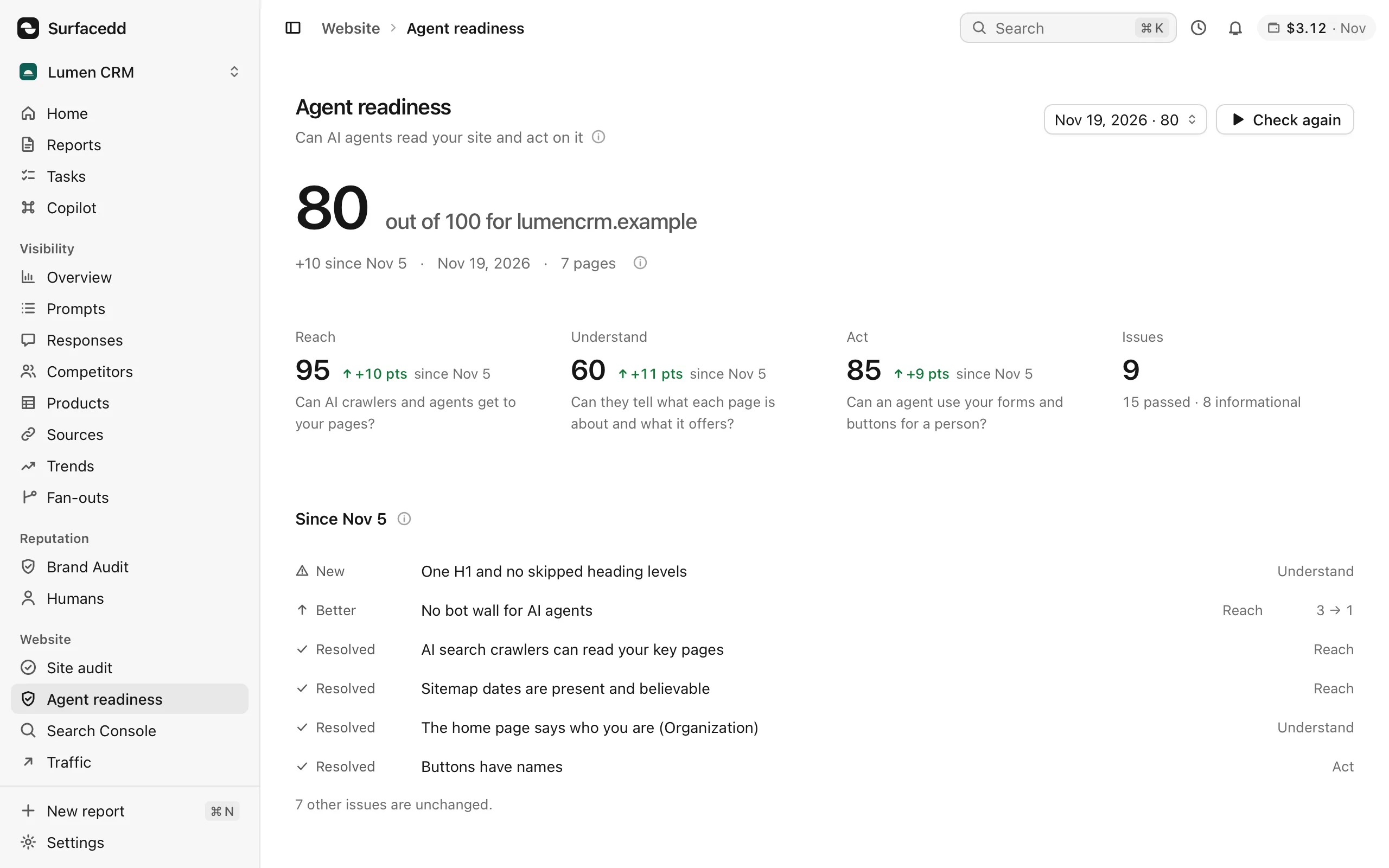
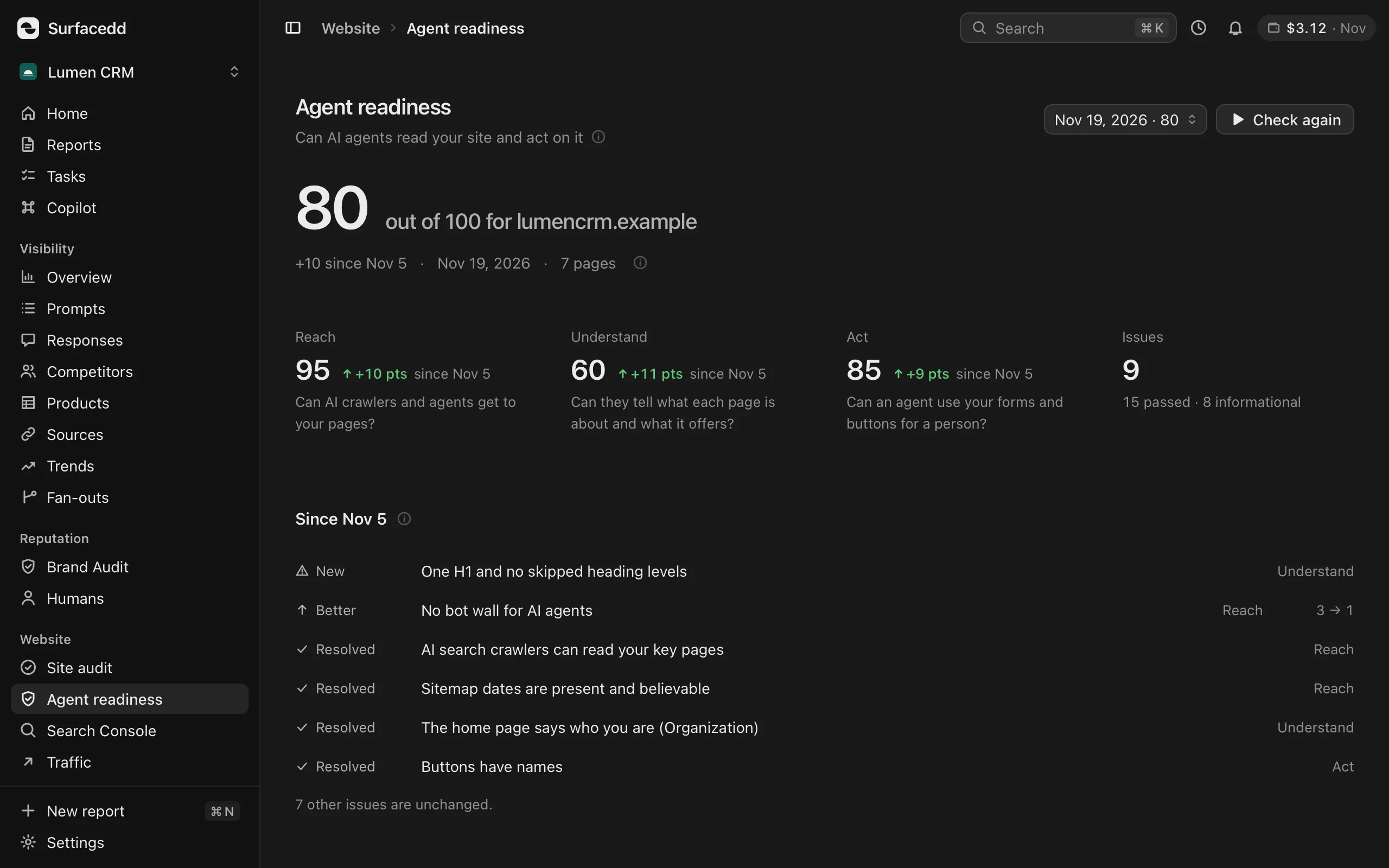
Here is how a re-check reads in practice, from our sample workspace's fictional brand, Lumen CRM. Its check on 19 November scored 80 out of 100, 10 points up on the check of 5 November: Reach 95 (up 10 points), Understand 60 (up 11), Act 85 (up 9).
The "Since Nov 5" list explains the movement rule by rule:
| Change | Rule | Category |
|---|---|---|
| Resolved | AI search crawlers can read your key pages | Reach |
| Resolved | Sitemap dates are present and believable | Reach |
| Resolved | The home page says who you are (Organization) | Understand |
| Resolved | Buttons have names | Act |
| Better | No bot wall for AI agents (3 agents walled before, 1 after) | Reach |
| New | One H1 and no skipped heading levels | Understand |
Seven other issues were unchanged, and nine remained in total, so Understand is where the next round of work sits.
Notice the new issue. Four fixes landed, and in the same fortnight something else broke a heading rule. That's typical: template changes add headings, security plugins add challenges and sitemap generators reset dates. The checklist is worth running on a schedule, not once.
Run it in Surfacedd
The free agent readiness checker runs this checklist on your home page and one key page in about 20 seconds. In the Surfacedd app, agent readiness runs at the end of every site audit, on every page the audit crawls, on your computer at no cost and with no AI calls. Each issue shows its evidence, a copyable fix and its source, and each re-check shows what's new, worse, better or resolved since the last one. The weekly audit schedule re-checks it automatically, and the SEO Copilot can fold the fixes into its action plans. The app is a one-time purchase: Launch price $29, $79 after 23:59 UTC on January 30, 2027.$79 once.
Once the site passes, keep it that way: run an agent readiness check in CI with the surfacedd command or the free surfacedd-check build for hosted runners, so a release that blocks AI agents fails its build instead of shipping.
Sources
- RFC 9309: Robots Exclusion Protocol
- OpenAI: Overview of OpenAI crawlers
- Perplexity: Perplexity crawlers
- Google: User-triggered fetchers
- Google: Allow Google-Agent
- Cloudflare: Detect a challenge page response
- AWS WAF: CAPTCHA and Challenge actions
- Google: JavaScript SEO basics
- Google: Build and submit a sitemap
- Google: Consolidate duplicate URLs
- Google: Make your links crawlable
- Google: Organization structured data
- Google: Merchant listing structured data
- Google: Optimizing for generative AI features
- Google Search documentation updates
- Mastercard: Agentic commerce guide
- W3C: WAI-ARIA 1.2
- W3C: WCAG 2.2
- W3C: AccName 1.2
- web.dev: Build agent-friendly websites
- Anthropic: Browser use tool
- IETF: AIPREF training preference signal draft
- Cloudflare: Content Signals Policy
- llms.txt proposal
Fair questions
What does it mean for a website to be AI agent ready?
It means AI crawlers, assistants and browsing agents can reach your pages, understand what each one says and offers, and complete simple actions such as searching, adding to cart or sending a contact form for a person. In practice that's robots.txt, firewall settings, server-rendered content, structured data and accessible forms and buttons.
Which checks matter most?
The bot wall carries the most weight in our score, followed by AI search crawler access, server-rendered content, product markup, prices in HTML, form labels, button names and login walls. Start with Reach: an agent that's blocked or sees an empty page never gets as far as your markup or your forms.
Does an AI agent ready site get recommended more by ChatGPT?
No primary source says it does, so we don't claim it. These checks make sure agents aren't blocked or confused by your site. Whether an assistant recommends you depends on what it knows about you and which sources it trusts, which you need to measure separately.
How do I test for a bot wall without special tools?
Request the same page twice with curl: once with a browser User-Agent and once with an agent's, such as ChatGPT-User. If the agent gets a 403, a 429 or a cf-mitigated: challenge header while the browser gets a 200, something in front of your site treats agents differently. The free checker runs this for several agents at once.
Are accessibility fixes really agent fixes?
Largely, yes. Browser agents read the accessibility tree alongside screenshots: Anthropic's browser tool reads elements' roles and names first, and web.dev's guidance for agent-friendly sites leans on labels, native buttons and landmarks. A field without a label is as hard for an agent to fill as for a screen-reader user.
Should I implement UCP, WebMCP or an MCP server now?
Only if it fits your business today. These protocols are early: UCP's well-known path has a provisional registration, WebMCP is in a Chrome origin trial, and MCP server cards are a pre-release extension. The established checks above affect every agent now, so do those first and watch the protocols.
How often should I run the checklist?
After any change to your firewall, CDN, theme, checkout or robots.txt, and on a regular schedule regardless. Sites drift: a template update can add a second H1 and a security plugin can start challenging bots. The Surfacedd app re-checks automatically with its weekly site audit.
Do I need to fix the informational items?
No. They're reported so you know where you stand, but they're never scored, because adoption is early and no evidence ties them to better outcomes. llms.txt is the cheapest of them to add; the rest only make sense if you run the corresponding service.
Free tools for this guide
How we research, write and correct pages: read our editorial policy.