Get Google's knowledge panel about you right, and see what AI repeats
A knowledge panel is Google's summary of who you are, generated from the web. You can't request one, but if you have one you can claim it, suggest changes, and fix the sources it draws on, which are often the same sources AI assistants read.
By the Surfacedd teamUpdated 7 min readMarkdown
On this page
Short answer
A Google knowledge panel is an automatically generated box summarising a person, place or organisation. You can't request one. If one exists about you, you can claim it by signing in through an official profile such as YouTube or Search Console, then suggest edits. Fixing the sources it draws on matters most, for the panel and for AI answers.
What is a knowledge panel?
Google describes knowledge panels as "information boxes that appear on Google when you search for entities", meaning people, places, organisations and things. They summarise Google's understanding of the entity from content across the web, sometimes with data from partners, and sometimes with edits suggested by the verified entity itself (Google).
Three facts shape everything else:
- Panels are generated automatically. Google doesn't create or delete them by hand.
- You can't request one. If you don't have a panel, there's no form to get one.
- They change as the web changes. Google updates panels as information on the web changes, and also considers feedback.
For a person, a panel typically shows a name, a short subtitle (such as a job), a description, an image, some facts, and links to social profiles.
How a knowledge panel relates to what AI says about you
The panel and AI answers are different systems, but they lean on the same thing: the public pages about you, and how consistently they agree. Our reasoning, not a documented mechanism: if Google's systems are confident enough about who you are to show a panel, the pages behind that confidence are probably the same consistent, well-linked pages assistants find when they search your name. If your panel shows a namesake's photo or an old job, the sources feeding it are likely feeding assistants too.
So treat the panel as a visible symptom. Correcting it is worth doing for its own sake, because it's the first thing people see when they search your name on Google. The bigger win is fixing the sources underneath, which helps both.
How to claim your knowledge panel
If a panel about you exists, you can claim it to become a verified representative. Google's steps (Google):
- Sign in to a Google Account.
- Search Google for yourself and find the panel.
- Select the option to claim the panel at the bottom of it (on mobile, it may be in the panel's menu or "About" section).
- Review the information shown.
- Sign in to one of the official sites or profiles associated with you that Google lists, such as YouTube, Search Console, Twitter (X) or Facebook.
If Google can't identify an associated official site, it asks for more information to verify your identity. Google also notes that "not all knowledge panels are claimable as of now", so if you don't see the option, check again later.
What you can change, and what you can't
Once verified, you sign in with the same account and choose "Suggest edits" on your panel. Anyone, verified or not, can send feedback through the panel's feedback link, but Google says it can prioritise feedback from a verified person about their own panel (Google).
| Panel element | What Google says you can do |
|---|---|
| Featured image | Suggest a different image, but only if the panel already shows one; Google won't add an image to a panel that has none |
| Title (your name) | Changes considered only with substantial evidence |
| Subtitle | Flag an inaccurate one so a new one is generated; Google doesn't write custom subtitles. You can ask to remove subtitles about family or romantic relationships |
| Description | Not edited directly: contact the source it comes from. If that fails, submit strong evidence, and Google may remove it, but won't write a custom one |
| Social profiles | Suggest new profiles or edit existing ones; the order can't be changed |
| Personal details | Ask to leave out items such as date of birth, marital status or relationships |
| "People also search for" and similar | Changed only where they violate Google's policies |
The pattern is clear: Google changes what its sources support. The description in particular points you back to the source. Which brings us to the work that lasts.
Fix the sources it draws on
Start with the sources you control and work outwards:
- Your canonical page. One page about you, on a domain you control, that opens with your name, current role, organisation, city and field. Mark it up with
ProfilePageandPersonand list your profiles insameAs; the Person schema guide has a complete template. - The profiles you'd use to verify. If you'll claim the panel through YouTube or Search Console, make sure that channel or site states the same facts.
- Consistent profiles. LinkedIn, your company's team page, author pages and speaker bios should use the same name format, title and bio sentence.
- The source of a wrong description. If the panel's description comes from a page you can identify, ask that page's owner to update it, as Google suggests.
- Disambiguation. If the panel mixes you with a namesake, use a consistent qualifier (middle initial, role and company, city) and two-way profile links, so systems can separate you.
The entity SEO guide covers this consistency work in more depth.
Wikipedia and Wikidata, realistically
Wikipedia and Wikidata are widely reused reference sources, so people ask whether they should create entries about themselves. Be realistic.
Wikipedia presumes a person is notable "if they have received significant coverage in multiple published secondary sources" that are reliable and independent of each other and of the subject. For people known for a single event, the guideline's general rule is to "cover the event, not the person" (Wikipedia). Your own site, press releases and interviews in your own words don't establish notability, and Wikipedia discourages writing about yourself. Earn independent coverage first; if an article exists and is wrong, request corrections on its Talk page with sources.
Wikidata has a lower bar. An item is acceptable if it has a valid sitelink to a Wikimedia project, or refers to "a clearly identifiable conceptual or material entity" that can be described with serious, publicly available references, or fulfils a structural need (Wikidata). A founder of a company that already has an item can often qualify. Cite independent references, keep the description neutral, and follow its rules on living people.
Neither earns you a panel by itself. Both, if accurate, give machines a stable, shared identifier for you.
Signals you control: a checklist
| Signal | Done when |
|---|---|
| Canonical profile page | Opens with your one-sentence bio; facts match your fact sheet |
| ProfilePage + Person markup | Validates; sameAs lists only your own profiles |
| Two-way profile links | Each profile links to your page; your page links to each with rel="me" |
| Verification account | The YouTube channel, site or social profile you'd verify with states the same facts |
| Stale bios | Old speaker pages, directories and team pages updated or removed |
| Namesake qualifier | Same middle initial, title and company everywhere |
In Surfacedd
Surfacedd's Humans module measures the other half of the picture: what AI assistants say about you, for your own profile or a client's with written authorization. It asks assistants questions such as "Who is {name}?" through their APIs, checks every answer against your fact sheet, and lists the pages cited in answers that got a fact wrong, the same sources that often feed a panel.
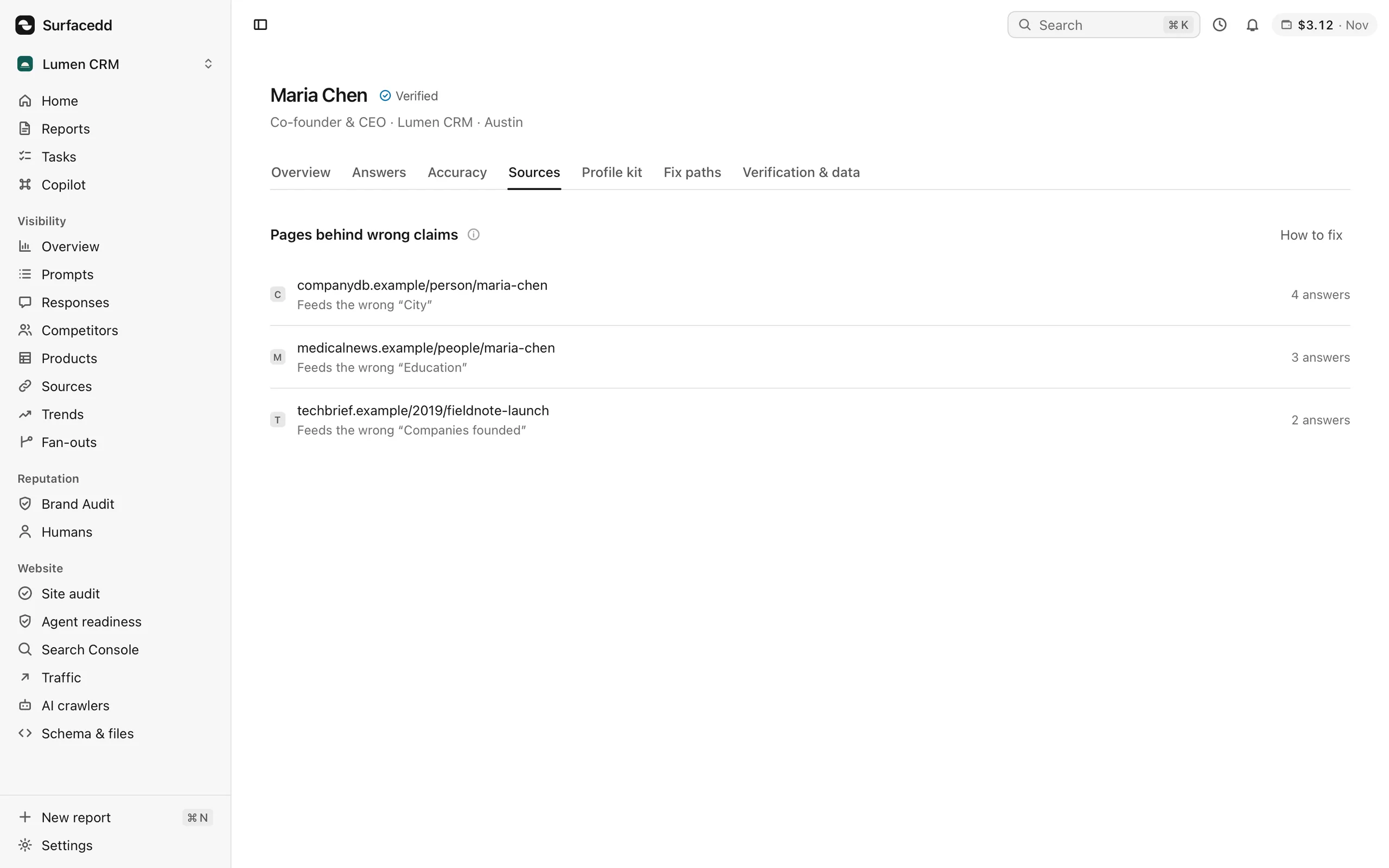
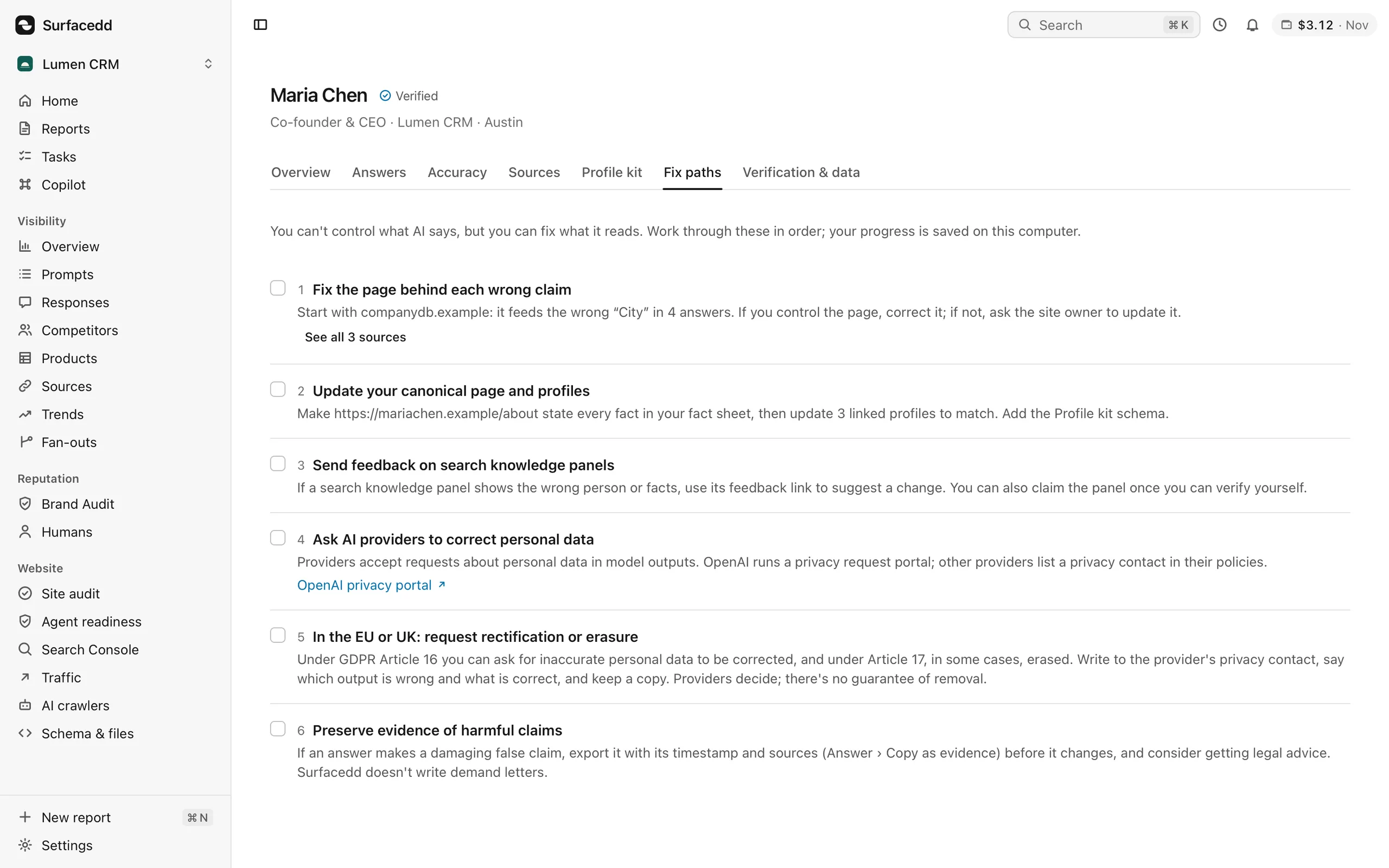
Knowledge-panel feedback is step three on its Fix paths tab, after fixing the cited pages and updating your canonical page and profiles.
Founders and executives can see the company-link questions in executive reputation in AI; everyone else can start at Humans.
Sources
Fair questions
How do I get a knowledge panel?
You can't request one. Google generates panels automatically when its systems have enough consistent information about an entity. What you can do is make that information exist and agree: a clear canonical page with Person markup, consistent profiles, and independent coverage. If a panel appears, claim it.
Who can claim a knowledge panel?
The person it's about, or their official representative. You claim it by signing in to an official site or profile Google associates with you, such as YouTube, Search Console, X or Facebook. If Google can't find one, it asks for more information. Not every panel is claimable yet.
Can I change the description on my knowledge panel?
Not directly. Google says descriptions come from sources, so contact the source that published it and ask for an update. If that doesn't work, you can submit strong evidence, and Google may remove the description, but it won't write a custom one for you.
My panel shows someone else's photo. What can I do?
If the panel already has an image, a verified person can suggest a replacement through "Suggest edits"; anyone can send feedback. If the mix-up goes beyond the photo, it's a disambiguation problem: use a consistent qualifier and two-way profile links so systems can separate you from the namesake.
Does a knowledge panel change what ChatGPT says about me?
Not directly; they're separate systems. But both draw on public pages about you, so the work that corrects a panel, consistent profiles and fixed sources, tends to improve AI answers too. Check assistants' answers before and after, and look at which pages they cite.
Should I create a Wikipedia article about myself?
No. Wikipedia requires significant independent coverage and discourages writing about yourself. Earn that coverage first. Wikidata has a lower bar and can be appropriate with independent references, for example as the founder of a company that already has an item.
How we research, write and correct pages: read our editorial policy.