Spot fake Googlebot and fake AI crawlers in your logs
A user agent is a string anyone can type. Check the IP instead: reverse DNS for Google, Bing and Apple, published IP lists for OpenAI, Anthropic and Perplexity.
By the Surfacedd teamUpdated 8 min readMarkdown
On this page
Short answer
A fake Googlebot is a request that claims a crawler's user agent but comes from someone else's server. To verify, check the IP: a forward-confirmed reverse DNS lookup for Googlebot, Bingbot and Applebot, or a match against the JSON IP list that OpenAI, Anthropic and Perplexity publish. Meta and ByteDance publish neither, so their bots can't be verified.
Why fake crawlers exist
Fake crawlers exist because many sites let anything calling itself Googlebot through. A scraper that sends Googlebot or GPTBot in its user agent often skips rate limits, paywalls and bot challenges that would stop an unknown client. Nothing in HTTP stops a client from claiming any name it likes.
That causes two problems for anyone measuring AI visibility. Your crawler numbers are inflated, so you may think ChatGPT reads your site daily when most "GPTBot" traffic is a scraper. And allow-listing by user agent opens a hole: whatever you exempt for real crawlers, the fakes get too.
The fix is to check where a request came from, not what it says it is. Every major search engine and most AI operators publish a way to do that.
Two ways to verify a crawler
There are two methods, and the operator decides which one you can use.
| Method | How it works | Operators that support it (our catalog) |
|---|---|---|
| Forward-confirmed reverse DNS | Look up the hostname for the IP, check it ends in the operator's domain, then look the hostname up again and confirm it returns the same IP | Google, Microsoft (Bing), Apple, Common Crawl, Amazon (Amazonbot) |
| Published IP list | Download the operator's JSON list of CIDR ranges and check whether the IP falls inside one | OpenAI, Anthropic, Perplexity, Google, Microsoft, Apple, Common Crawl, DuckDuckGo, Mistral |
The forward step in reverse DNS matters. Whoever controls an IP block can make its reverse record say anything, including crawl.googlebot.com. Only the real domain owner can make the forward lookup of that name point back to the IP.
Verify Googlebot and Bingbot (reverse DNS)
To verify Googlebot, run a reverse lookup on the IP from your log, check the domain, then run a forward lookup on the name you got back. Google's documented example:
$ host 66.249.66.1
1.66.249.66.in-addr.arpa domain name pointer crawl-66-249-66-1.googlebot.com.

$ host crawl-66-249-66-1.googlebot.com
crawl-66-249-66-1.googlebot.com has address 66.249.66.1
The name ends in googlebot.com and resolves back to the same IP, so this is Googlebot. Google lists three acceptable domains: googlebot.com, google.com and googleusercontent.com. Its common crawlers use crawl-…googlebot.com or geo-crawl-…geo.googlebot.com, while user-triggered fetchers use …gae.googleusercontent.com or google-proxy-…google.com. (Google)
Google also publishes the same ranges as JSON, split by crawler type: common crawlers, special-case crawlers, user-triggered fetchers and user-triggered agents. Matching against those files is faster than DNS when you check thousands of IPs. (Google)
Bingbot works the same way with a different suffix. The reverse name must end in search.msn.com, and the forward lookup must return the original IP. (Bing Webmaster Blog) That 2012 post predates Microsoft's IP list; today Bingbot's ranges are also published as JSON at bing.com/toolbox/bingbot.json.
Applebot uses applebot.apple.com for reverse DNS and publishes a JSON list at search.developer.apple.com/applebot.json. (Apple)
Verify OpenAI, Anthropic, Perplexity and others (IP lists)
The AI-native operators don't support reverse DNS. Instead they publish JSON files of CIDR ranges in the same prefixes format Google uses. A request is genuine when its IP falls inside the list for the bot it claims to be.
| Crawler | Published IP list |
|---|---|
| GPTBot | https://openai.com/gptbot.json |
| OAI-SearchBot | https://openai.com/searchbot.json |
| ChatGPT-User | https://openai.com/chatgpt-user.json |
| ClaudeBot, Claude-SearchBot, Claude-User | https://claude.com/crawling/bots.json (one list for all three) |
| PerplexityBot | https://www.perplexity.ai/perplexitybot.json |
| Perplexity-User | https://www.perplexity.ai/perplexity-user.json |
| DuckAssistBot | https://duckduckgo.com/duckassistbot.json |
| MistralAI-User | https://mistral.ai/mistralai-user-ips.json |
Note that OpenAI publishes one list per bot. An IP in chatgpt-user.json that claims to be GPTBot is a real OpenAI address sending the wrong name, which is rare but worth flagging rather than calling it fake. Anthropic says plainly that an IP on its list "indicates that the crawler is coming from Anthropic". (Anthropic)
This short Python script checks one IP against any of these lists. It uses only the standard library:
import ipaddress, json, sys, urllib.request

url, ip = sys.argv[1], ipaddress.ip_address(sys.argv[2])
prefixes = json.load(urllib.request.urlopen(url))["prefixes"]
nets = [ipaddress.ip_network(p.get("ipv4Prefix") or p.get("ipv6Prefix")) for p in prefixes]
print("verified" if any(ip in n for n in nets) else "not in published ranges")
Run it as python3 inranges.py https://openai.com/gptbot.json 132.196.86.14. Download each list once a day, not once per log line. The lists change, and operators don't want millions of requests for them.
Operators you can't verify
Some operators publish neither an IP list nor a reverse DNS pattern for the bots below. For them, "verified" is not an available answer, and a tool that says otherwise is guessing.
| Crawler | Operator | What you can do |
|---|---|---|
| Meta-ExternalAgent, Meta-WebIndexer, Meta-ExternalFetcher | Meta | Treat as unverifiable. Meta's crawler page publishes no ranges for them. |
| Bytespider | ByteDance | Unverifiable. No documentation page in our catalog. |
| cohere-ai | Cohere | Unverifiable. |
| YouBot | You.com | Unverifiable. |
| Amzn-SearchBot, Amzn-User | Amazon | Amazon lists their IPs on web pages, not in a machine-readable list. Check by hand if it matters. |
| Google-Extended, Applebot-Extended | Google, Apple | Never visit, so there is nothing to verify. They are robots.txt tokens only. |
Report these as a separate bucket. Folding them into "verified" overstates your crawler traffic. Folding them into "fake" accuses real crawlers. Our app labels them unverifiable, and keeps a fourth label, unchecked, for lines with no IP or for when the range lists haven't downloaded yet.
A worked example: a spoofed GPTBot
Here are three lines from an nginx access log, with IPs from documentation ranges where they are not real crawlers. The user agents are shortened.
132.196.86.14 - - [18/Nov/2026:06:02:11 +0000] "GET /pricing HTTP/1.1" 200 18342 "-" "Mozilla/5.0 AppleWebKit/537.36 (KHTML, like Gecko); compatible; GPTBot/1.4; +https://openai.com/gptbot"
203.0.113.50 - - [18/Nov/2026:06:02:15 +0000] "GET /pricing HTTP/1.1" 200 18342 "-" "Mozilla/5.0 AppleWebKit/537.36 (KHTML, like Gecko); compatible; GPTBot/1.4; +https://openai.com/gptbot"
198.51.100.7 - - [18/Nov/2026:06:03:40 +0000] "GET /blog/ HTTP/1.1" 200 9120 "-" "Mozilla/5.0 (compatible; Googlebot/2.1; +http://www.google.com/bot.html)"
Check each one:
- Line 1 claims GPTBot.
132.196.86.14sits inside132.196.86.0/24, which is inopenai.com/gptbot.json(fetched 2026-11-19). Verified. - Line 2 sends the identical user agent, but
203.0.113.50is in no OpenAI list. OpenAI publishes a way to verify GPTBot and this IP fails it. Spoofed. - Line 3 claims Googlebot.
host 198.51.100.7returns nogooglebot.comorgoogle.comname, and the IP is in none of Google's JSON lists. Spoofed.
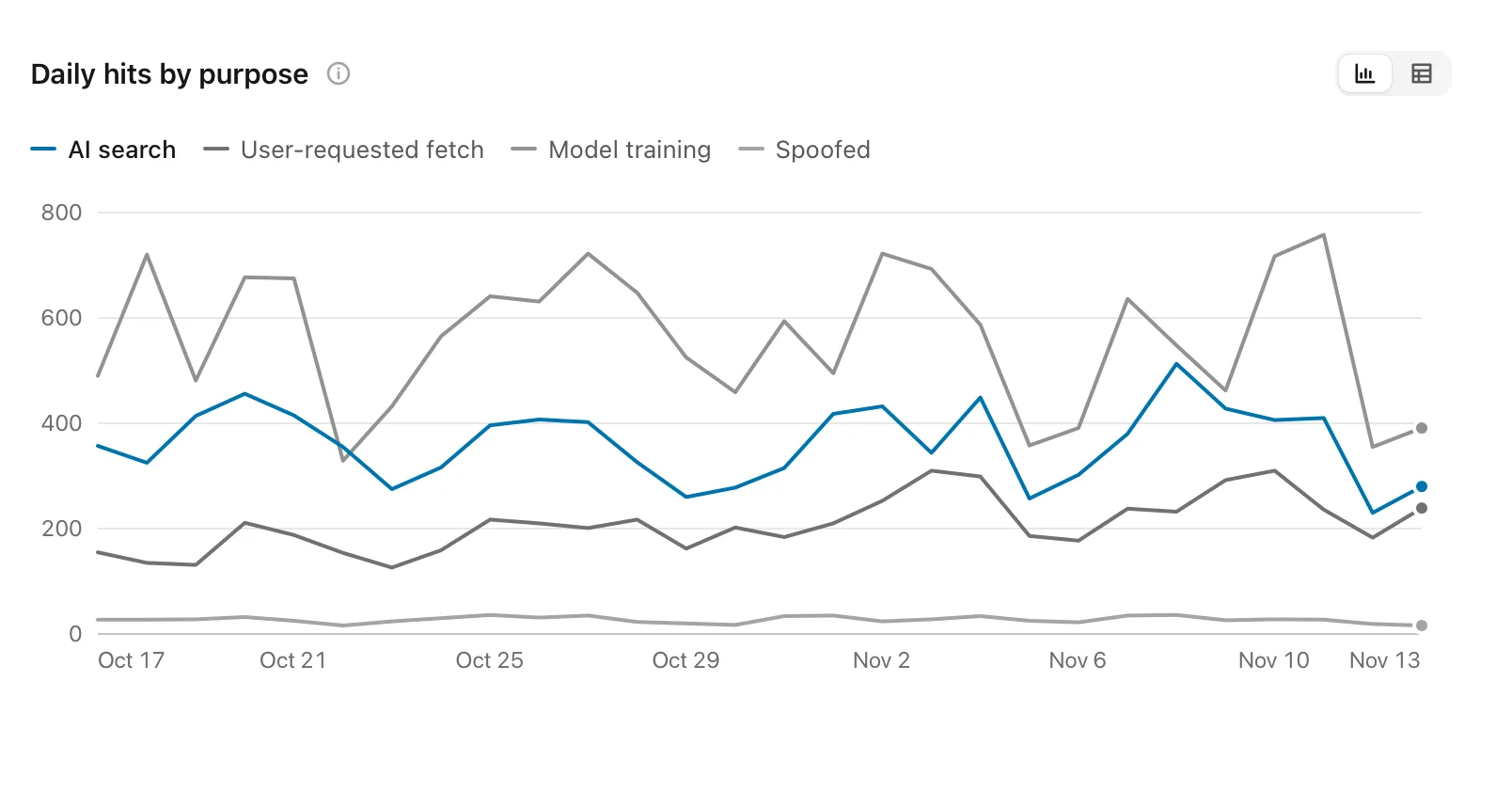
If you had counted user agents, you would report two GPTBot visits and one Googlebot visit. The real numbers are one GPTBot visit and no Googlebot visits. On busy sites the gap can be large: the sample workspace in our app shows 336 spoofed hits in 28 days next to roughly 27,600 crawler visits. That's a fictional brand, so read it as an illustration of the view, not as a benchmark.
What to do with spoofed traffic depends on what it costs you. If it is light, just exclude it from reporting, and remember that it never reaches GA4 either, so it can't distort your AI traffic numbers. If it is heavy, block those IPs at your firewall or CDN. Never block by user agent alone, because that blocks the real crawler too.
Automating it
Checking by hand works for a handful of IPs. For a full log you want the same logic in a script or a tool:
- Download every published list once a day and cache it.
- For each log line, find the bot by user agent token. Our catalog's tokens are a good starting list.
- If the operator publishes a list, check the IP against it. If it publishes a reverse DNS pattern, run a forward-confirmed lookup and cache the answer per IP.
- Label the hit verified, spoofed, unverifiable or unchecked, then count by day and bot.
- Drop the IPs once counted. You need the label, not the address.
The free AI bot log analyzer does steps 2 and 4 in your browser. It does not download IP lists, so its claimed-crawler hits stay "unchecked". The full catalog of crawlers and their purposes is in our AI crawlers guide, and a complete method for reading crawler logs is in log file analysis for AI crawlers.
In Surfacedd
The desktop app does all five steps for you. It downloads each operator's published ranges on demand and caches them for 7 days. It can also run forward-confirmed reverse DNS for operators that support it. Every hit gets one of four labels, and spoofed hits are drawn as their own line on the daily chart, so they never inflate a real crawler's count.
Logs are parsed on your computer and only daily totals are stored, never IP addresses. See the AI crawler analytics feature for the full set of views, or download Surfacedd.
Sources
- Google: Verifying Googlebot and other Google crawlers
- Bing Webmaster Blog: How to verify that Bingbot is Bingbot
- Microsoft: Bingbot IP ranges (JSON)
- Apple: About Applebot
- OpenAI: Overview of OpenAI crawlers
- OpenAI: GPTBot IP ranges (JSON)
- Anthropic: crawler documentation and IP list
- Perplexity: Perplexity crawlers
- Meta: Meta web crawlers
Fair questions
How do I know if Googlebot is fake?
Run host on the IP from your log. A real Googlebot IP returns a name ending in googlebot.com, google.com or googleusercontent.com, and running host on that name returns the same IP. If either step fails, or the IP is in none of Google's published JSON range files, the request only claimed to be Googlebot. Block it by IP, never by user agent.
Does OpenAI publish GPTBot's IP addresses?
Yes. OpenAI publishes a separate JSON file for each crawler: gptbot.json for GPTBot, searchbot.json for OAI-SearchBot and chatgpt-user.json for ChatGPT-User, all on openai.com. Each file lists CIDR prefixes. A request is genuine when its IP falls inside a prefix in the file for the bot it claims to be. OpenAI does not support reverse DNS checks.
Can I verify ClaudeBot?
Yes. Anthropic publishes one IP list for ClaudeBot, Claude-SearchBot and Claude-User at claude.com/crawling/bots.json, and says an IP on that list means the request comes from Anthropic. Because the list is shared, it proves the request is Anthropic's but not which of the three bots sent it. Use the user agent for that.
Why can't I verify Meta's crawlers?
Meta's crawler documentation does not publish IP ranges or a reverse DNS pattern for Meta-ExternalAgent, Meta-WebIndexer or Meta-ExternalFetcher. Without either, no one can prove a request came from Meta. Label these hits unverifiable rather than verified or fake, and judge them by behaviour, such as request rate and the paths they request.
Should I block spoofed crawlers?
Exclude them from your reports in every case. Block them only if they cost you something, such as server load, scraped prices or content copied elsewhere. Block by IP or network at your firewall or CDN, not by user agent, because a user-agent rule would also block the real crawler you want to keep.
How often do crawler IP ranges change?
Often enough that you should never hard-code them. OpenAI's GPTBot file shows a creation timestamp that changes when the list does, and Bing's own verification guidance warns that responding to requests based on a hard-coded list "is not a recommended approach". Download each list at least weekly, cache it, and re-check old logs against the list that was current at the time.
Free tools for this guide
How we research, write and correct pages: read our editorial policy.